
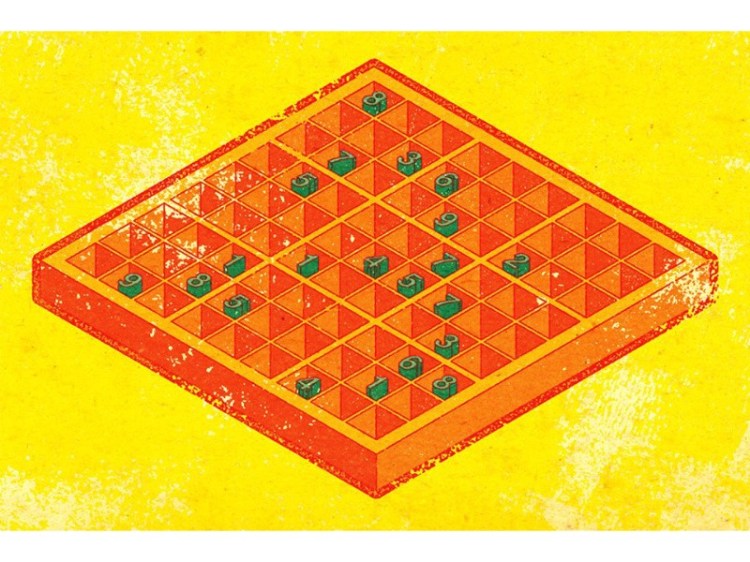
Sudoku Solver AI with OpenCV
We will be creating a Sudoku Solver AI using python and Open CV to read a Sudoku puzzle from an image and solving it. There a lot of methods to achieve this goal. Thus in this series, I have compiled the best methods I could find/research along with some hacks/tricks I learned along the way.
This article is a part of the series Sudoku Solver with OpenCV.
Part 1: Image Processing
Part 2: Sudoku and Cell Extraction
Part 3: Solving the Sudoku
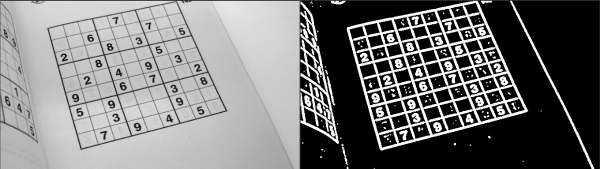
Steps
I am trying to be as detailed as possible in listing the steps along with there descriptions. There are several ways to Extract sudoku and solve it. I will add alternate ways, but won’t go into detail about them.
- Import the image
- Pre Processing the Image
2.1 Gaussian blur: We need to gaussian blur the image to reduce noise in thresholding algorithm
2.2 Thresholding: Segmenting the regions of the image
2.3 Dilating the image: In cases like noise removal, erosion is followed by dilation. - Sudoku Extraction
3.1 Find Contours
3.2 Find Corners: Using Ramer Doughlas Peucker algorithm / approxPolyDP for finding corners
3.3 Crop and Warp Image: We remove all the elements in the image except the sudoku
3.4 Extract Cells
3. Sudoku Extraction
3.1 Find Contours:
We will find external contours and then sort by area in descending order. Thus, the largest polygon is stored in contours[0].
findContours: boundaries of shapes having the same intensity
CHAIN_APPROX_SIMPLE — stores only minimal information of points to describe the contour
RETR_EXTERNAL: gives “outer” contours.
for c in ext_contours:
    peri = cv2.arcLength(c, True)
    approx = cv2.approxPolyDP(c, 0.015 * peri, True)
    if len(approx) == 4:
        # Here we are looking for the largest 4 sided contour
        return approx
Tip: If you want to see the contours, try drawcontour(..)

3.2 Find Corners:
The largest contours is are the corners of the sudoku. There are several ways we can achieve this. Notable methods include Canny Edge Algorithm, Ramer Doughlas Peucker algorithm, Bounding Rectangle, and approxPolyDP.
A. approxPolyDP:
We approximate the curve given by the largest Contours. The largest 4-sided contour is the sudoku.
Function Deatils:
cv2.approxPolyDP(curve, epsilon, closed[, approxCurve])
Curve-> hers is the largest contour
epsilon -> Parameter specifying the approximation accuracy. This is the maximum distance between the original curve and its approximation.
closed -> If true, the approximated curve is closed. Otherwise, it is not closed.
return type: the same type as the input curve
peri = cv2.arcLength(c, True)
approx = cv2.approxPolyDP(c, 0.015 * peri, True)
if len(approx) == 4:
    # Here we are looking for the largest 4 sided contour
    return approx
# approx has the
In corners[0],… stores the points in format [[x y]].
# Extracting the points
corners = [(corner[0][0], corner[0][1]) for corner in corners]
top_r, top_l, bottom_l, bottom_r = corners[0], corners[1], corners[2], corners[3]
return top_l, top_r, bottom_r, bottom_l
# Index 0 - top-right
#       1 - top-left
#       2 - bottom-left
#       3 - bottom-right
B. Ramer Doughlas Peucker algorithm:
We will use max(list, key) for the right side corners as there x-value is greater. Likewise, we will use min(list, key) for the left side corners.
operator is a built-in module providing a set of convenient operators. In two words operator.itemgetter(n) constructs a callable that assumes an iterable object (e.g. list, tuple, set) as input, and fetches the n-th element out of it.
We will use max(list, key) for the right side corners as there x-value is greater. Likewise, we will use min(list, key) for the left side corners.
bottom_right, _ = max(enumerate([pt[0][0] + pt[0][1] for pt in
                                 ext_contours[0]]), key=operator.itemgetter(1))
top_left, _ = min(enumerate([pt[0][0] + pt[0][1] for pt in
                            ext_contours[0]]), key=operator.itemgetter(1))
bottom_left, _ = min(enumerate([pt[0][0] - pt[0][1] for pt in
                                ext_contours[0]]), key=operator.itemgetter(1))
top_right, _ = max(enumerate([pt[0][0] - pt[0][1] for pt in
                              ext_contours[0]]), key=operator.itemgetter(1))
Trending AI Articles:
Natural Language Generation:
The Commercial State of the Art in 2020
Becoming a Data Scientist, Data Analyst, Financial Analyst and Research Analyst
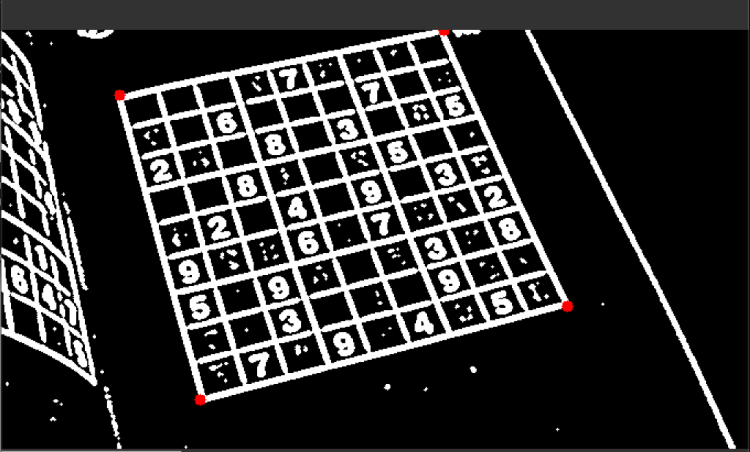
3.3 Crop and Warp Image
In order to crop the image, we need to know the dimensions of the sudoku. Although sudoku is a square and has equal dimensions, in order to ensure that we dont crop any part of the image we will calculate the height and width.
width_A = np.sqrt(((bottom_r[0] - bottom_l[0]) ** 2) + ((bottom_r[1] - bottom_l[1]) ** 2))
width_B = np.sqrt(((top_r[0] - top_l[0]) ** 2) + ((top_r[1] - top_l[1]) ** 2))
width = max(int(width_A), int(width_B))
Similarly, we can calculate height
height_A = np.sqrt(((top_r[0] - bottom_r[0]) ** 2) + ((top_r[1] - bottom_r[1]) ** 2))
height_B = np.sqrt(((top_l[0] - bottom_l[0]) ** 2) + ((top_l[1] - bottom_l[1]) ** 2))
height = max(int(height_A), int(height_B))
We need to construct dimensions for the cropped image. Since the index starts from 0, we start from the points are (0, 0) , (width-1,0) ,(width-1, height-1), and (0, height-1). We will then get the grid and warp the image.
dimensions = np.array([[0, 0], [width - 1, 0], [width - 1, height - 1],
                       [0, height - 1]], dtype="float32")
# Convert to Numpy format
ordered_corners = np.array(ordered_corners, dtype="float32")
# calculate the perspective transform matrix and warp
# the perspective to grab the screen
grid = cv2.getPerspectiveTransform(ordered_corners, dimensions)
return cv2.warpPerspective(image, grid, (width, height))
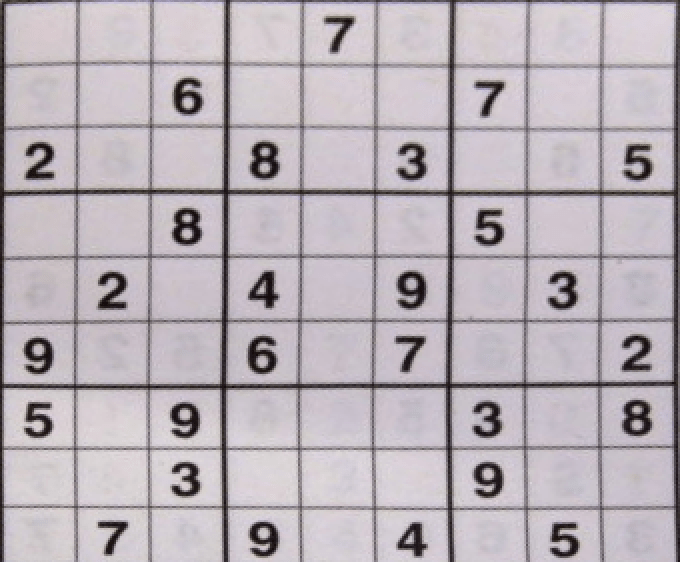
3.3 Extract Cells
So we need to process the image again suing adaptive threshold and bitwise_inversion.
Note: Don’t forget to convert the image to grey scale before processing. I made that mistake. The code seemed simple, didn’t make sense if it had any problem but it kept on showing error. It took 3 hrs for me to realize. During this time, I had my Software Engineer moment when we get a error, don’t understand why after trying everything and then when you realize you feel like breaking your laptop.?
# here grid is the cropped image
grid = cv2.cvtColor(grid, cv2.COLOR_BGR2GRAY) # VERY IMPORTANT
# Adaptive thresholding the cropped grid and inverting it
grid = cv2.bitwise_not(cv2.adaptiveThreshold(grid, 255, cv2.ADAPTIVE_THRESH_GAUSSIAN_C, cv2.THRESH_BINARY, 101, 1))
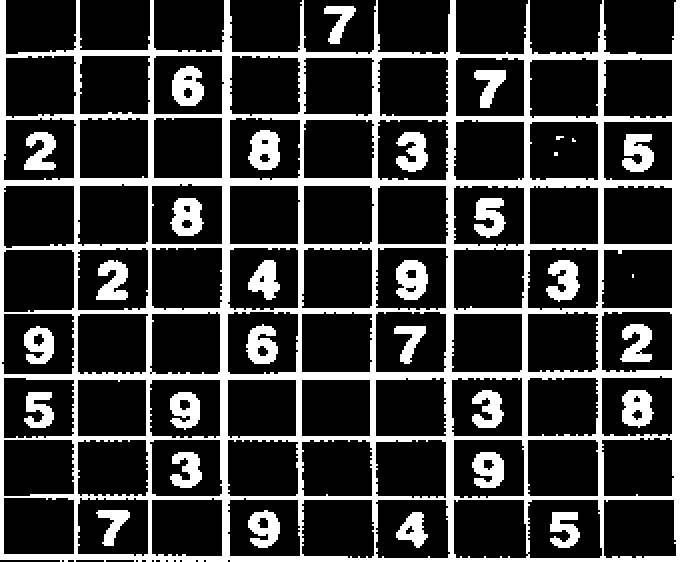
Extracting every cell/square. Most sudoku are square, but not all of them. For instance, the sudoku used throughout this series is not a square so the cells are not also square. There will extract the celledge_h and college_w using np.shape(grid)
edge_h = np.shape(grid)[0]
edge_w = np.shape(grid)[1]
celledge_h = edge_h // 9
celledge_w = np.shape(grid)[1] // 9
We will iterate through the length and width of the cropped and processed image (grid), extract the cells and store them in a temporary grid.
tempgrid = []
for i in range(celledge_h, edge_h + 1, celledge_h):
    for j in range(celledge_w, edge_w + 1, celledge_w):
        rows = grid[i - celledge_h:i]
        tempgrid.append([rows[k][j - celledge_w:j] for k in range(len(rows))])
Creating an 9×9 array of the images and converting it into a numpy array, so that it is easier to process.
# Creating the 9X9 grid of images
finalgrid = []
for i in range(0, len(tempgrid) - 8, 9):
    finalgrid.append(tempgrid[i:i + 9])
# Converting all the cell images to np.array
for i in range(9):
    for j in range(9):
        finalgrid[i][j] = np.array(finalgrid[i][j])
try:
    for i in range(9):
        for j in range(9):
            os.remove("BoardCells/cell" + str(i) + str(j) + ".jpg")
except:
    pass
for i in range(9):
    for j in range(9):
        cv2.imwrite(str("BoardCells/cell" + str(i) + str(j) + ".jpg"), finalgrid[i][j])
return finalgrid
Next Step
Check out Part 3: Solving the Sudoku to complete your Sudoku Solver AI. Feel free to reach out to me if you have any questions. Check out the code at Sudoku_AI
Resources:
Contours:
https://www.youtube.com/watch?v=FbR9Xr0TVdY
ApproxPloyDP:
https://docs.opencv.org/2.4/modules/imgproc/doc/structural_analysis_and_shape_descriptors.html
Other:
1.https://hackernoon.com/sudoku-solver-w-golang-opencv-3-2-3972ed3baae2
Don’t forget to give us your ? !




Part 2: Sudoku and Cell Extraction was originally published in Becoming Human: Artificial Intelligence Magazine on Medium, where people are continuing the conversation by highlighting and responding to this story.
source https://365datascience.weebly.com/the-best-data-science-blog-2020/part-2-sudoku-and-cell-extraction
 365 Data Science