
Neural style transfer is an optimization technique used to take two images — a content image and a style reference image (such as an artwork by a famous painter) — and blend them together so the output image looks like the content image, but “painted” in the style of the style reference image.
Let’s begin with the setup.
Import modules.
import tensorflow as tf
import IPython.display as display

import matplotlib.pyplot as plt
import matplotlib as mpl
mpl.rcParams['figure.figsize'] = (12,12)
mpl.rcParams['axes.grid'] = False

import numpy as np
import PIL.Image
import time
import functools
def tensor_to_image(tensor):
  tensor = tensor*255
  tensor = np.array(tensor, dtype=np.uint8)
  if np.ndim(tensor)>3:
    assert tensor.shape[0] == 1
    tensor = tensor[0]
  return PIL.Image.fromarray(tensor)
Top 4 Most Popular Ai Articles:
1. Natural Language Generation:
The Commercial State of the Art in 2020
4. Becoming a Data Scientist, Data Analyst, Financial Analyst and Research Analyst
Next, let’s download the content and a style image:
Here I used Lorem Picsum and Wikipedia.
content_path = tf.keras.utils.get_file(‘YellowLabradorLooking’, ‘https://picsum.photos/1080')
style_path=tf.keras.utils.get_file('kandinsky5.jpg','https://storage.googleapis.com/download.tensorflow.org/example_images/Vassily_Kandinsky%2C_1913_-_Composition_7.jpg')
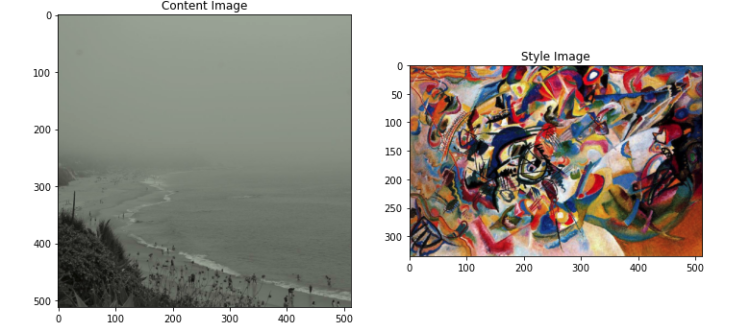
Let’s visualize the input. We will limit the maximum dimension to 512 pixels.
def load_img(path_to_img):
  max_dim = 512
  img = tf.io.read_file(path_to_img)
  img = tf.image.decode_image(img, channels=3)
  img = tf.image.convert_image_dtype(img, tf.float32)

  shape = tf.cast(tf.shape(img)[:-1], tf.float32)
  long_dim = max(shape)
  scale = max_dim / long_dim

  new_shape = tf.cast(shape * scale, tf.int32)

  img = tf.image.resize(img, new_shape)
  img = img[tf.newaxis, :]
  return img
Create a function to display an image:
def imshow(image, title=None):
  if len(image.shape) > 3:
    image = tf.squeeze(image, axis=0)

  plt.imshow(image)
  if title:
    plt.title(title)
content_image = load_img(content_path)
style_image = load_img(style_path)

plt.subplot(1, 2, 1)
imshow(content_image, 'Content Image')

plt.subplot(1, 2, 2)
imshow(style_image, 'Style Image')

Fast Style Transfer using TF-Hub
import tensorflow_hub as hub
hub_module = hub.load('https://tfhub.dev/google/magenta/arbitrary-image-stylization-v1-256/1')
stylized_image = hub_module(tf.constant(content_image), tf.constant(style_image))[0]
tensor_to_image(stylized_image)
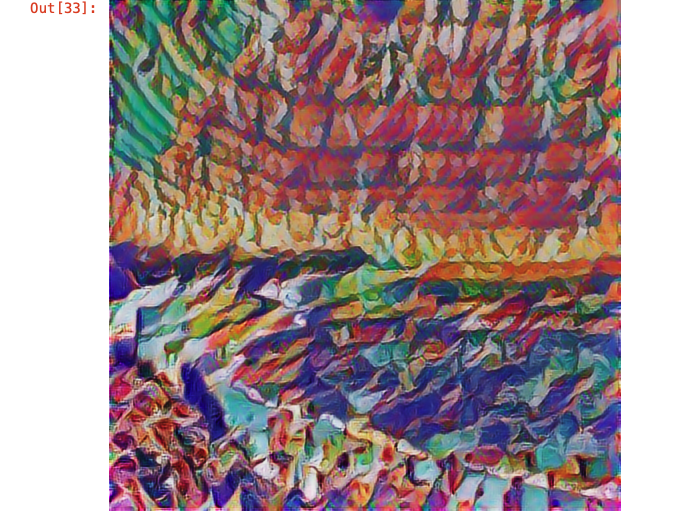
This is the output I got.
To see how it works in detail, please check out this link. Neural style transfer.
Don’t forget to give us your ? !




Neural Style Transfer was originally published in Becoming Human: Artificial Intelligence Magazine on Medium, where people are continuing the conversation by highlighting and responding to this story.
Via https://becominghuman.ai/neural-style-transfer-b7b0a067c70c?source=rss—-5e5bef33608a—4
source https://365datascience.weebly.com/the-best-data-science-blog-2020/neural-style-transfer
 365 Data Science

