

Camera image stream processing problem
Camera is a nice plugin to access hardware cameras, take some pictures and save them in a memory, while camera streaming is very heavy and quite efficient only on a medium quality level. It might be enough in some cases, but when resolution matters, streams can lag and slow down until app die. The reason is very simple: streams push huge amounts of data into each frame in the main thread. How to move those in a separate thread?
- You need to register separate isolates, register plugins in those isolates and somehow handle a memory. I find it tricky.
- Another solution is to write your own plugin with access to camera, handle camera streams in Android and iOS threads, and push some results on top. This is also not the easiest solution.
So I decided to work on third solution, easier and less time consuming.
Possible solution, or my own ‘wheel’
Depending on a task and requirements, there is a solution which might cause some ‘freezing’ issues, but in the end its overall result generally satisfies the requirements. When resolution matters and image update frequency is not so important (for example, from three to five frames in a second are acceptable), you can pick frames from camera, process them, show results, and perform all these steps in a cycle.

Some common camera configurations
To make this app work with a camera, first it needs to be configured. A camera controller is configured as shown or as you wish, according to your requirements, and followed by camera plugin samples.
Image capturing is also simple. Provide image url. Take a picture (frame) and save it. Here you could see some pieces of BLoC events triggering:
While the main frame picking logic is here:
I have also added some kind of cache to save 10 latest frames for processing and cleaning operation to be performed in a separate isolate. You could find that in a sample application.
Trending AI Articles:
1. Microsoft Azure Machine Learning x Udacity — Lesson 4 Notes
2. Fundamentals of AI, ML and Deep Learning for Product Managers
Flutter widgets, building prerequisites
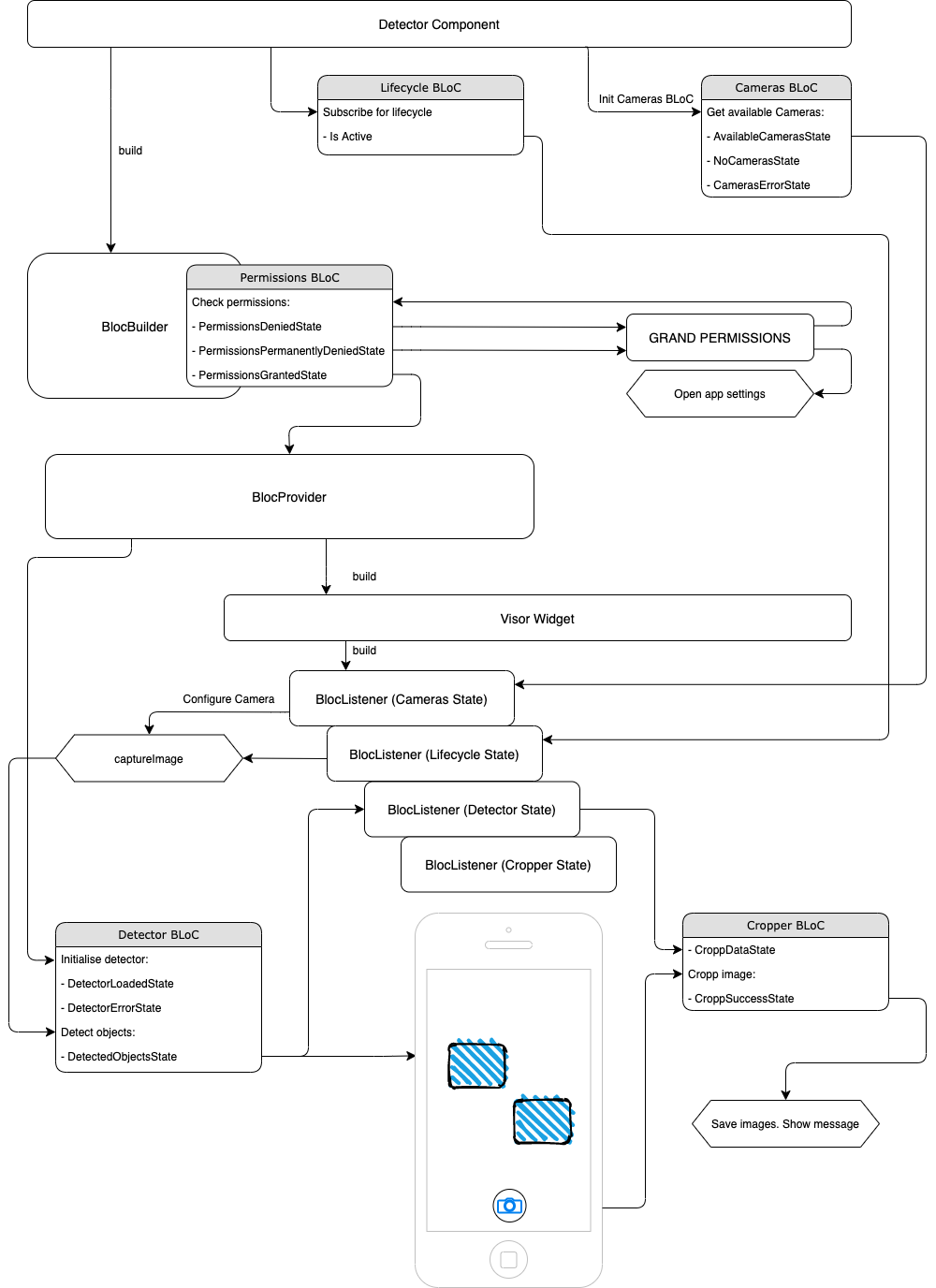
To work properly with a camera and a memory, some more configurations are required. I have used the permission handler plugin wrapped in Permissions BLoC to handle all this stuff, also connected to Lifecycle BLoC to stop the processes when the app is in background (collapsed) and to Cameras BLoC for requesting the available cameras list and update UI, depending on the data. So main detector component functionality is the following:
More detailed functionality could be found in BLoC files.
Detector widget in Component wrapped in MultiBlocProvider with two main BLoCs: Detector and Cropper. They are quite local and should not be used over the application only in this particular part:
More business logic is here
For this application I have used a BLoC architecture solution. While I am a fan of Redux pattern for approaches to split: UI, state storage, state change and business logic, BLoC is still event-driven and quite simple for understanding, based on streams. Some plugins implementing the bloc provide simpler solutions, wrapping all streams handling inside. So i stuck on flutter_bloc. Thanks to Felix Angelov, I was inspired by his talk on Flutter Europe.
The general flow of image detection is shown in this piece of Detector’s BLoC code:
Detailed method explanation will follow.
Responsible for image cropping Cropper BLoC:
For better understanding, the next section contains code examples for all internally-used methods from utils.dart class.
Object detection on ‘image stream’
I had a task to run object detection on a camera stream, draw their frames on a screen, cropp these objects (if needed), and send them to some other component for post processing.
For this task I have checked a few solutions. Firebase ML does not allow using custom-trained models locally, for now. Yes, there is a great article with Firestore, which I have not checked yet.
Models loading
For my first implementation I have used an easier solution on an existing tflite plugin. Pre-trained models for this article application have also been taken from their sample application. It allows loading custom-trained neural networks right from the device. And it worked .
Detection logic
Detection is quite straightforward. For this you need to load the image path to TFLite, and, as a result, get detected objects as a list of coordinate boxes with recognized object labels.
This method is also wrapped into the Exif image rotation function from plugin to get a proper image angle; as I have found out (after some painful debugging), on most devices images are saved with a rotation of 90 degrees.
Object cropping
A simple method to copy bytes from the original image matrix to the resulting image matrix. Pixel by pixel. One by one.
Here you can find _copyCropp method which performs image data copying from original source to cropped destination.
Some pitfalls
While working on the plugin, I have found out that cropped images are always of the same size. I configured the camera controller to get the maximum image size. But it was constantly the same. After some research I found an issue in a camera plugin, which actually returns a high-quality size as upper bound. Surprise )
To get a proper image size, for future boxes displaying on the camera stream, I had to do this:
All these pieces are used one by one, cycled and connected to the application lifecycle.
Results
All described above will lead to the following results:

Cropped images look like these ones below. Quality is good enough for some purposes, even if it not perfectly detected/cropped.

Overall scheme
Please do not be scared at scheme below. It is quite complex, but I tried to show as much as possible to give the understanding of the full flow of events.
Code sample
All sample application code is provided and could be found here:
I highly recommend to check if all plugin requirements are implemented, to be on the safe side. It can be not configured for iOS, but it will work on it, as my original project showed.
Summary
As you can see from a gif (video) or from an application that you could build from the provided code sample, this solution is not perfect. It still requires some optimisation and simplification. Some improvements could also be done by moving separate logic to isolates. In general, however, this solution works much better than the camera stream itself. And for now, it can be applied for some purposes.
I hope you liked this article and it could be useful for you.
Thank you for your time.
Don’t forget to give us your ? !




Image Stream Processing in Flutter application by TFLite Neural Networks was originally published in Becoming Human: Artificial Intelligence Magazine on Medium, where people are continuing the conversation by highlighting and responding to this story.
 365 Data Science