
In another post, we explained how to apply Object Detection in Tensorflow. In this post, we will provide some examples of how you can apply Object Detection using the YOLO algorithm in Images and Videos. For our example, we will use the ImageAI Python library where with a few lines of code we can apply object detection.
Object Detection in Images
Below we represent the code for Object Detection in Images.
from imageai.Detection import ObjectDetection
import os
execution_path = os.getcwd()
detector = ObjectDetection()
detector.setModelTypeAsYOLOv3()
detector.setModelPath( os.path.join(execution_path , "yolo.h5"))
detector.loadModel()
detections = detector.detectObjectsFromImage(input_image=os.path.join(execution_path , "cycling001.jpg"), output_image_path=os.path.join(execution_path , "new_cycling001.jpg"), minimum_percentage_probability=30)
for eachObject in detections:
print(eachObject["name"] , " : ", eachObject["percentage_probability"], " : ", eachObject["box_points"] )
print("--------------------------------")
And we get:
car  :  99.66793060302734  :  [395, 248, 701, 405]
--------------------------------
bicycle  :  66.10226035118103  :  [81, 270, 128, 324]
--------------------------------
bicycle  :  99.86441731452942  :  [242, 351, 481, 570]
--------------------------------
person  :  99.92108345031738  :  [269, 186, 424, 540]
--------------------------------
We also represent the Original and the Detected Image
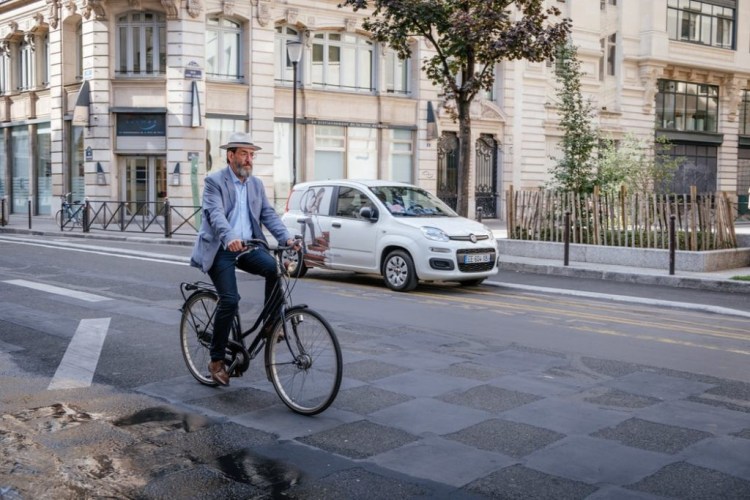
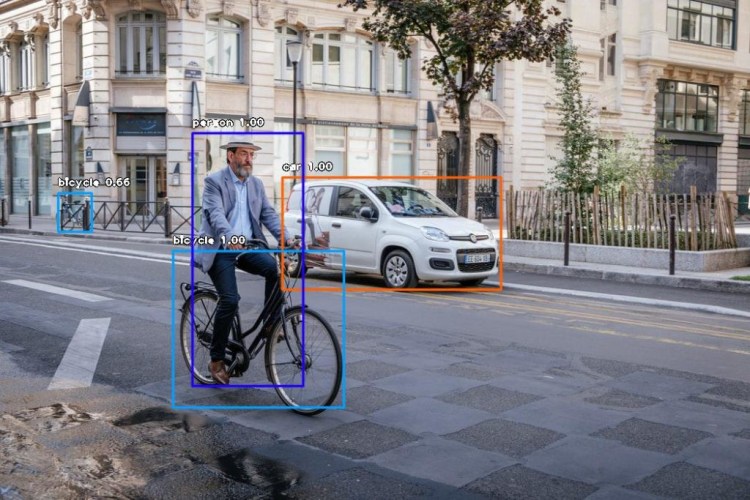
Notice that it was able to detect the bicycle behind-A-M-A-Z-I-N-G!!!

Let’s provide another example of the Original and the Detected image


Notice that it detected the bed, the laptop and the two persons!
Trending AI Articles:
1. Microsoft Azure Machine Learning x Udacity — Lesson 4 Notes
2. Fundamentals of AI, ML and Deep Learning for Product Managers
Object Detection in Videos
Assume that you have a video in your PC called “Traffic.mp4”, then by running this code you will be able to get the detected objects:
from imageai.Detection import VideoObjectDetection
import os
execution_path = os.getcwd()
detector = VideoObjectDetection()
detector.setModelTypeAsYOLOv3()
detector.setModelPath( os.path.join(execution_path , "yolo.h5"))
detector.loadModel()
video_path = detector.detectObjectsFromVideo(input_file_path=os.path.join(execution_path, "Traffic.mp4"),
output_file_path=os.path.join(execution_path, "New_Traffic")
, frames_per_second=20, log_progress=True)
print(video_path)
And the detected video is here:
Let’s provide another example of a Video:
Object Detection using your Camera
The following examples show how we can use our USB camera for Object Detection:
from imageai.Detection import VideoObjectDetection
import os
import cv2
execution_path = os.getcwd()
camera = cv2.VideoCapture(0)
detector = VideoObjectDetection()
detector.setModelTypeAsYOLOv3()
detector.setModelPath(os.path.join(execution_path , "yolo.h5"))
detector.loadModel()
video_path = detector.detectObjectsFromVideo(camera_input=camera,
output_file_path=os.path.join(execution_path, "camera_detected_video")
, frames_per_second=20, log_progress=True, minimum_percentage_probability=30)
print(video_path)
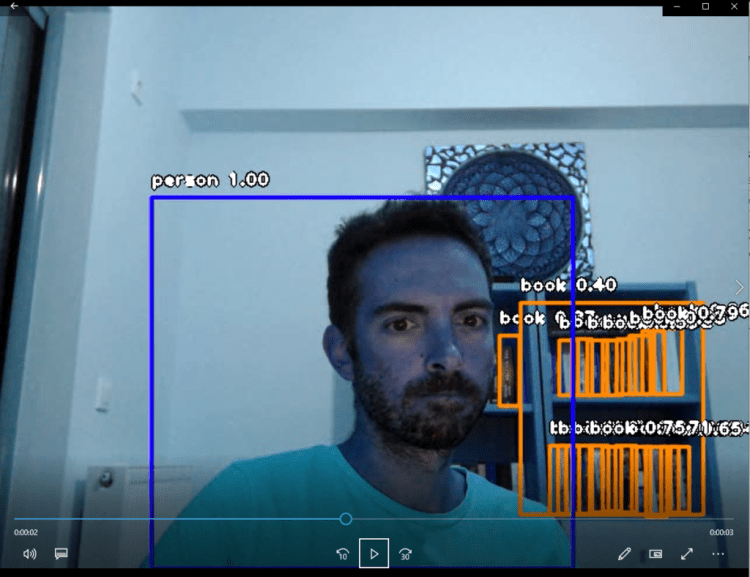
Below I represent just a snapshot of the recorded video of my office while I was coding. As you can see it was able to detect the books of the library behind me!
Don’t forget to give us your ? !




YOLO: Object Detection in Images and Videos was originally published in Becoming Human: Artificial Intelligence Magazine on Medium, where people are continuing the conversation by highlighting and responding to this story.
 365 Data Science