
Hello and Welcome to the exciting world of Computer vision where fun never ends and exploration is limitless. Here, in this article we will discuss on how to cartoonize an image using OpenCV and Python with 15 lines of code.
So, lets dive in and see how to cartoonizing an image.
First, Let’s breakdown the pipeline we are going to follow:
— Reading an image as input
— Import required libraries
— Getting the edges in the image
— Cartoonization of the image
— Display the resultant images
Trending AI Articles:
1. Microsoft Azure Machine Learning x Udacity — Lesson 4 Notes
2. Fundamentals of AI, ML and Deep Learning for Product Managers
Let’s get into the code now.
- For the first step, let us import the required libraries as below
import cv2
import numpy as np - For the second step, let us read an image as input
img = cv2.imread(“my_image.jpg”)
Here my image name in my_image.jpg - For the third step, let us get the edges of the image read as input
gray = cv2.cvtColor(img, cv2.COLOR_BGR2GRAY)
gray = cv2.medianBlur(gray, 5)
edges = cv2.adaptiveThreshold(gray, 255, cv2.ADAPTIVE_THRESH_MEAN_C, cv2.THRESH_BINARY, 9, 9)
In the above step, we converted the normal BGR image to Grayscale and applied median blurring on the image. Post that apply the adaptiveThreshold on the image which will yield the image containing all the edges.

4. For the fourth step, let us cartoonize the image using the bitwise and of the color generated images using bilateral filter. Let us see the code to do this.
color = cv2.bilateralFilter(img, 9, 250, 250)
cartoon = cv2.bitwise_and(color, color, mask=edges)
5. For the final step, we will visualize our results using the below code
cv2.imshow(“Image”, img)
cv2.imshow(“Edges”, edges)
cv2.imshow(“Cartoon”, cartoon)
6. Always remember to use waitKey and destroy the windows before exiting, hence use the below code.
cv2.waitKey(0)
cv2.destroyAllWindows()
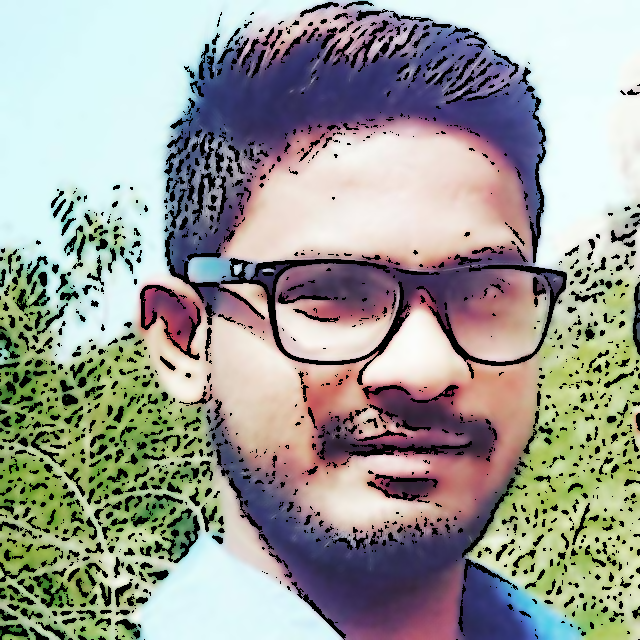
This will produce a cartoonized image for the input image you passed as input, let me share a collage of how my input image looks after it is cartoonized.
Cartoonizing an image using OpenCV and Python with 15 lines of code was originally published in Becoming Human: Artificial Intelligence Magazine on Medium, where people are continuing the conversation by highlighting and responding to this story.
 365 Data Science