
Deploying on Heroku and live on Web

If anyone landed on this page directly then wait you will have to read the first, second and third part of this series to get the idea of what’s going on here 🙂
Part 1 — Creating ML model for News Classification Link
Part 2 — Creating News Classification Django App ( Part 1) Link
Part 3 — Creating News Classification Django App ( Part 2) Link
This is going to be a small part so Let’s get started.
Step-1
First, install GIT if you do not have already.
from here
Step-2
Now visit the Heroku website and create an account if you do not have already.

Step-3
Download Heroku CLI and install it into your PC.
Step-4
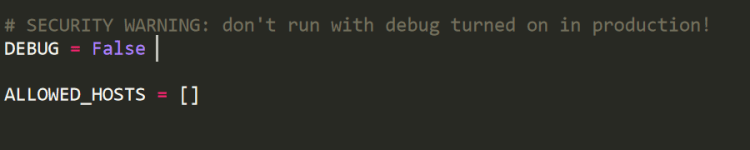
Open the settings.py in “newsclassifer” folder and change Debug=True to Debug=False. Because you are putting your website on Web so we do not need to run our website in debugging mode.
Step-5
Now open a new conda terminal and install gunicorn and django-heroku using pip.
pip install gunicorn
pip install django-heroku
Trending AI Articles:
1. How to automatically deskew (straighten) a text image using OpenCV
3. 5 Best Artificial Intelligence Online Courses for Beginners in 2020
4. A Non Mathematical guide to the mathematics behind Machine Learning
Step-6
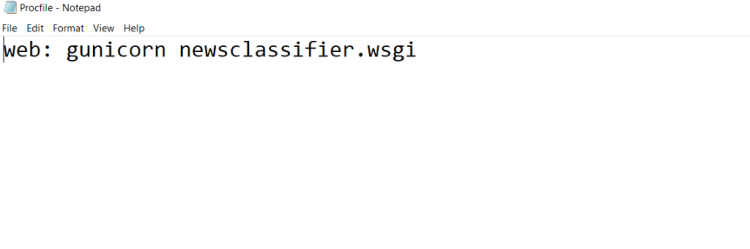
Go to your “newsclassifier” directory and create a file named Procfile and with no extension. And not open this file by clicking open with notepad.
And type this in your file.
Step-7
Go to your settings.py and add the below code in the settings.py file
import django_heroku
# Activate Django-Heroku.
django_heroku.settings(locals())
Step-8
Now we need to create requirements.txt file
So go to your conda terminal and type
pip freeze
And now search for your django, gunicorn, sklearn and django_heroku version in the lists of libraries, in my case requirements.txt looks like.

Step-9
Now open the GIT bash terminal in “newsclassifier” directory in which manage.py is present, by clicking right key of your mouse.
After opening GIT bash type below code step by step.
git config — global user.name “FIRST_NAME LAST_NAME”
git config — global user.email
git init
git add .
git commit -m “first”
heroku login -i
Now type your email and password of Heroku cloud. And you will log in into your Heroku account in bash.
Now type
heroku create newsclassif
Note “newsclassif” if the name of the application and it should be unique ie. you can’t type the above name because it is already taken by me so try some other name.
At last type
git push heroku master
And it will do the automatic setup of your website on Heroku cloud. After few seconds you will get a link like this
https://newsclassifiers.herokuapp.com/
This means that your website is online on WWW on Heroku cloud. Now you can open this site from anywhere in this world 🙂
Thanks for everyone who followed this series of articles so far. And if anyone got any problem, then you can ask me in comments. I will reply for sure 🙂
And wait wait wait ! before moving on further if you like this article then you can give me a clap 🙂 and I am thinking to create many articles on real Web deployment projects in the field of ML, CV, and Reinforcement learning. So if you do not want to miss them. Follow me and stay tuned 🙂
My contacts.
Don’t forget to give us your ? !




Deploy your first ML model live on WEB (Part 4) was originally published in Becoming Human: Artificial Intelligence Magazine on Medium, where people are continuing the conversation by highlighting and responding to this story.
 365 Data Science