
How to Deploy AI models? Part 6- Deploying Web-application on Streamlit via Github
This Part is the continuation of the Deploying AI models , where we deployed Iris classification model using Decision Tree Classifier, had a glance of version control i.e. Git. In this article, we will see how we can deploy data science as well as Machine Learning application easily with the help of open source library streamlit.
1. Digit Classification Model Web application using Streamlit.
1.1. Packages
The following packages were used to create the application.
1.1.1. Numpy, pandas
1.1 .2. Streamlit
- 1.3. Dataset, SVC, Model Selection from sklearn

1.2. Dataset
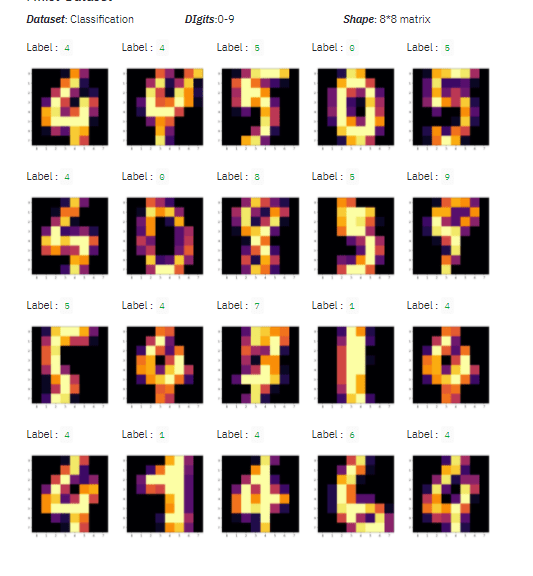
The dataset is used to train the model is of digit dataset composed of 10 classes i.e. label is 10 from 0–9 with 180 samples per class where each sample is represented as a vector with dimension of vector of length 64 thought it can be reshaped into 8*8 vector to represent the dataset into 1-D image
Predictors: Pixel value in form of vector with length 64, where each piel value ranges between 0–16
Target : Digit labelled from 0–10
Dataset Shape: 1797 * 65 metrics
1.3. Model
For training the model we followed the following procedure:
Data Split up: 8:2 i.e. 80% training set and 20% for the test set
Model: Support Vector Machine Classifier
Below is the code for the training the model.
import sklearnimport
sklearn.datasetsimport sklearn.ensemble
import sklearn.model_selection
from sklearn import svm, metrics
import pickle
import os
#load data
data = data=sklearn.datasets.load_digits() #Split the data into test and
traintrain_data, test_data, train_labels, test_labels = sklearn.model_selection.train_test_split(data.data, data.target, train_size=0.80)
print(train_data,train_labels)
#Train a model using random
model = svm.SVC(kernel=parameters['kernal'],tol=float(parameters['Tol']),max_iter=int(parameters['Max_Iteration'])).fit(X_train,y_train)
#test the model
result = model.score(test_data, test_labels)
print(result)
#save the model
filename = ‘iris_model.pkl’
pickle.dump(model, open(filename, ‘wb’))
1.4. Frontend using Streamlit
For feeding the value in the trained model we need some User Interface to accept the data from the user and feed into the trained neural network for classification. As we have seen in the section in 1.2 Dataset where we have 64 vectors for each samples with 10 classes .
Trending AI Articles:
2. How AI Will Power the Next Wave of Healthcare Innovation?
We will use streamlit API to create the frontend and for displaying the various frontend part of this application. Instead of creating the separate the html files for the front end file streamlit API gives us the flexibility to write the code in the same script which is shown below (as refrence):
import streamlit as st
import pandas as pd
import numpy as np
import matplotlib.pyplot as plt
import sklearn.datasets
from sklearn.model_selection import train_test_split
col1, col2= st.beta_columns(2)
with col1:
    st.write("**Profile :** https://www.rstiwari.com")
with col2:
    st.write("**Blog :** https://tiwari11-rst.medium.com/")
# Text/Title
st.title("Logistic Regression - Mnist Dataset") }
Similarly you can create the various frontend elements for reference please refer to the Link. This article does not covers the concept of how to use streamlit for developing the model — It covers how we can deploy the model on streamlit.
1.5. Extracting Packages and their respective versions
We need to create the require.txt file which contains the name of package we used in our application along with their respective version. The process of extracting the requirement.txt file is explained in the Article: Deep Learning/Machine Learning Libraries — An overview.
For this application below is the requirement.txt file content.
streamlit==0.76.0
joblib==1.0.0
numpy==1.19.3
scikit-learn==0.23.2
scipy==1.5.4
sklearn==0.0
2. Streamlit
Streamlit is gaining popularity in Machine learning and Data Science. It is a very easy library to create a perfect dashboard by spending a little amount of time. It also comes with the inbuilt webserver and lets you deploy in the docker container.
Step 1:
Open the Link and do the following:
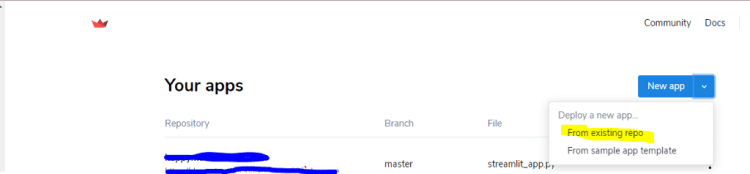
Click on the New app and select Deploy from existing repo option as shown in below image.
Step 2:
Select the Repository
The branch of the repository where the files are present main or master and the name of the script file as shown in below image:


Congratulation!!! we have successfully deployed an Iris classifier web application.
4. Deployed Web Application
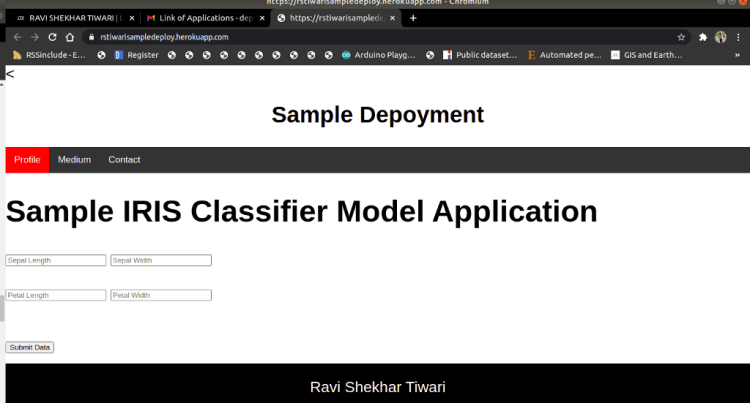
The overview of the deployed web application with Iris Application: Link is shown below.
We have reached to an end to the model deployment series, hope you al have gained something from this series. Please visit this link to get list of all deployed application.
Special Thanks:
As we say “Car is useless if it doesn’t have a good engine” similarly student is useless without proper guidance and motivation. I will like to thank my Guru as well as my Idol “Dr. P. Supraja”- guided me throughout the journey, from the bottom of my heart. As a Guru, she has lighted the best available path for me, motivated me whenever I encountered failure or roadblock- without her support and motivation this was an impossible task for me.
Reference:
Extract installed packages and version : Article Link.
Notebook Link Extract installed packages and version : Notebook Link
How to Deploy AI Models? — Part 1 : Link
How to Deploy AI Models? — Part 2 Setting up the Github For Herolu and Streamlit : Link
Streamlit Docs : Link
Streamlit Login : Link
YouTube : Link
Deployed Application: Link
Iris Application: Link
If you have any query feel free to contact me with any of the -below mentioned options:
Website: www.rstiwari.com
Medium: https://tiwari11-rst.medium.com
Google Form: https://forms.gle/mhDYQKQJKtAKP78V7
Don’t forget to give us your ? !




How to Deploy AI models ? Part 5- Deploying Web-application on Streamlit via Github was originally published in Becoming Human: Artificial Intelligence Magazine on Medium, where people are continuing the conversation by highlighting and responding to this story.
 365 Data Science