
This is the cloud continuation of the previous article on deploying the Pytorch model with Okteto CLI and Flask API
here is the link: https://python.plainenglish.io/deploy-pytorch-model-with-okteto-cli-d494d058216
In the previous article, we learnt how to deploy a text generation model built with PyTorch using Okteto CLI and in this article, we will learn how to build a text generation model using a state of art text generation library(TEXT-GEN) and deploy the model with okteto cloud.

Text gen
Text gen is an almost state of the art library python library that allows you to build a custom text generation model with ease. Text gen is built on top of Tensorflow, so if you are familiar with tensorflow then text gen will be really easy for you.
At the end of this session we will be able to;
- Build a model for generating Rihanna kind of lyric
- Create a flask API
- Push our model to Github
- Deploy the text generation model with Okteto
- Test our model with Postman

Notebook: The Notebook for the codes can be found here.
Prerequisites:
- Okteto account
- Github
- Python 3
- Text gen
- Google colab or Jupyter lab
Before we start building the model, we need to download a dataset of Rihanna lyrics from Kaggle and also you will either have to create an account or sign in to Kaggle to download the data(click here to download the data)
After downloading the data, create the following files and folders, move the “rihanna.txt” to the data folder.
├── app
│ ├── __init__.py
│ ├── model.py
│ ├── api.py
├── data
├── model
├── main.py
├── Dockerfile
├── okteto.yml
└── requirements.txt
Now, let’s install the Text-gen library
$ pip install -U text-gen
After installing the package, let’s import text-gen and load our data from the data folde
from text_gen import ten_textgen as ttg
data = open('/data/rihanna.txt').read()
corpus = data.lower().split("\n")
corpus
Now, let’s plot a word cloud to see the frequent words on Rihanna lyrics.
#create the wordcloud object
corpus = str(corpus)
wordcloud = WordCloud(stopwords = STOPWORDS,
                      collocations=True).generate(corpus)
#plot the wordcloud object
plt.imshow(wordcloud, interpolation='bilInear')
plt.axis('off')
plt.show()
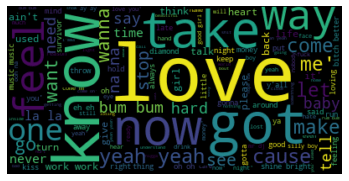
In machine learning, a model is a function with learnable parameters that maps an input to an output. The optimal parameters are obtained by training the model on data.
After plotting the word cloud, we will configure our model parameters.
A model parameter is a configuration variable that is internal to the model and whose value can be estimated from data. paramters are like car speed booster, you tune(change values) them to optimize the model and improve the accuracy and performance
pipeline = ttg.tentext(corpus)
seq_text = pipeline.sequence(padding_method = 'pre')
configg = pipeline.configmodel(seq_text, lstmlayer = 128, activation='softmax', dropout = 0.25)

It’s time to fit and train our data into our model. Fitting a neural network requires using a training dataset to update the model weights to create a good mapping of inputs to outputs.
model_history = pipeline.fit(loss = 'categorical_crossentropy', optimizer = 'adam', batch = 300, metrics = 'accuracy', epochs = 500, verbose = 0, patience = 10)
After training, we will save our model and generates a lyric with 100 as the word_length
pipeline.predict('yo yo', word_length = 100, segment = True)
#save the model
pipeline.saveModel('./model/model')
#check the model folder for 'modeltextgen.h5'

You can also load the model and use the load_model_predict function
#load the model and predict
ttg.load_model_predict(corpus = dataset, padding_method = 'pre', modelname = './model/model2textgen.h5', sample_text = text, word_length = 100)
Voila!!!!!!!! we have successfully built and save a lyric text model that generates Rihanna kind of lyric.
Trending AI Articles:
2. How AI Will Power the Next Wave of Healthcare Innovation?
Deploy with Okteto
Now it’s time to serve our model. To do this, we’re going to write a REST service using Flask. The service will have an endpoint that will take the sample text as a parameter, and generate lyrics from it.
For the “api.py” file, use the code to create a flask route.
from flask import Flask,jsonify,request,render_template, make_response
from flask_cors import CORS, cross_origin
from app.predict import prediction
app = Flask(__name__)
cors = CORS(app)
@app.route("/")
def index():
   return("welcome to love letter generation pytorch model")
@app.route("/ririlyric", methods = ['GET', 'POST'])
def textgen():
   text_g = request.form['content']
   lyric = prediction(text_g)
   return lyric
on the predict.py file, input the script below. The prediction function takes in the sample text, load the model and the training dataset.
from text_gen import ten_textgen as ttg
#load train data and the model
data = './data/data.txt'
dataset = ttg.loaddata(data)
#prediction function
def prediction(text):
    lyric = ttg.load_model_predict(corpus = dataset, padding_method = 'pre', modelname = './model/model2textgen.h5', sample_text = text, word_length = 100)
    return lyric
on the main.py file, input the script below so we can run the API locally.
from app.api import app
if __name__ == '__main__':
    app.run(host= '0.0.0.0', port = 8080, debug=True)
let’s test our API locally.
$ python3 main.py
After testing the API locally, create an okteto stack manifest file okteto-stack.yml to define your application
name: riry
services:
api:
public: true
image: okteto/riri-service
build: .
ports:
- 8080
resources:
cpu: 1
memory: 516Mi
and a Dockerfile
FROM python:3.8
WORKDIR /app
EXPOSE 8080
ADD data/data.txt /app/data/data.txt
ADD model/modeltextgen.h5 /app/model/modeltextgen.h5
ADD requirements.txt requirements.txt
RUN pip install -r requirements.txt
ADD . /app/
CMD ["python", "main.py"]
Create a GitHub repo and push the code to GitHub
$ git add .
$ git commit -m "textgenpush"
$ git remote add origin <github repo url>
$ git push origin master
Okteto cloud
Now, it’s time to deploy our application. For this, we’ll be using Okteto Cloud. Okteto Cloud is a free developer platform powered by Kubernetes that lets you code, build and run cloud-native applications entirely in the cloud. With Okteto cloud, you can deploy your Machine Learning model with just a click of a button
After pushing our files to GitHub, it’s time to deploy our model.
okteto empower developers to innovate and deliver cloud-native applications faster than ever.
Create an account on Okteto, click on the deploy icon and a pop up will appear asking you to input your GitHub repo link with the branch you want to deploy.
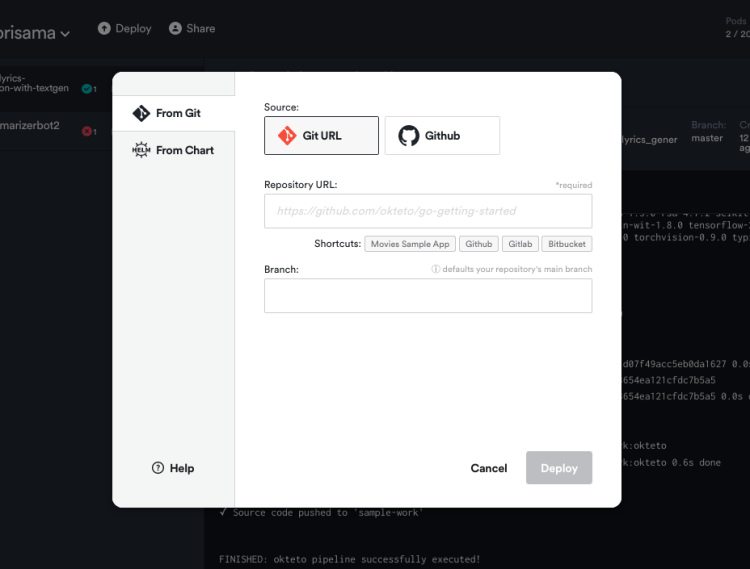
Now click on deploy.
Volia!!!!!! deployed successfully.

Test our API
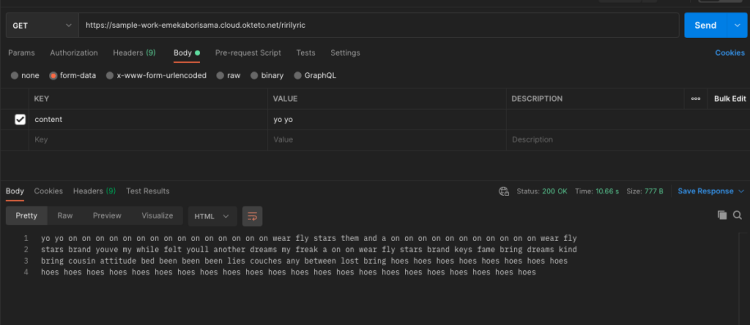
Now we have deployed our Rihanna lyric generation model, the deployment command starts an application on your dashboard. Let’s test our API with Postman. Copy the URL from okteto and use the “GET” method with /ririlyric endpoint on Postman
Further work:
- Hyperparameter tuning using the “hyper-param” function on text-gen
- Get more data
- Segment text (Incoming feature on text-gen)
- Increase the word_length to get more words or text
- Add Okteto GitHub action to automate deployment
Here is the Github repo for this project
Conclusion:
In all, we have been able to build a Rihanna lyric generator using text-gen and also learnt how easy it is to deploy a machine learning model with okteto
Resources
- https://github.com/Emekaborisama/Rihanna_lyrics_generation_with_textgen
- https://python.plainenglish.io/deploy-pytorch-model-with-okteto-cli-d494d058216
- https://okteto.com/blog/building-a-machine-learning-application-with-spago/
- https://okteto.com/blog/building-and-deploying-a-fastapi-app-in-okteto-cloud/
- https://github.com/Emekaborisama/textgen
Don’t forget to give us your ? !




Deploy Rihanna lyric generation Model with Okteto Cloud was originally published in Becoming Human: Artificial Intelligence Magazine on Medium, where people are continuing the conversation by highlighting and responding to this story.
 365 Data Science