365 Data Science is an online educational career website that offers the incredible opportunity to find your way into the data science world no matter your previous knowledge and experience.
Have you ever wondered why many of the NBA’s shooting greats hold the same frame after releasing the ball? The ball is already gone so holding the frame is not going to change the outcome. At the completion of a swing, the golf club is so far back that a golfer could almost kiss the club head. Darts players tend to freeze their hand in a pointing position as if to psycho kinetically guide the dart to the bull’s eye.
The follow-through is a leading indicator for achieving what we intend to achieve. Indeed, you may have observed amateurs and pros alike either celebrate or yell out a few choice words before the basketball reaches the hoop or the golf ball lands on the green or in the lagoon. This follow-through-mindset or way of achieving a goal can be applied to our engineering work as well.
We could bucket any work cycle into planning, executing and learning phases. In each of these phases, one can apply the follow-through-mindset to assess whether they have set themselves up well for the next stage.
Follow-through-planning
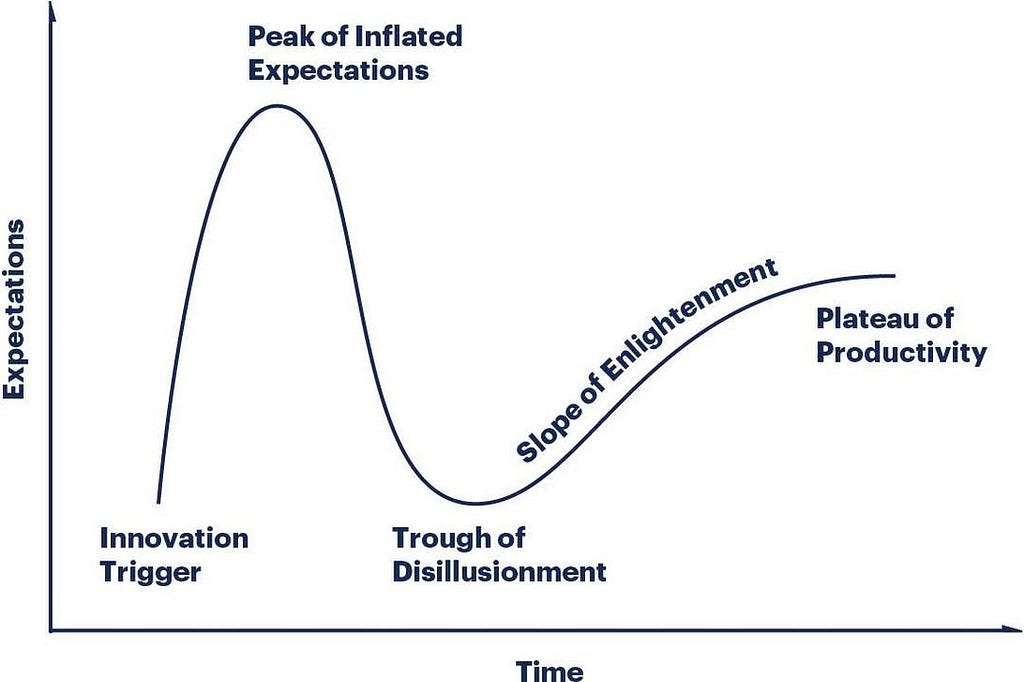
The beginning of any cycle is typically as alive with activity as a sunny morning in a tropical rainforest. It typically conjures up images of the early phase of the Gartner hype cycle. Your goal as a planning team is to tamp down the peak of inflated expectations and avoid the valley of disillusionment.
Gartner Hype cycle
So how might we achieve this? There are two simple questions that a team must answer:
What are our goals and why do they matter? → Understand
What are the best ways to achieve our goals? → Identify
The conclusion of a good planning period should leave the team with a well-grounded sense of optimism for what the near-future holds.
Follow-through-state:
Clear goals
A concise body of work needed to achieve goals
Confidence in expected impact
ML Jobs
Follow-through-execution
Having a leading-metric for success is particularly critical in hardware sales because the conversion cycle is much longer than a “move fast” culture is comfortable with. So in order to make ship decisions faster and compound learnings, one needs to know with a good level of certainty that achieving a follow-through state, X, implies statistically significant increases in sales Y months later. In this phase, we must check and double-check our assumptions and execution to ensure that don’t get ensnared in the usual “gotchas” e.g. network effect contamination, test-control imbalances, slow exposure velocity etc
Follow-through-state:
Live and valid experiments
Defined and tracked leading metrics
Follow-through-learning
When we evangelize our processes effectively, and repeat incessantly, the steps to the follow-through position become invisible as we execute them without conscious thought. They become muscle memory. This frees up our minds, to think about next best action. The basketball player might want to run in for the rebound or run back to defend. This decision is made before the ball approaches the rim. The best players and teams whether in sports or tech appear to continuously leverage this upward cycle, freeing up mental space to ponder the next best action.
Follow-through-state:
Logical conclusions → A leads to B
Valid deductions → Therefore C is likely to lead D
Michael Jordan shoots a free throw with eyes closed.
As you plan, execute and learn it might be worthwhile to ask yourself, if the team achieved good follow-through-states at each phase. If the answer is “no”, the time to raise the alarm is now as opposed to the end of the cycle.
After much consideration, the General Chairs, Executive Committee and Organizing Committee for KDD 2020 have decided to take the conference fully virtual. Clear your calendar for August 23-27, 2020, and enjoy access to all the virtual content live and on demand the week of the event.
We are fast approaching the world of smart homes, driverless cars, and connected devices. Experts predict that over 80% of all emerging technologies will use AI in their work, and there is no doubt that intelligent apps will be an integral part of this world too.
In fact, they already are.
Keep reading to dig into smart applications and see some excellent examples of intelligent apps readily available for download.
What are Intelligent Apps?
Intelligent applications use historical and real-time data to make the user experience more relevant, personalized, and adaptive.
Ability to learn: Intelligent apps continuously learn from user interaction and improve their performance based on the acquired historical data;
Ability to predict: Unlike traditional mobile applications, smart ones predict what information or suggestions would be the most relevant to the user and proactively reach out to users, not vice versa;
Ability to automate: Intelligent apps analyze and make decisions basing on the vast amount of data, thus completing many tasks without waiting for user commands.
The Diverse Applications of Smart Apps
The advantages of using AI for mobile app development are difficult to overestimate, as it is capable of changing our everyday practices and reinventing many processes in diverse industries:
Personal use: M-commerce and media apps equipped with artificial intelligence algorithms can serve us personalized offers. Smart bots and intelligent assistants help us search and order the necessary products, remind of the required actions, and give personalized recommendations in a wast range of spheres starting with sleep and nutrition and finishing with personal finance.
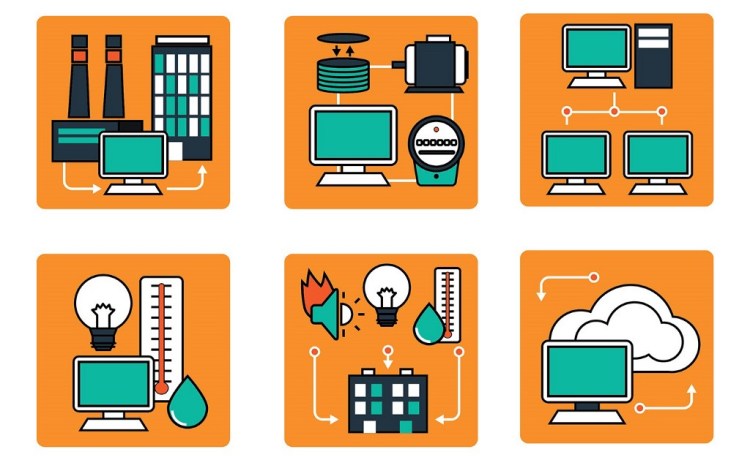
Enterprise apps: There are a plethora of successful cases of the use of AI-based apps in finance, manufacturing, logistics, media, and other industries. For example, smart enterprise apps help to filter impressive amounts of data and prompt employees on the best choices. In the field of production and transportation, intelligent applications increase the overall effectiveness, safety, and economical energy use by analyzing data from multiple sensors and providing users with timely and relevant information.
AI functionality and mobile app development are definitely a perfect match. First, the features of the devices such as GPS navigation and location tracking, cameras, QR code readers, etc. enhance the features of intelligent apps. Second, omnichannel customer experience and transition to enterprise mobility is a powerful demand of the time. The success of the following examples proves this very well.
Examples of Great Intelligent Apps
Alexa, Siri, Cortana, and Google Assistant
All these personal assistant apps are great AI applications that leverage natural language generation and machine learning to become excellent assistants and companions to its users. They can give updates, answer our inquiries, adjust smart LEDs, schedule meetings, play our favorite music, and even tell jokes.
Netflix
Netflix has caused much disruption in the media industry and has surely leveraged AI in its mobile app. Thanks to big data analytics, the brand can give accurate, personalized movie recommendations — a feature that millions seeking something to watch deeply appreciate.
Elsa
Elsa (English Language Speech Assistant) is a renowned teacher of English pronunciation. The app gives accurate feedback on the user’s pronunciation and adapts the training to his unique needs.
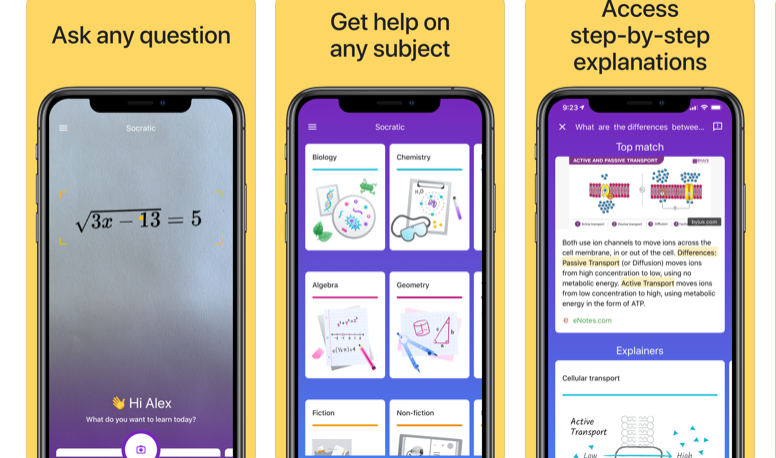
Socratic
The smart app helps students with math and other homework. Users may ask or simply take a photo of the complex concept, and AI-powered assistant will provide a visual explanation. Over 5 million downloads suggest Socratic is good at his explanations.
Ada Health
The AI-based app is often called a doctor in your pocket: it carefully listens to users’ symptoms, asks clarifying questions, and helps to navigate to the most suitable care analyzing the responses against a rich data of similar cases.
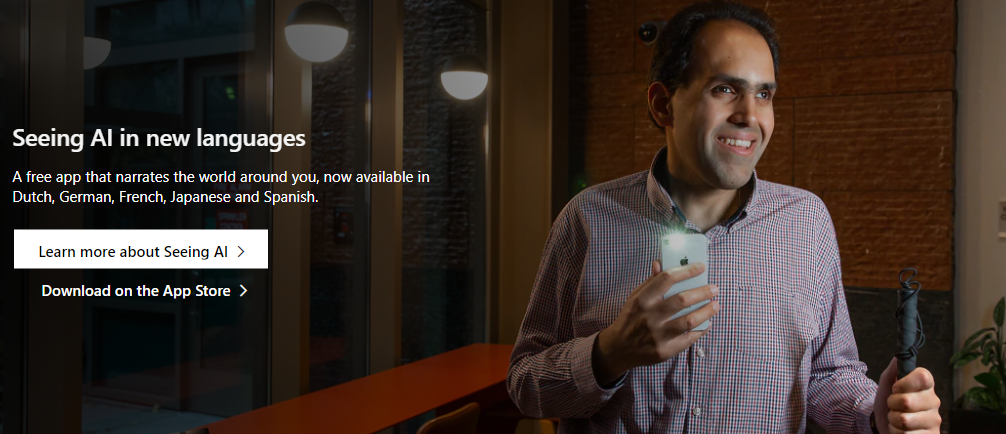
Seeing AI
The Seeing AI is a talking camera app developed by Microsoft for the visually-impaired people. The computed vision is so powerful, it can help users identify currencies, handwriting, colors, images in other apps, and even the age and emotions of people speaking to the user.
Microsoft Pix Camera
The camera app uses AI to help users retain the best memories of their unique moments. Namely, every shutter click makes the camera capture 10 frames, and AI, in just a second, selects up to three of the best ones to store.
What is the Future of AI Apps?
Undoubtedly, intelligent apps multiply the effectiveness, but they are also giving the mobile apps a human touch: yes, you may realize that all the responses are generated by the algorithms, but it still feels great when someone listens to you and cares. Now, when a new technology like ARKit facilitates the development of AI apps, the mobile-first rule has all the chances to grow into the AI-first one.
As many of us know Artificial Intelligence is considered to be one of the world’s most popular technologies but automation in the world of Ai is something you might have not heard about. Today we are going to discuss one such method to make our Deep Learning Model and adjust its hyperparameters automatically.
Earlier, we had to manually set the value of each hyperparameter for increasing the accuracy of a deep learning model. But now we can automate the process with the help of DevOps very easily without any human intervention.
To start with the journey of learning we require you to set up your system first.
Go to the following link and clone the repository it contains two foldersDeep learningandMachine_learningwhich containsDockerFile, requirements.txt, and code.
Change directory to Deep learning → open terminal → Build the Image
cd Deeplearning
docker build -t name:tag .
Once you have finished the above steps, its time to run your Jenkins Docker container. ( for ease of reference we will call it Jenkins Container)
docker run -it --name container_name image_name:tag
Please follow the video completely and install the plugins in the Jenkins as we will require it for the rest of the project.
Now we have to configure our root system for SSH access through Jenkins, Feels overwhelming already don’t worry follow up on the process and you will see it all working in the end.
Steps to configure SSH (Inside Jenkins Container) – Open your terminal and type the following commands:-
# Command to access the container bash shell(Jenkin Container).
--> docker exec -it container_name bash
It will attach you to your Jenkins container
# Command to install the required packages to run ssh.
--> yum -y install openssh-server openssh-clients
# Command to create new authentication key pair for ssh(.pub).
--> ssh-keygen
# Command to install an SSH key on a server as an authorized key.
--> ssh-copy-id -i ~/.ssh/id_rsa.pub user@host_ip
Steps to configure Jenkins –
As we know Jenkins is running on the docker container it cannot be accessed to the outside world, to make it publically available we have to convert private IP into the public IP (Tunneling) using ngrok.
# Command to unzip the ngrok zip.
--> unzip ngrok-stable-linux-amd64.zip
# Command to tunnel the private ip.
--> ./ngrok protocol port
Our pre-requisite setup is finished, Great!.
Now let’s move onto the jobs we have to set up for our Jenkins. First start Jenkins using the following commands, enter your Id and Password.
# Command to start the Jenkin Container using downloaded Image.
-->docker run -it --name name sarvesh1523/custom_jenkin:v1
JOB 1 –
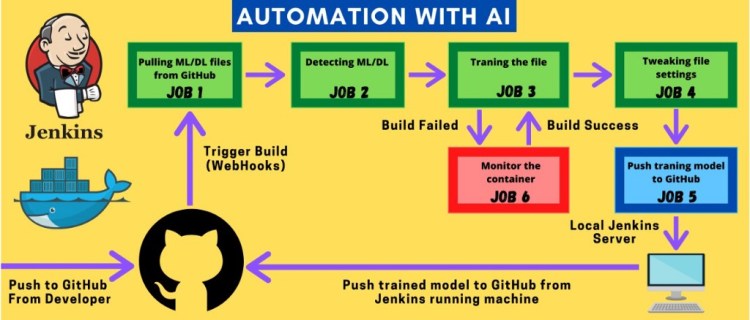
Here we will pull the repository from our GitHub Using WebHooks and Jenkins then we will copy the fetched file which is saved in the workspace of Jenkins to the host mounted folder.
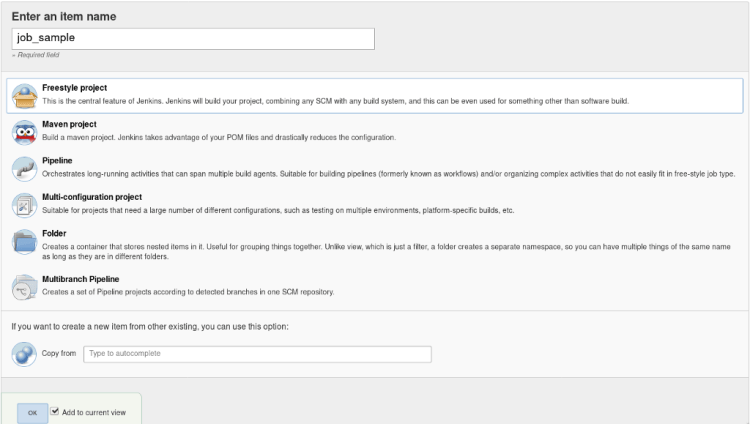
Click on the new item in the dashboard, give the appropriate name here for the demo we will be using the name “job1”.
Create a freestyle project named “job1”
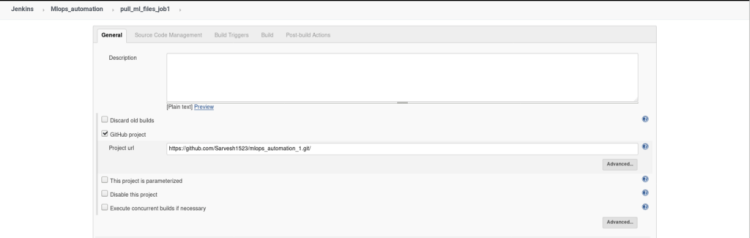
2. Inside the General setting click on the GitHub project and copy the repository link in the given below tab as shown in the image given below and add a description to your job, So that you can refer later to it.
This is an optional step it just gives you an extra option in the dashboard of this particular job to directly open your GitHub account and review changes.
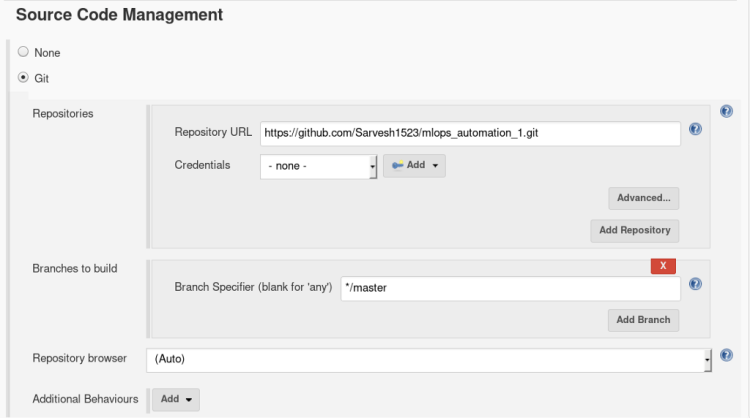
we don’t have to provide any external credentials right now as Git plugins will direct Jenkins to take actions.
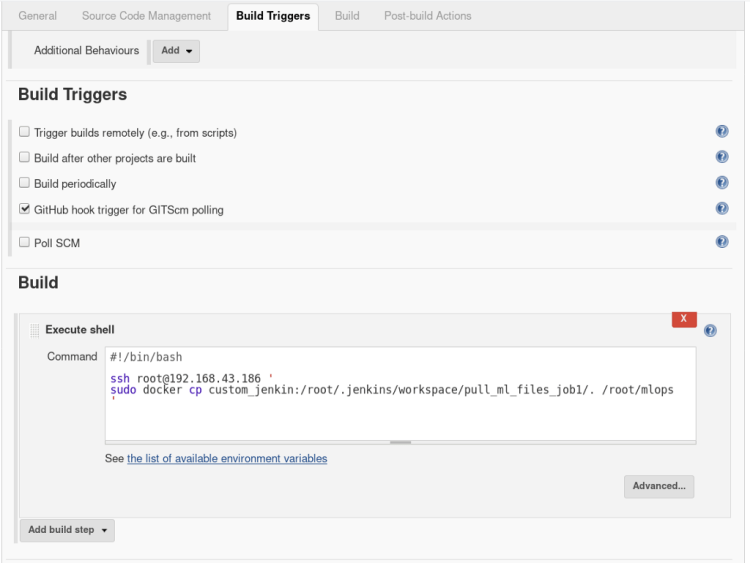
4. In Build and triggers select Github hook trigger for GTScm polling. This trigger will inform Jenkins whenever there is a change in the repository in the meantime
In build, option open the drop-down menu > select Execute shell and type the following commands
# Command that indicate what kind of interpreter to run.
#!/bin/bash
# Command to SSH to host and copy all the files from job1 workspace to host mounted folder.
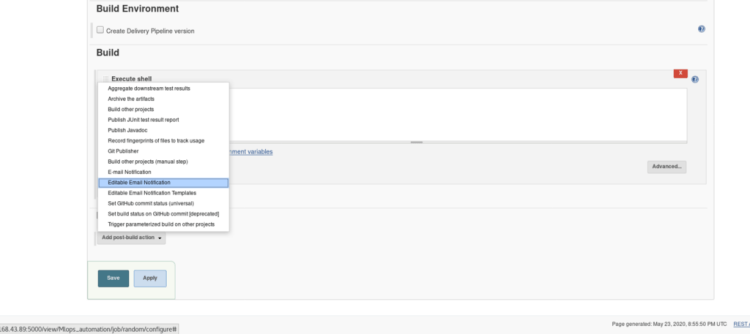
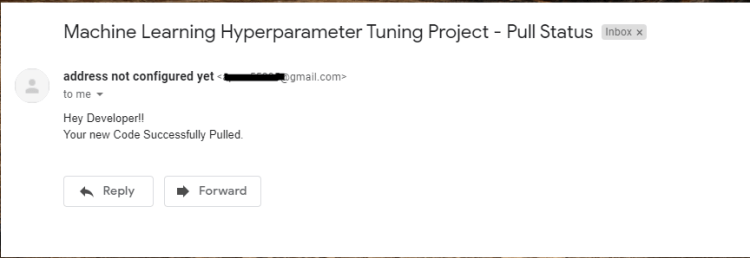
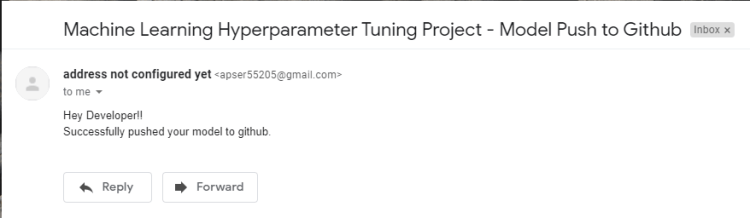
5. If you want to notify your user that your build was successful or not through the email you can use Post Build Action, this step is Optional. Inside Post-build Actions select > Editable email notification.
Select Add post-build action > Editable Email NotificationKeep everything in the settings default as shown in the figure
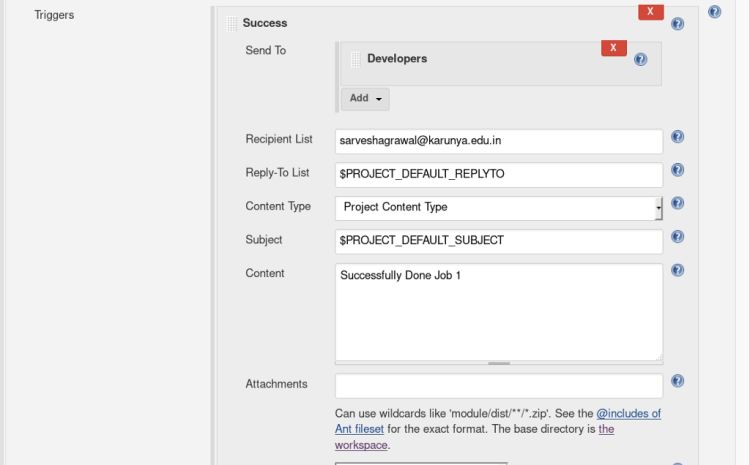
Select Advanced Settings option inside Editable email notification, A new menu will pop up > Select when to activate the trigger.
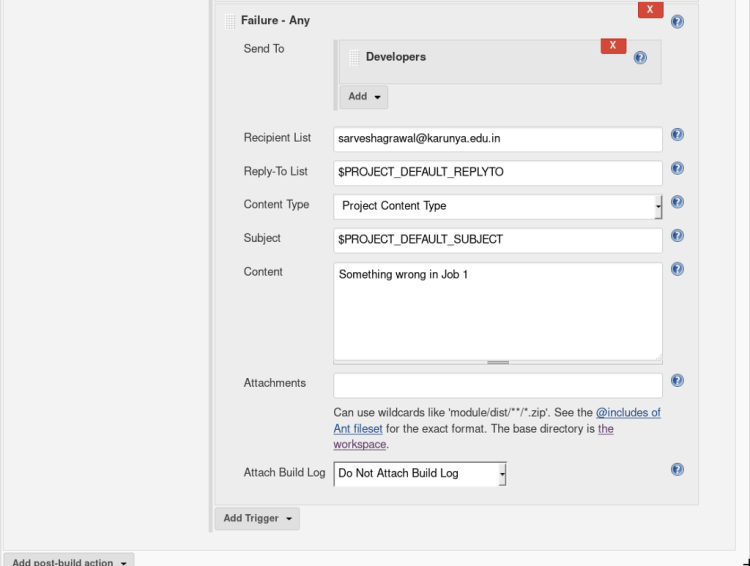
Enter the Recipient mail address in the recipient list and content as shown below.
This trigger sends a message to email if the job is successful.This trigger sends a message to email if the job is failed.
Amazing you have completed Job 1! ? Let’s move on next job
JOB 2-
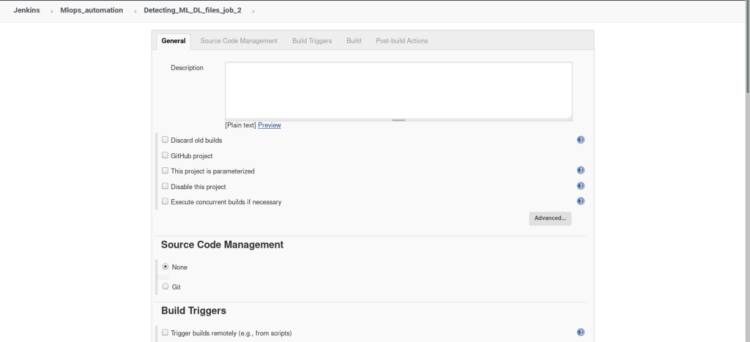
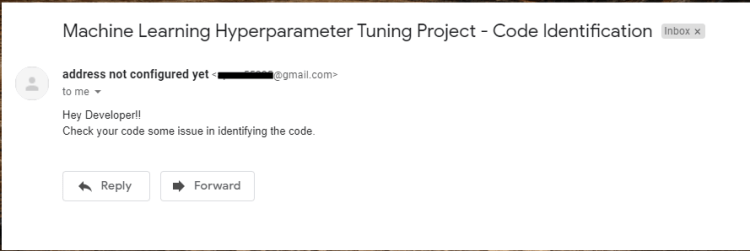
This job will get triggered automatically after job 1 is done confused about how it will happen? we will soon see how It works. In this job, we are going to perform a check whether the provided data & code require a Deep learning container or Machine Learning container. Based on that we will create an empty file Named ‘ML’ or ‘DL’ inside a separate folder. This folder will be used later to fetch our ML/DL code to run into the specified container.
1. Click on the new item from the dashboard, Create a freestyle project named “job 2” (similar to job 1)
Keep everything default in the General, Source Code Management.
2. Inside build triggers select > Build after other projects are built, insert name of the project to watch in this scenario we will name our project “job1”.
In build open the drop menu > select Execute shell and type the following commands
#!/bin/bash
ssh root@192.168.43.186 '
cd /
cd root/mlops
# Checking whether the code is for ML or DL(by searching the library used for ML and DL in code).
# If the code is written for DL then creating empty file DL or if ML then creating empty file ML.
ML=$(cat file.py | grep sckit-learn | wc -l)
DL=$(cat file.py | grep keras | wc -l)
if [[ $ML > 0 ]]
then
touch ML
elif [[ $DL > 0 ]]
then
touch DL
else
exit 1
fi
'
3. If you want to notify your user that your build was successful or not through the email you can use Post Build Action, this step is Optional.( refer JOB1 step-5)
Big Data Jobs
When job 2 is finished we will have either have DL or ML file Based on the libraries used inside the code.
you have completed Job 2! Let’s move on to the next job
JOB 3-
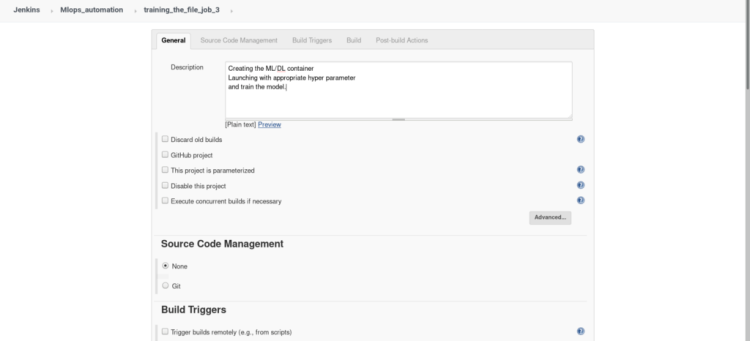
In this job, we will launch the container for deep learning if a saved file from the previous job is DL or we will launch the container for Machine learning if a saved file from the previous job is ML.
The key factor that decides the type of container to be used is the libraries available inside the code for our model. Keras and TensorFlow for Deep learning scikit-learn for Machine learning
Once the container is launched it will run the initial code in the container and if any interrupt or failure occurs in between the execution of job 3, it will report it to job 6.
If there is no fault occurrence it will create a file inside the same folder as ML/DL named “target score”
Click on the new item from the dashboard, Create a freestyle project named “job 3” (similar to job 1), Add description of your job in short words.
2. Inside build triggers select > Build after other projects are built, insert name of the project to watch in this scenario we will name our project “job2”.
In build open the drop menu > select Execute shell and type the following commands
#!/bin/bash
ssh root@192.168.43.186 '
cd /root/mlops
# Checking the file created in last job whether DL or ML.
if [[ $(ls | grep DL) ]]
then
# -d   : running the container in detach mode.
# -it  : interactive terminal(to get terminal).
# --rm : Container terminate on finishing the work(lifetime).
# -v   : Mounting current workdir of root to container workdir.
# -w   : Explicitly telling the workdir for container.
# training model with default values(Epoch= 1, Layer= 1)
docker run -dit --rm --name pyt -v $PWD:/usr/src/myapp -w /usr/src/myapp python:dl python file.py
3. If you want to notify your user that your build was successful or not through the email you can use Post Build Action, this step is Optional.( refer JOB1 step-5)
you have completed Job 3! Let’s move on to the next job
JOB 4-
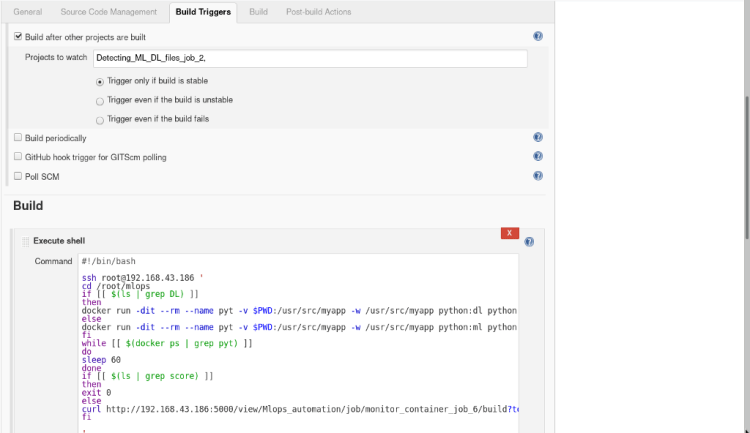
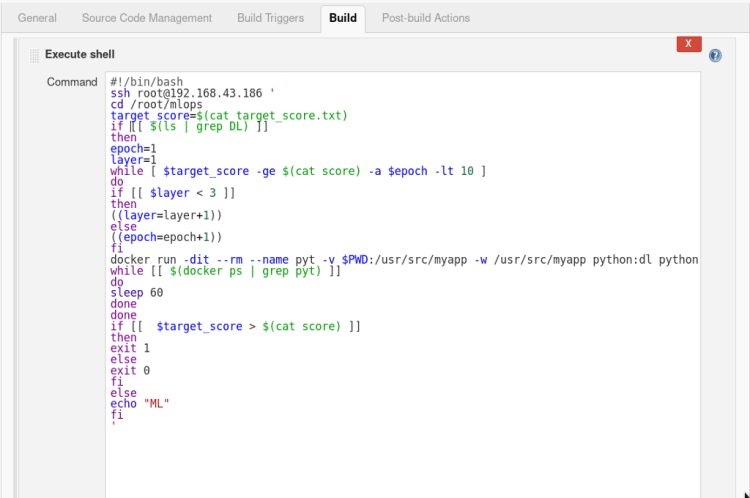
It will automatically get triggered once Job 3 is done, This Job will go to the Host and check whether the given file created in the last Job is ML or DL based.
If the file is found to be DL based it runs a loop until the desired accuracy > actual accuracy or epoch <=10 using 1 epoch and 1 layer as default value in the first iteration. Once it reaches the Layer of neurons up to 3 it starts changing the number of epochs only.
It waits until the machine gets trained in the background and check if the desired accuracy is met or not, this job automatically Changes the parameter, remove the container and re-run with newly updated parameter increasing layer as well as epochs layer by a factor of 1 with every iteration.
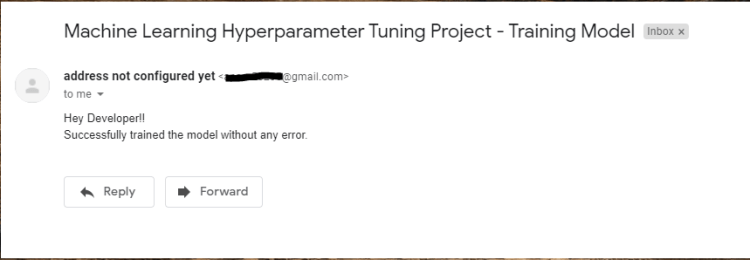
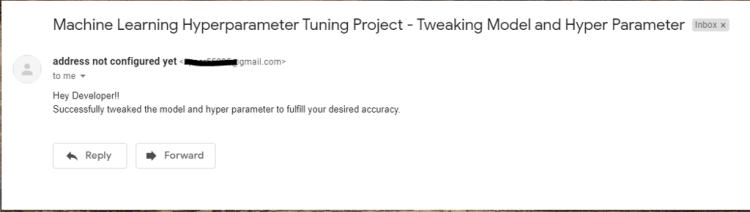
Once the desired accuracy is attained then it successfully exits from the loop or exit with an error in either condition the developer receives a mail of success or failure.
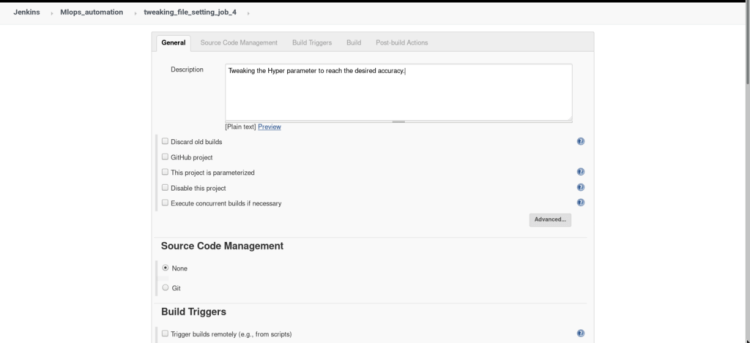
Click on the new item from the dashboard, Create a freestyle project named “job 4” (similar to job 1), Add description of your job in short words.
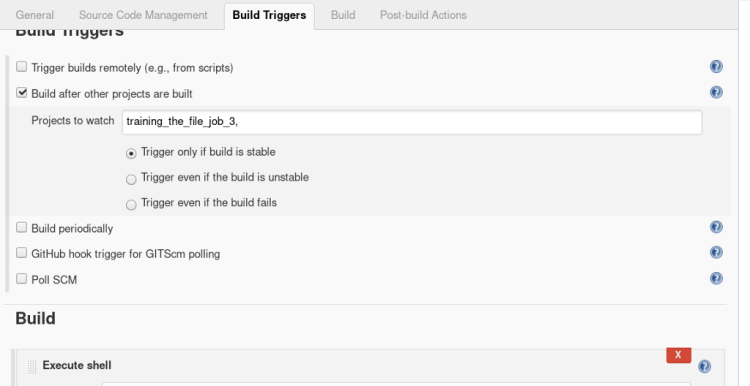
2. Inside build triggers select > Build after other projects are built, insert name of the project to watch in this scenario we will name our project “job3”.
3 In build open the drop menu > select Execute shell and type the following commands.
#!/bin/bash
ssh root@192.168.43.186 '
cd /root/mlops
# Desired Accuracy
target_score=$(cat target_score.txt)
if [[ $(ls | grep DL) ]]
then
epoch=1
layer=1
# Process continues until reach the desired accuracy or 10 epochs. # Each time adding 1 more set of layer once count reached 3 layersthen changing no. of epochs. while [ $target_score -gt $(cat score) -a $epoch -lt 10 ] do if [[ $layer < 3 ]] then ((layer=layer+1)) else ((epoch=epoch+1)) fi
# Passing the no. of epochs and layers as a argument.
docker run -dit --rm --name pyt -v $PWD:/usr/src/myapp -w /usr/src/myapp python:dl python file.py -l=$layer -e=$epoch
while [[ $(docker ps | grep pyt) ]]
do
sleep 60
done
done
# If incase model stopped tunning because it reaches the no. of max epochs then exit failure or if reached the desired accuracy then exit with success.
if [[  $target_score > $(cat score) ]]
then
exit 1
else
exit 0
fi
else
echo "ML"
fi
'
4. If you want to notify your user that your build was successful or not through the email you can use Post Build Action, this step is Optional.( refer JOB1 step-5).
you have completed Job 4! Let’s move on to the next job
JOB 5-
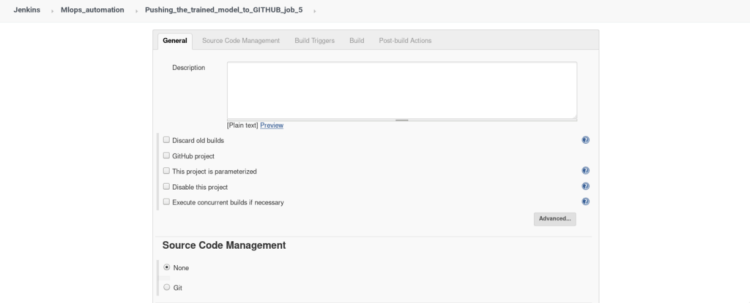
Once Job 4 is successfully built it clones the 2nd repository from GitHub inside a folder inside the root. Copy the model and accuracy rate into the .git directory and push it to your remote GitHub account.
Click on the new item from the dashboard, Create a freestyle project named “job 5” (similar to job 1), Add description of your job in short words.
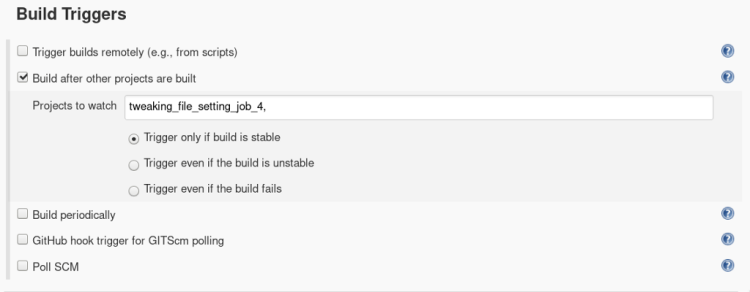
2. Inside build triggers select > Build after other projects are built, insert name of the project to watch in this scenario we will name our project “job4”.
3. In build open the drop menu > select Execute shell and type the following commands.
# Copying model and accuraccy in cloned dir.
cp mnist_model.h5 /root/mlops/mlops_automation_2
cp Actual_score.txt /root/mlops/mlops_automation_2
cd mlops_automation_2/
sleep 2
# Adding the model annd accuracy_file, committing the changes in remote repository, and pushing changes into remote repository.
git add mnist_model.h5
git add Actual_score.txt
sleep 2
git commit -m "Uploading trained Model and score"
sleep 2
git push
'
you have completed Job 5! Let’s move on to the next job
JOB 6-
Job 6 will be remotely triggered if something is wrong in a container while running job 3, if the container stopped due to any reason it will again initiate the container and start training the machine.
Click on the new item from the dashboard, Create a freestyle project named “job 4” (similar to job 1), Add description of your job in short words.
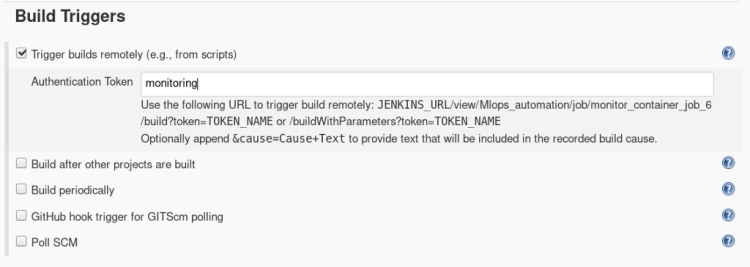
2. Inside build triggers select > Trigger builds remotely, Insert Authentication token Here we have put token as “monitoring” to build our job remotely from any external resource.
A Trigger builds remotely can be used from anywhere in the network if Jenkins is also running on the same network to build our Job 6.
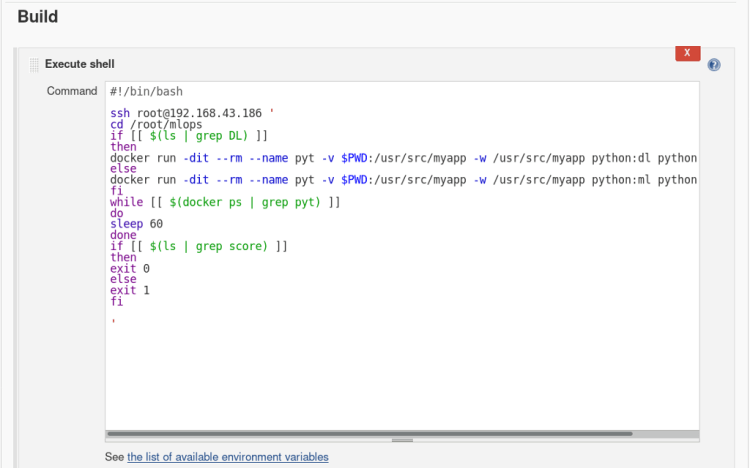
3. In build open the drop menu > select Execute shell and type the following commands.
# Same as job3 which will be called by job3 on failure
#!/bin/bash
ssh root@192.168.43.186 '
cd /root/mlops
if [[ $(ls | grep DL) ]]
then
docker run -dit --rm --name pyt -v $PWD:/usr/src/myapp -w /usr/src/myapp python:dl python file.py
else
docker run -dit --rm --name pyt -v $PWD:/usr/src/myapp -w /usr/src/myapp python:ml python file.py
fi
while [[ $(docker ps | grep pyt) ]]
do
sleep 60
done
if [[ $(ls | grep score) ]]
then
exit 0
else
exit 1
fi
'
Amazing you have completed all the Job!?
How to Run
In this racing world, even technologies like Artificial intelligence also need to be automated as the world is becoming faster and sharper, We have to equip ourselves with such technologies to create a better future. It was a great pleasure for us to write this article this took some time but it has helped us in understanding the concepts more clearly than before, This article cannot be completed without mentioning the name of our great Mentor Mr.Vimal Daga who helped us in understanding the concepts of combining the power AI and DevOps to create this project.
Various data privacy threats can result from the usual process of building and constructing data and AI-based systems. Avoiding these challenges can be supported by utilizing state-of-the-art technologies in the domain of privacy-preserving AI.
So what does it take to become a data scientist? For some pointers on the skills for success, I interviewed Ben Chu, who is a Senior Data Scientist at Refinitiv Labs.
So, to help you stay at the forefront, we’ve conducted an in-depth study on job offers in the field of data science.
And in this article, we’ll share our insights based on 1,170 data scientist job descriptions in the USA. We’ve extracted valuable information about the companies offering the position, the required educational credentials, and sought-after work experience, as well as the desired skills and techniques involved.
So, let’s explore the intriguing findings together, shall we?
Data Scientist Job Descriptions 2020
What companies were targeted in the research?
The 1,170 data scientist positions in our study were posted by 357 unique companies. This is a positive sign, as:
The presence of many different companies means the data is more likely to be a random sample of the market and, therefore, not biased towards the requirements or needs of a single or few companies.
This also shows that the website is an active and popular job openings aggregator.
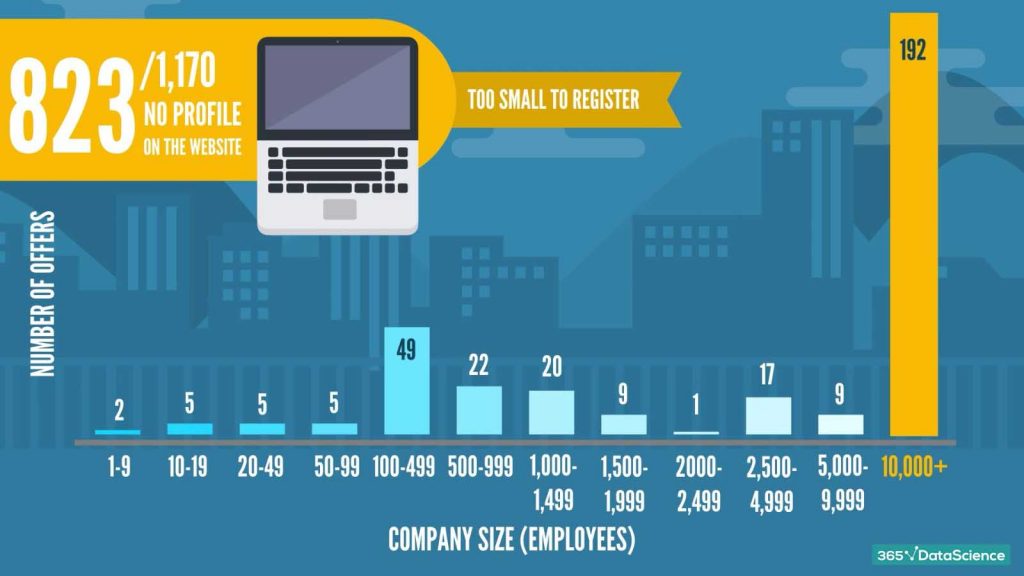
That being said, let’s take a look at the distribution of offers against the size of the company making the offer. Here’s a chart of the number of openings posted by companies with their respective number of employees:
It’s easy to see that the majority of job offers come from very big companies, with more than 10,000 employees. This could significantly skew our data towards the necessities of big corporations. However, looking beyond that, 823 of the total 1,170 job offers were posted by companies that didn’t actually have a profile on the website. Therefore, their size hasn’t been determined and is not present in the chart.
But what about the offers themselves? Let’s analyze this!
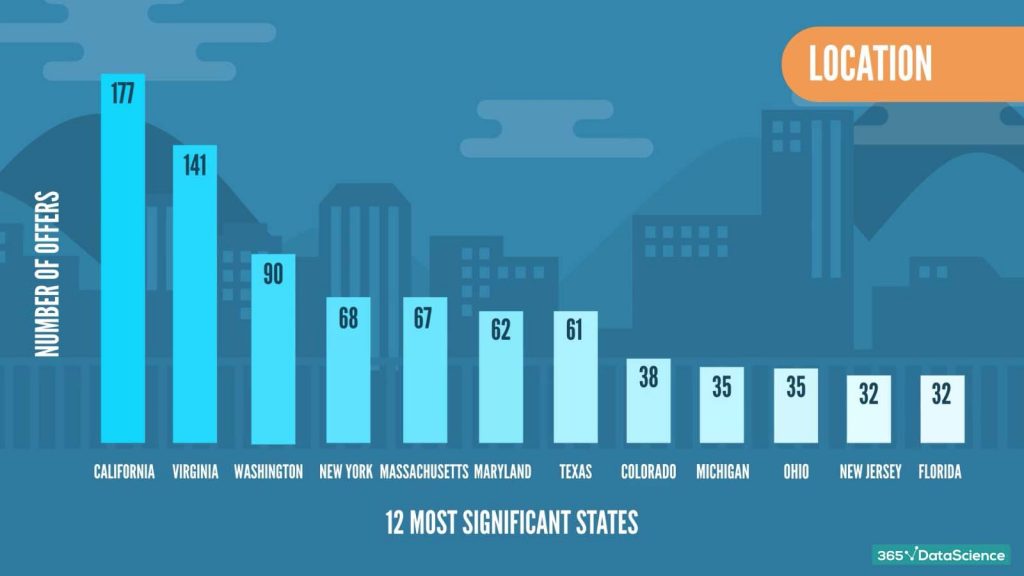
What are the locations of the data scientist job descriptions in our study?
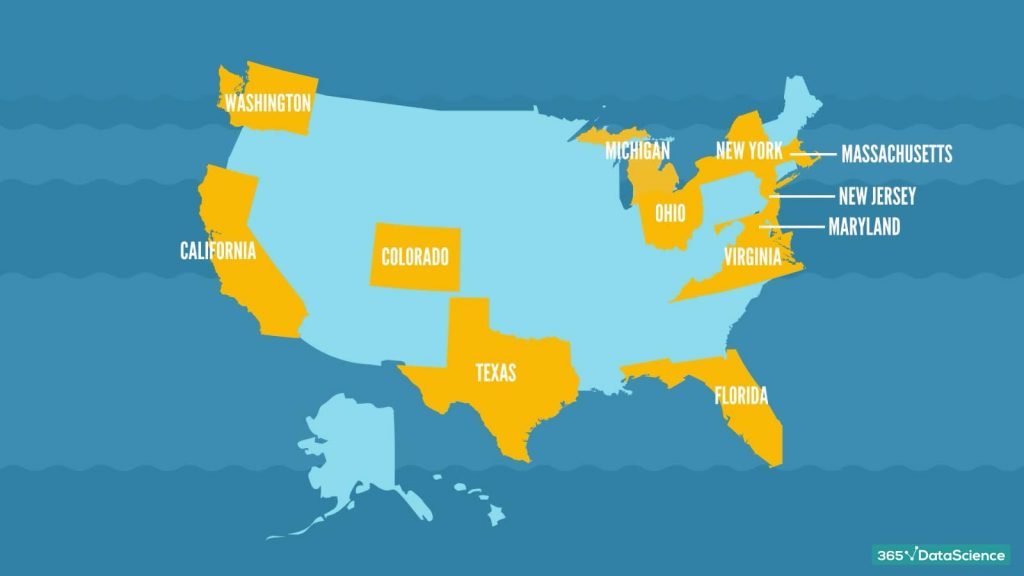
The data scientist job descriptions we studied originated from 38 states in the US. Here are the top 12: California, Virginia, Washington, New York, Massachusetts, Maryland, Texas, Colorado, Michigan, Ohio, New Jersey, and Florida.
And here are the same states highlighted on a map:
Now that you have a good idea about the top states by number of offers, let’s move on to the job requirements.
What is the required education in data scientist job descriptions in 2020?
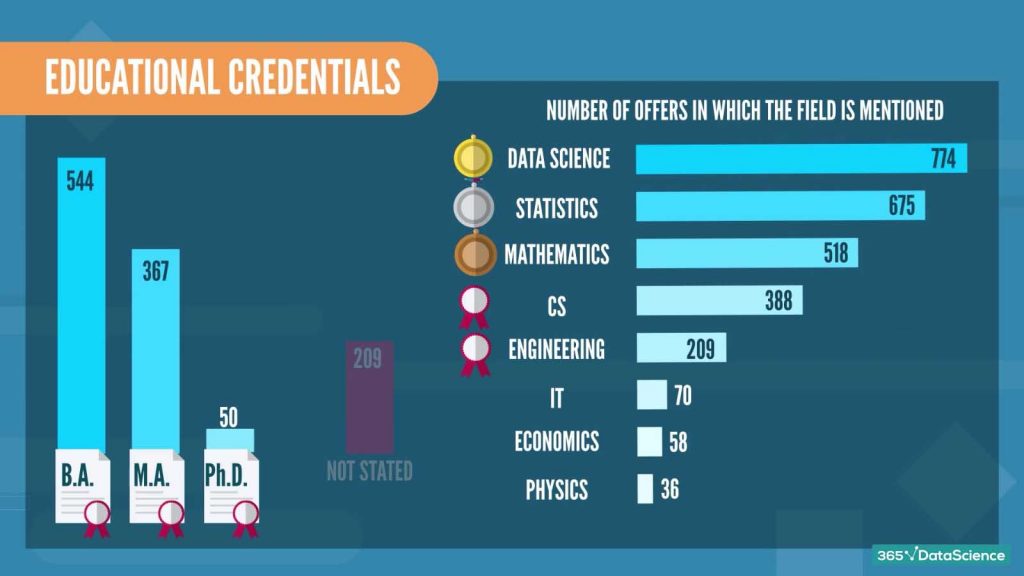
When it comes to education, 544 job offers stated that they require at least a Bachelor’s degree, 367 – a Master’s and 50 were looking for a Ph.D. While at the same time in 209 job offers, the level of education was not stated.
As for the preferred fields of study, here are the results. We collected the data by extracting only the first three mentioned fields. Data science takes the lead, followed by Statistics, Mathematics, Computer Science, and Engineering. IT, Economics, and Physics are much less popular, according to the numbers.
What is the required work experience in data scientist job descriptions in 2020?
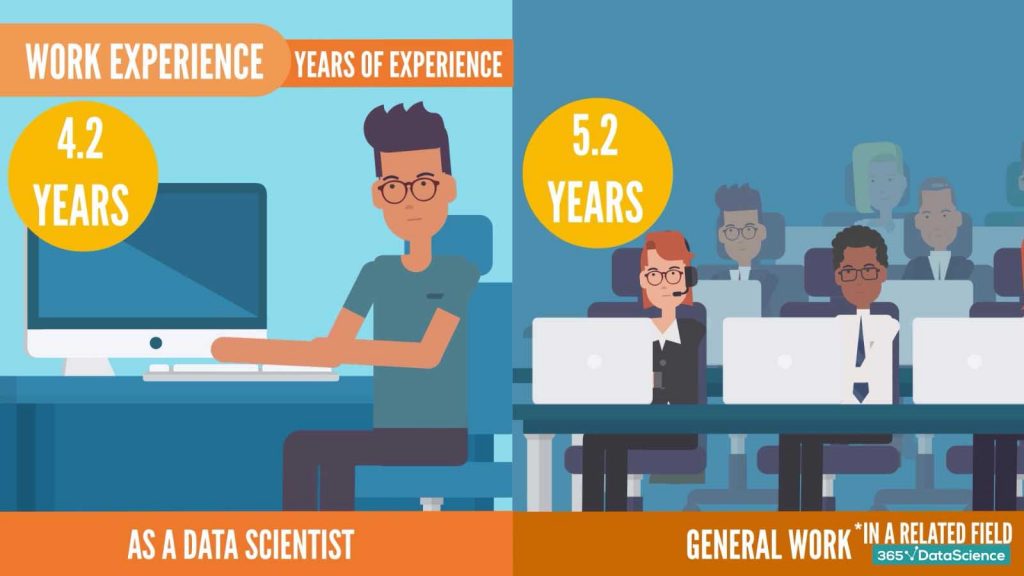
We set the years of experience in these 2 categories: ‘years of experience as a data scientist’ and ‘general work experience.’ Bear in mind that in most job offers, general work experience should be in a related field.
What we found out is that on average companies demand that candidates have at least 4.2 years of previous experience as a data scientist and 5.2 years of experience in related fields.
Which are the required programming languages in data scientist job descriptions in 2020?
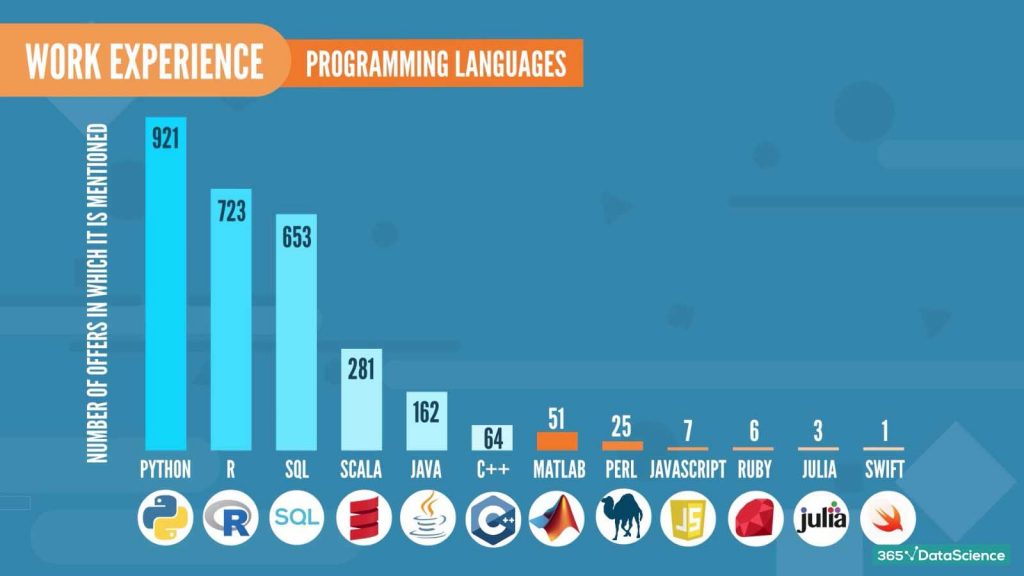
Here are the most quoted programming languages in the 1,170 job offers (there may have been more than one language per offer):
No big surprises here – Python is the most popular one, as expected, followed by R and SQL. The other languages with a significant number of mentions are Scala, Java, and C++.
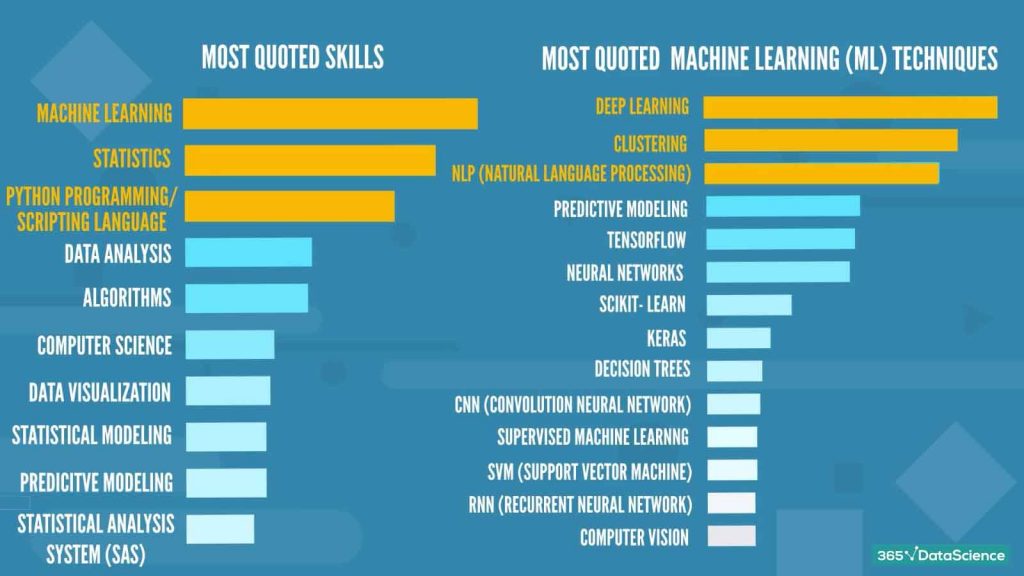
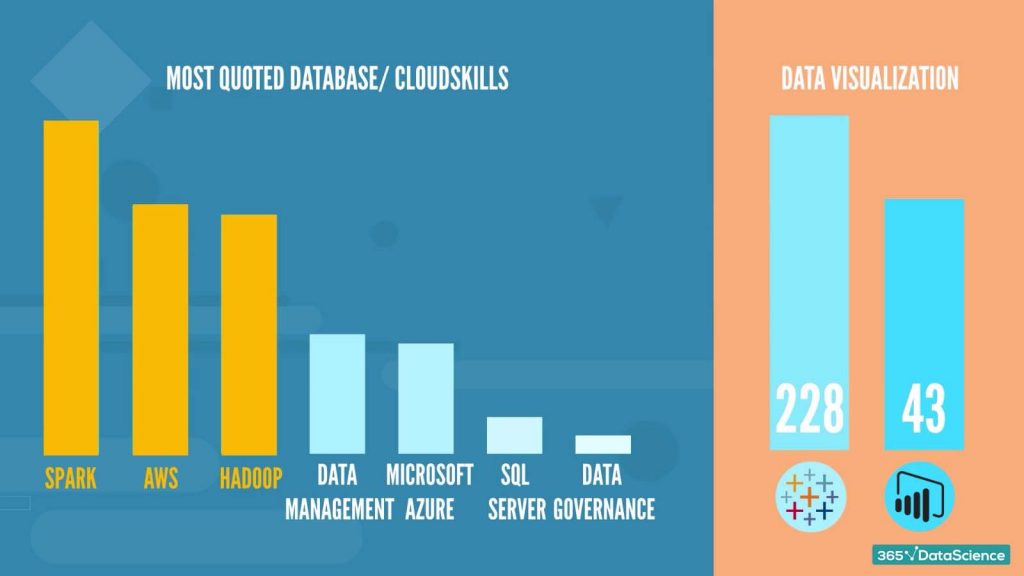
What are the most cited skills and machine learning techniques in data scientist job descriptions?
We also performed a keyword analysis on the description of the job offers and extracted the most cited skills and machine learning techniques.
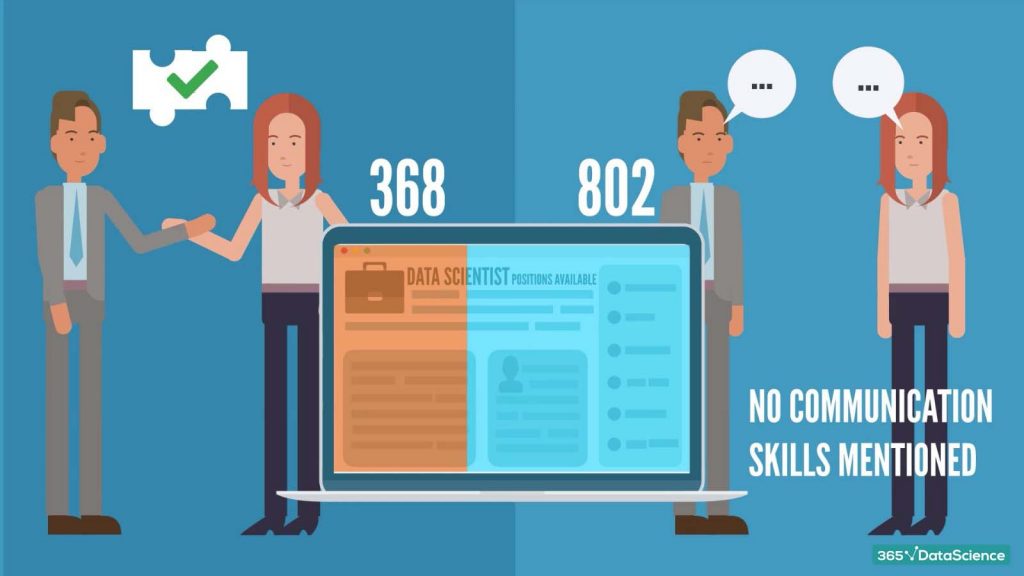
Are communication skills of major importance in data scientist job descriptions?
That was true in 368 offers, while in the rest 802 there was no mention of communication or teamwork at all.
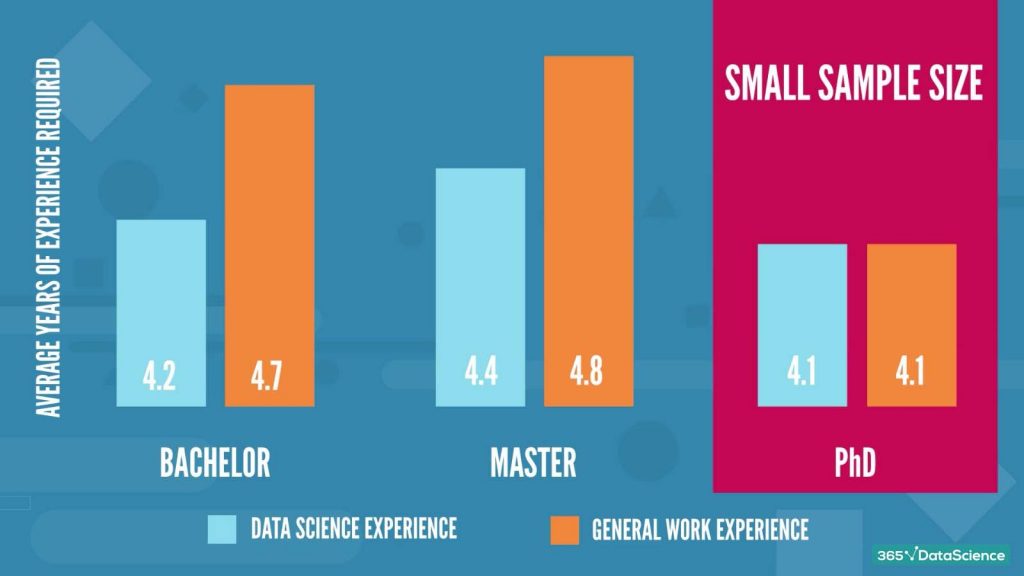
Now, let’s analyze the prior work experience with respect to the education required in data scientist job offers.
Here is what we found:
As you can see, there is no real significant difference between the preferred work experience for the different degrees. However, there are two very important factors to consider here:
The sample size is not large, especially for the Ph.D.
This data applies to candidates with a degree that is the minimum requirement. In fact, there were no job postings that did not require university education. As in any other industry, holding a Ph.D. lowers the minimum required experience. However, not dramatically so, especially having in mind that a Ph.D. takes several years to complete.
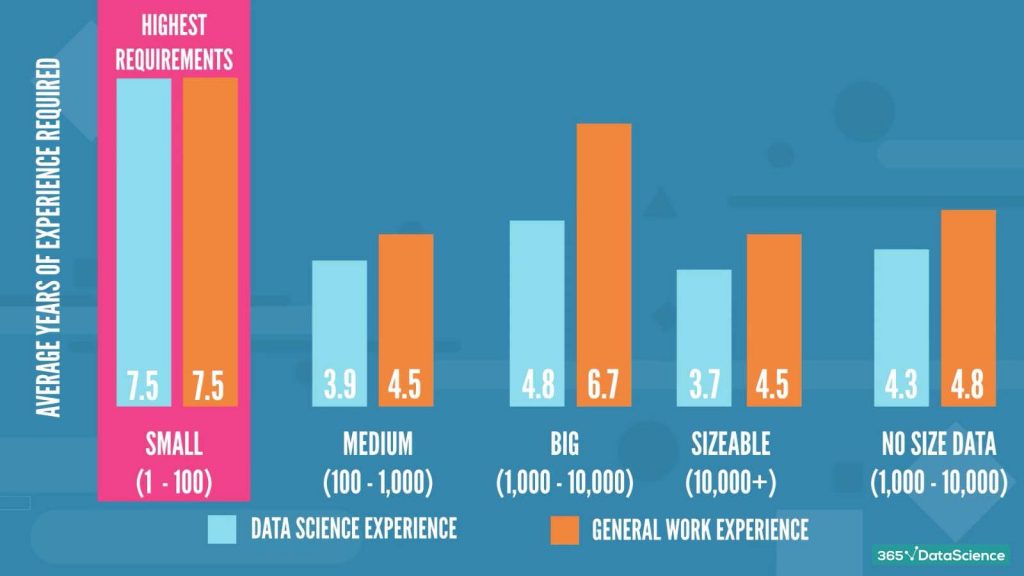
So, let’s look at how the company size affects the experience required in data scientist job offers.
For this analysis, we have grouped the companies into 5 categories: small (1 – 100 employees), medium (100 – 1,000 employees), big (1,000 – 10,000 employees), sizeable (10,000+ employees), and those with No size data. It is very important to remember that the sample size here is rather small.
Quite surprisingly, it looks like the smallest companies have the highest requirements for experience. Apart from the sample limitation, we can assume that smaller companies have a limited number of employees. So, to expand and become successful, it needs more experienced professionals. The sizeable companies, in contrast, may not necessarily need an experienced individual but someone they can train to become a useful tool for the company in the future.
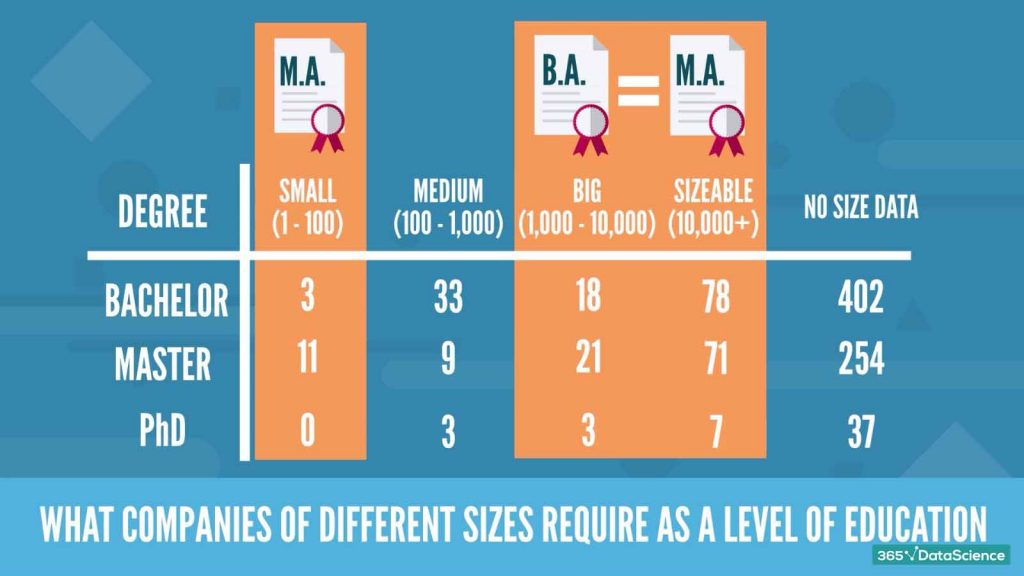
And we’ve arrived at the last piece of analysis – what companies of different sizes require as a level of education in data scientist job descriptions.
Due to the small samples, we have decided to summarize the data in a table, rather than a graph. Smaller companies don’t really look for Ph.D.s and prefer Master’s degree holders. At the other end of the spectrum, the bigger companies have somewhat more balanced requirements with an approximately equal number of positions asking for either a Bachelor’s or a Master’s degree.
That was our compelling look at a sample of 1,170 job offers for the position of data scientist.
We hope you will find this information useful and advantageous for you in your path to landing your dream data scientist job.
Ready to take the next step towards a data science career?
Check out the complete Data Science Program today. Start with the fundamentals with our Statistics, Maths, and Excel courses. Build up a step-by-step experience with SQL, Python, R, Power BI, and Tableau. And upgrade your skillset with Machine Learning, Deep Learning, Credit Risk Modeling, Time Series Analysis, and Customer Analytics in Python. Still not sure you want to turn your interest in data science into a career? You can explore the curriculum or sign up for 12 hours of beginner to advanced video content for free by clicking on the button below.

























 365 Data Science