comments Source Geographic Information Systems are seeing a new popularity in recent times partly thanks to the COVID-19 Outbreak that has prompted may people to Read more »
Originally from KDnuggets https://ift.tt/2SlQrgS

365 Data Science is an online educational career website that offers the incredible opportunity to find your way into the data science world no matter your previous knowledge and experience.
Originally from KDnuggets https://ift.tt/2SlQrgS
Originally from KDnuggets https://ift.tt/2VN5KkS
Originally from KDnuggets https://ift.tt/2Yj6mk0
Originally from KDnuggets https://ift.tt/2y2HhPA

This article will talk about implementing Deep learning in R on cifar10 data-set and train a Convolution Neural Network(CNN) model to classify 10,000 test images across 10 classes in R using Keras and Tensorflow packages.
For details on the Cifar10 Dataset — https://www.cs.toronto.edu/~kriz/cifar.html
There has always been a tough competition between R and Python when it comes to Data Science and implementing Machine Learning. R has always been a statistician’s choice because it was developed by Statisticians Ross Ihaka and Robert Gentleman at the University of Auckland,New Zealand. The project was conceived in 1992, with an initial version released in 1995 and a stable beta version in 2000. It is a descendant of S programming language.
We all know that R has always been leading when talking about Statistical Computing and Statistical Analysis of data because of the in-build packages and functions available which make both descriptive and inferential analysis very easy for us. And how can we forget the world-famous ‘GGplot2’ graphics package for making a variety of state-of-the-art Plots and Visualizations and my personal favourite ‘dplyr’ package for Data transformation and Data Manipulation which also supports SQL like syntax and functions.
P.S — I am personally a R lover .
R and its libraries implement a wide variety of statistical and graphical techniques, including linear and nonlinear modelling, classical statistical tests, time-series analysis, classification, clustering, and others. R is easily extensible through functions and extensions, and the R community is noted for its active contributions in terms of packages. Many of R’s standard functions are written in R itself, which makes it easy for users to follow the algorithmic choices made.
Advanced users can easily write C, C++ and Python code to manipulate R objects directly.
But due to the Data Explosion in the past few years,since then Deep Learning started gaining lots of importance due to the advancements in Computational Power and our ability to Process, Manage and store such Big complex data Sets easily that too at a cheaper cost , since then Python has been leading in terms of implementing Deep learning easily using its famous Deep learning libraries such as ‘Keras’ , ‘Tensorflow’ etc. The balance now shifted towards Python as it had an enormous list of Deep Learning libraries and frameworks which R lacked .
Python was now leading the Deep Learning World in every way it can, because with R it was almost impossible to run big complex deep learning Models , but not anymore, R is back in the fight again .
Due to the recent launch of Keras library in R with Tensorflow (CPU and GPU compatibility) at the backend, it is again back in the competition. R will again fight Python for the podium even in the Deep Learning world. For aspiring Data Scientists like me who know only R it is a big relief and an advantage to implement Deep learning in R itself.
Firstly, If you are not familiar with the basics of R language, I urge readers to go complete this amazing course by DataCamp on R Programming , and this is the course from where I started my Data science journey using R. Trust me with this, these course are worth your time and money or if you want to learn the complete data science fundamentals from scratch using R which includes Statistics and probability, Data viz, exploring the data, data modelling and machine learning and other important concepts, I strongly recommend this foundation course Data science with R and I am currently enrolled in this foundation course and I am already loving it.
Also, I have noticed that DataCamp is having a SALE(75%off) on all the courses. So this would literally be the best time to grab some yearly subscriptions(which I have) which basically has unlimited access to all the courses and other things on DataCamp and make fruitful use of your time sitting at home during this Pandemic. So go for it folks and Happy learning, make the best use of this quarantine time and come out of this pandemic stronger and more skilled.
Anomaly Detection in R is another amazing course which I loved doing.Then this course on Joining data in R is a course which I did initially when I was learning R for data analysis and helped me a lot to develop data pre-processing skills.
If learning machine learning from scratch is what you want then this course is one of the best for understanding basics of Machine learning in R called Machine learning Toolbox . There is a course on Predictive analysis in R for Networked data and network analysis which I recently started and I am just loving it. It is amazing for understanding the concepts of Network analysis. It is something new in the market and really interesting.
For all the python lovers, I am also attaching some lovely and hand picked courses in python on learning and implementing Deep learning fundamentals — these courses Deep learning in Python using keras, Building chatbots in Python ,NLP fundamentals in Python using NLTK would be the best choice for the python users interested in deep learning. So give these a try based on you interest.
If you are more interested in learning machine learning fundamentals using python then this course is the best to start off with Supervised learning in Python using Scikit-learn.
Now let’s start off with the implementation in R —
First of all we need to install Keras package for R from github which will include installing ‘Reticulate’ package for interface of Python in R and then ‘Tensorflow’ package.
#Installing Keras and Tensorflow at the Backend
#You need to install Rtools for installing ‘reticulate’ package for using the above packahes in R.
#The reticulate package provides an R interface to Python modules, classes, and functions
#You can install Rtools for your R version here —
#https://cran.r-project.org/bin/windows/Rtools/
#installing 'devtools' package for installing Packages from github
install.packages('devtools')
#installing keras
devtools::install_github("rstudio/keras")
The above code will load Keras library from github and now we need to load the keras package .
#Loading the keras package
library(keras)
#The R interface to Keras uses TensorFlow as it’s underlying #computation engine.So we need to install Tensorflow engine
Now we need to install the Tensorflow Engine for R. By default RStudio loads the CPU version of tensorflow. Use the below command to download the CPU version of tensorflow.
install_tensorflow()
This will install and download the CPU version of Tensorflow which will do all the computations in the backend on the CPU.

For installing the GPU version of the Tensorflow –
install_tensorflow(gpu = T)
For more on how to install Tensorflow in R refer this link-
Below is the list of different Neural Network models that can be built in R using Keras.
Let us start with building a very simple CNN model and try to classify 10,000 32X32 cifar10 images .
#loading keras library
library(keras)
#loading the keras inbuilt cifar10 dataset
?dataset_cifar10 #to see the help file for details of dataset
cifar<-dataset_cifar10()
It might take some time to download the dataset as it is around ~ 100 MB large . After loading the dataset , lets separate Training and Test Data .
#TRAINING DATA
train_x<-cifar$train$x/255
#convert a vector class to binary class matrix
#converting the target variable to once hot encoded vectors using #keras inbuilt function 'to_categorical()
train_y<-to_categorical(cifar$train$y,num_classes = 10)
#TEST DATA
test_x<-cifar$test$x/255
test_y<-to_categorical(cifar$test$y,num_classes=10)
#checking the dimentions
dim(train_x)
cat("No of training samples\t",dim(train_x)[[1]],"\tNo of test samples\t",dim(test_x)[[1]])
#a linear stack of layers
model<-keras_model_sequential()
#configuring the Model
model %>%
#defining a 2-D convolution layer

layer_conv_2d(filter=32,kernel_size=c(3,3),padding="same",                input_shape=c(32,32,3) ) %>%
layer_activation("relu") %>%
#another 2-D convolution layer

layer_conv_2d(filter=32 ,kernel_size=c(3,3))  %>%  layer_activation("relu") %>%
#Defining a Pooling layer which reduces the dimentions of the #features map and reduces the computational complexity of the model
layer_max_pooling_2d(pool_size=c(2,2)) %>%
#dropout layer to avoid overfitting
layer_dropout(0.25) %>%
layer_conv_2d(filter=32 , kernel_size=c(3,3),padding="same") %>% layer_activation("relu") %>%  layer_conv_2d(filter=32,kernel_size=c(3,3) ) %>%  layer_activation("relu") %>%
layer_max_pooling_2d(pool_size=c(2,2)) %>%
layer_dropout(0.25) %>%
#flatten the input
layer_flatten() %>%
layer_dense(512) %>%
layer_activation("relu") %>%
layer_dropout(0.5) %>%
#output layer-10 classes-10 units
layer_dense(10) %>%
#applying softmax nonlinear activation function to the output layer #to calculate cross-entropy
layer_activation("softmax")
#for computing Probabilities of classes-"logit(log probabilities)
Now after Defining the Architecture of our CNN model we need to Compile and define the type of Loss function and a Optimizer for our Model which will do the Parameter Updates.
#Model's Optimizer
#defining the type of optimizer-ADAM-Adaptive Momentum Estimation
opt<-optimizer_adam( lr= 0.0001 , decay = 1e-6 )
#lr-learning rate , decay - learning rate decay over each update
model %>%
 compile(loss="categorical_crossentropy",
 optimizer=opt,metrics = "accuracy")
#Summary of the Model and its Architecture
summary(model)
Now after all this its time to Train our Model on the images-
#TRAINING PROCESS OF THE MODEL
data_augmentation <- TRUE
if(!data_augmentation) {
model %>% fit( train_x,train_y ,batch_size=32,
               epochs=80,validation_data = list(test_x, test_y),
               shuffle=TRUE)
}
  else {
#Generating images

gen_images <- image_data_generator(featurewise_center = TRUE,
      featurewise_std_normalization = TRUE,
      rotation_range = 20,
      width_shift_range = 0.30,
      height_shift_range = 0.30,
      horizontal_flip = TRUE  )
#Fit image data generator internal statistics to some sample data
gen_images %>% fit_image_data_generator(train_x)
#Generates batches of augmented/normalized data from image data and #labels to visually see the generated images by the Model
model %>% fit_generator(
     flow_images_from_data(train_x, train_y,gen_images,
     batch_size=32,save_to_dir="F:/PROJECTS/CNNcifarimages/"),
     steps_per_epoch=as.integer(50000/32),epochs = 80,
     validation_data = list(test_x, test_y) )
}
#use save_to_dir argument to specify the directory to save the #images generated by the Model and to visually check the Model's #output and ability to classify images.
Now The above Model gave me a accuracy of 86.667 % on validation set after hours of Training. It took about 3–4 hours for the model to train and learn on my i5 Notebook with 8Gb of RAM and 64-Bit 2.63 ghz processor.
3. Part-of-Speech tagging tutorial with the Keras Deep Learning library
You guys can reduce or increase the number of epochs( no of iterations over the training data) or adjust the other Model’s parameters to converge fast and achieve different results ,depending on your computational power.
This was literally my first Deep learning Model in R , and trust me there was a constant smile and excitement on my face while watching the model train and run .
If this was your first Deep Learning model in R like me , I hope you guys liked and enjoyed it. With a simple code, we were able to classify images with ~87 % accuracy .
If you have already used keras deep learning library in Python, then you will find the syntax and structure of the keras library in R to be very similar to that in Python.
Actually what happens is the keras package in R creates a conda virtual environment and installs everything required to run keras in that environment.I am very excited to see data scientists building real life deep learning models in R.
Developers and Software Engineers are still working on the Keras and Tensorflow packages in R and constantly improving the packages everyday by adding new features and solving issues . For more details on R interface to Keras visit-https://github.com/rstudio/keras and spend time on reading the documentation about the R functions used in the various Deep learning Models.
P.S — I had some issues while setting up and installing the above Deep learning packages in R due to some outdated R packages which i had to update , so be patient while installing and running the Deep learning Models.
If you encounter some errors and have any doubt while running the above code feel free to comment and contact me on anishsingh.walia2015@vit.ac.in .
Digit Recognition on MNIST dataset in R using a simple Multi layer perception Model —
anishsingh20/Deep-Learning-in-R-using-Keras-and-Tensorflow-
I hope you guys like this Post and is enough to motivate you all to implement Deep learning in R on your own.
Do like and share the post and follow me on github for more updates —
anishsingh20 (Anish Singh Walia)




How to implement Deep Learning in R using Keras and Tensorflow was originally published in Becoming Human: Artificial Intelligence Magazine on Medium, where people are continuing the conversation by highlighting and responding to this story.

The most common question regarding Competitive Programming is where do I start? Let me build this for you step by step:
Continue reading on Becoming Human: Artificial Intelligence Magazine »

Do you think 100% automation is a pipe dream? You’re not alone. But what if you’re wrong?
Prior to joining Infrrd, I worked for a leading software vendor that helped Fortune 500 companies optimize their contact centers. We offered all sorts of analytics, customer engagement, and automation solutions, including self-service automation like chatbots.
Having a Beer with a Forrester Analyst
Not long ago, we had an advisory day with one of Forrester’s leading contact center analysts.
After eight hours of a deep-dive into the market, competitors, product, and strategy we called it quits and headed out to a brewpub.
We held a really interesting discussion over some really good beer.
Then I threw out a strong point of view to get the analyst’s gut response:
I think we should shoot for 100% automation in the contact center. No human agents.
We have one client (a digital bank) who has that goal.
Shouldn’t everyone ask, Hey! How can we get to 100% automation?”
Kate’s response? No, it’s not possible.
I continued, if the enterprise doesn’t ask that question, some AI start-up will:
Ask the question
Build a solution to achieve 100% automation, and
Threaten the enterprise’s business model
She wasn’t buying 100%.
(My former employer would have agreed with her; they had a significant revenue stream coming from managing agents. 100% automation would kill profitability.)
A short time after that really good beer and really interesting discussion, I joined Infrrd.
One thing that immediately impressed me about Infrrd is the culture. You are encouraged to ask tough, penetrating, insightful questions… anything that can create value for our customers.
I find this extremely refreshing.
The 100% Automation Question
So how do you ask the big, audacious, 100% automation question?
Well… what we advise our clients is this:
Start with this question: How do we get to 100% automation of a process or a workload or a decision process?
This is the big one.
A similar question that has the same effect is the 10x question:
What would it take to improve your business performance by 10x?
You cannot sit still after the question is asked.
Why is this such a great question?
It will force you to examine the entire system vs one component.
It will force you to think beyond just the technology.
It will surface hidden assumptions and mental roadblocks.
It will uncover bottlenecks.
It might just unlock real enterprise value otherwise lost.
Once you get some ideas flowing about getting to 100%, then ask what if we could….?
This gets you thinking about the art of the possible. This gets you thinking about how to attack individual components in the system.
A 100% Workshop
So how do you actually ask the question in a way that creates value, clarity, and direction for your team?
One great way to tackle the 100% question is through a workshop.
Infrrd conducts workshops like this with clients to help them explore what is possible in a safe environment.
Here is an illustrative outline for a 100% workshop. These are steps that we’ve learned after conducting more than a few:
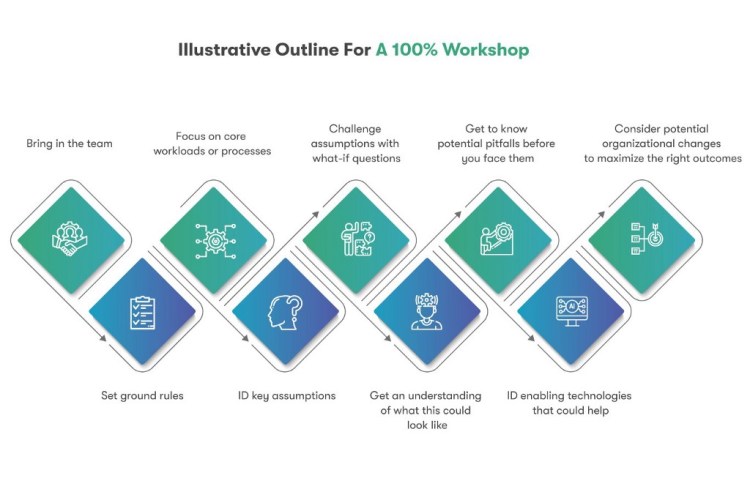
1. Bring in the team. Include people with diverse views and different responsibilities.
2. Set ground rules. This is about exploring the possibilities and ideation, not attacking and blaming…or worse, having people trying to hold onto their territory. Make it safe to explore areas the team might fear.
3. Focus on core workloads or processes. Identify all possible processes, then pick one or two top processes that could have the biggest impact. Be sure to consider both cost savings and revenue-generating processes.
4. ID key assumptions. The processes are designed and operate based on assumptions about people, technology, budget, culture, and goals. Start asking why. Why are things like they are? Ask why again, and again.
5. Challenge assumptions with what-if questions. After the why questions, ask what if. What if we could automate this? What if we had that data? What if……?
6. Get an understanding of what this could look like: If we could get to 100%, what would the outcome be? What business impact might we achieve?
7. Get to know potential pitfalls before you face them. What specific challenges would we need to overcome? Data, people, technology?
8. ID enabling technologies that could help. What tech would we need? How could AI help us?
9. Consider potential organizational changes to maximize the right outcomes. How would we need to restructure and align the org to achieve our 100% goals?
The workshop deliverable is an outline of what AI-based process automation you could do and what bottlenecks must be addressed to achieve the 100% automation goal.
3. Part-of-Speech tagging tutorial with the Keras Deep Learning library
Remember, these are the very questions some nimble startup is asking about your business right now. The risk is that a competitor figures this out before you do and creates their own competitive advantage using AI enablement.
A 100% Automation Customer Example
One Infrrd client wanted to implement a 100% automated insurance claim process. Such a process would give them a competitive advantage over other providers.
After collaborating on the 100% question, we found the most critical bottleneck in need of a fix was accurately extracting data trapped in various unstructured documents and images.
If we could help them automate data extractionwith a high degree of accuracy, the claim process could run using straight-through processing — with minimal human involvement. We removed the data extractionbottleneck for them…Today, they operate right on the cusp of 100%.
Ask the Right Question
AI is a great technology that can drive real business impact. But, if you don’t ask the right questions, AI enablement will not generate the business results you expect.
Consider this article as an encouragement to ask the big, system-level questions!
Don’t ask can we achieve 100% automation for an end-to-end process or workload?
That answer will likely be no.
Instead, ask how do we achieve 100% automation for an end-to-end process or workload?
We find these questions help our clients gain clarity around AI enablement and open up real possibilities for significant business performance improvements.
Want some help asking the 100% automation question in your organization?
Want additional tips or help in running your workshop? Just ask. We are here to help.
Can you achieve 100% AI automation? was originally published in Becoming Human: Artificial Intelligence Magazine on Medium, where people are continuing the conversation by highlighting and responding to this story.
Via https://becominghuman.ai/can-you-achieve-100-ai-automation-72fb6b1a5d37?source=rss—-5e5bef33608a—4
source https://365datascience.weebly.com/the-best-data-science-blog-2020/can-you-achieve-100-ai-automation
Originally from KDnuggets https://ift.tt/3aMM4BV
Originally from KDnuggets https://ift.tt/2VMBl6d
Originally from KDnuggets https://ift.tt/2xgpGTP

 365 Data Science