They didnt believe AI can make profits in Crypto trading but when they saw the results of the

They didn’t believe AI can make profits in Crypto trading, but when they saw the results of the first 8 months

We set ourselves a hard goal. In cryptocurrency trading, 95% of crypto traders lose money. Imagine you are an elementary math teacher. You have a class of 30 kids. On a Monday morning, you order your class to tell you how much they get if they multiply 32 with 78. Only one kid gives you the right answer. No matter what year, no matter how old they were, only one. This is pretty much the case of crypto traders. But the kids can use a calculator any time, can they? What about the traders? Can they also have a calculator?

We were looking for the answer!

The b-cube.ai startup was founded in 2018. At the time, there were plenty of articles to read about the spread of AI. The internet was crammed with videos in which Elon Musk or Stephen Hawking warned of the dangers of uncontrolled artificial intelligence. But there were also content on how to use AI in cancer diagnosis. If something is so smart as to be a worthy opponent of cancer, why don’t we use it against the Bitcoin market as well?

Artificial Intelligence Jobs

This idea kept Guruprasad Venkatesha, the CEO of b-cube.ai, awake. Sitting in front of the monitor placed on Morgan Stanley’s white-painted desk, he saw enough of the S&P 500’s red and green candles. He also saw enough account statements and balance sheets. And he had enough experience after years in his former investor analyst firm.

Equities have been trading for more than 400 years. During all this time, traders have accumulated enough knowledge for the next generation of investors.

Trending AI Articles:

1. How to automatically deskew (straighten) a text image using OpenCV

2. Explanation of YOLO V4 a one stage detector

3. 5 Best Artificial Intelligence Online Courses for Beginners in 2020

4. A Non Mathematical guide to the mathematics behind Machine Learning

But what about Cryptocurrencies?

The cryptos didn’t even exist until an unknown person Satoshi Nakamoto, uploaded Bitcoin’s Whitepaper. Moreover, they did not use artificial intelligence for trading. Such technology requires intensive research and development. Not the knowledge you can learn by watching a YouTube video for 20 minutes a day with a mug of green tea.

But then, how can this goal be achieved? How to consistently make a profit in cryptocurrency using AI?

Many try to apply Machine Learning, the subcategory of AI into finance. The AI is excellent in pattern recognition. You can train models to tell the difference between an apple and a pear. So the idea is, if the AI can see patterns in the price data — the chart — it can also tell which direction is the price likely to move next. The AI sees the pattern now, you buy now and you make money.

This couldn’t be further from the truth!

The financial data have different statistical properties which demand a very specific approach. These Machine Learning models are orders of magnitude more complex than theory driven models. They are much harder to design, test and deploy. They are not invented by human understanding. Patterns never have been found by human researchers using only their intuition. The amount of data and noise is simply too enormous for a human mind to grasp. This is directly related to the concept of “microscopic alpha” introduced by López de Prado: the easy correlations that could be found out by human intuition have already been exhausted, and more sophisticated techniques are increasingly required to keep on extracting alpha.

The turning point

In March 2019, the b-cube project entered their incubation program of Centrale Supélec. Thanks to this program, we could get a partnership with the Paris-Saclay University. Which is the number 1 mathematics university in the world. This meant we had access to the university’s quantitative finance lab, professors and could also accept interns. That’s how Francois joined the team. A brilliant AI engineer whose story is also fascinating. As a true officer of the French Army, Francois showed extreme work ethics.

Francois and our CTO, Erwan along with the tech department have been working intensively for months. It was also not uncommon for them to work 16–18 hours a day under a lamplight while the morning birds began to sing from outside.

Our mentor, Dr. Damien Challet, a professor at the university personally guided the research work.

Our usage of AI for crypto trading

1) Use of sentiment analysis, based on social media and news. We absorb these data, store, filter and process them with NLP (Natural Language Processing) in real time. We evaluate the sentiment of the market about a given cryptocurrency. The market is highly driven by sentiment, which can be positive or negative, greed or fear.

2) Use of machine learning to absorb different uncorrelated features and detect patterns in multiple dimensions, which can be related to price and volume (endogenous data), sentiment analysis (once processed by our sentiment analysis engine) or blockchain related data (volume of transactions, speed of mining, size and move happening on “wallet of the whales”, etc.).

Instead of considering the craft of producing individual strategies in what really is an artisanal way, our approach is to produce them in batches industrially, within a pipeline that allows proper testing, deployment, and selection (what we call meta-strategies).
What were the results?
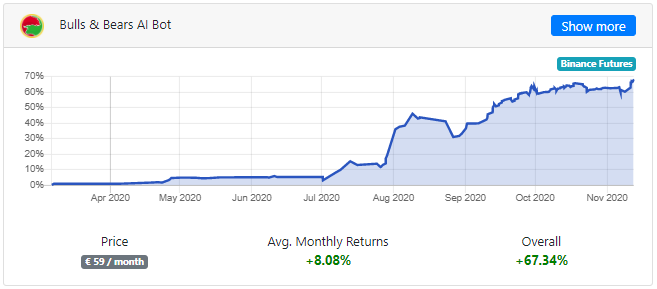
From March to July 2020, we achieved a profit of +15.32%. But then there was a big leap. By August 9, we were already at +46.1%. This result was already satisfactory. From March to October 2020, we have achieved a +65.84% of profits.

We made our AI Bot public today.
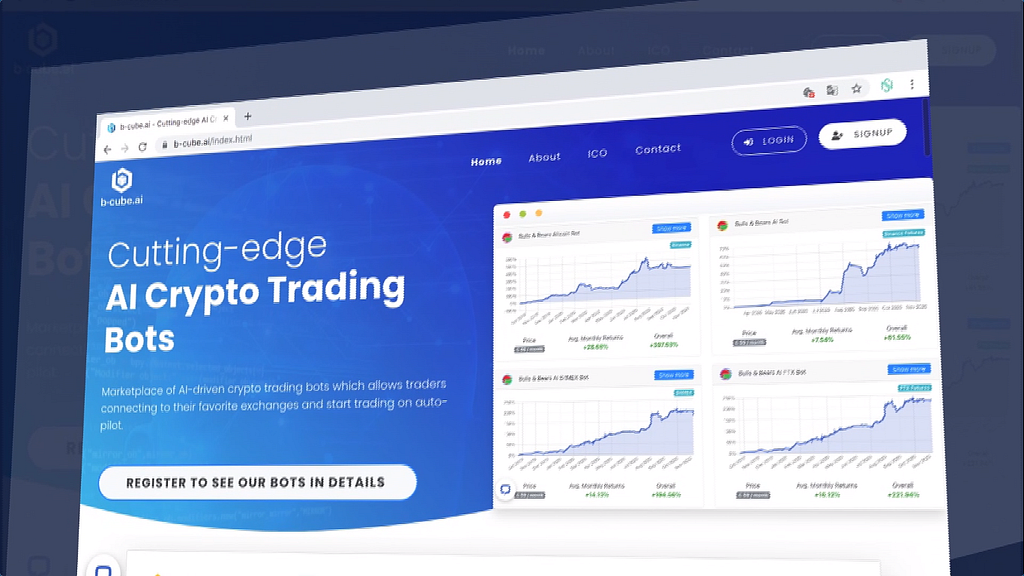
From now on, you can put to work the same Bot that we have benefited over 60% in the last 8 months. This will require a Binance Futures account and a subscription that costs € 59 per month. The Binance account requires API integration. If this is a bit complicated or you don’t have an account, check out our website for more help:

In the end, we can say that it is indeed possible to make a consistent profit in cryptocurrency markets. And this is no longer exclusive, but available to retailers. Look at past results and calculate how you would have performed on your own account. We have uploaded all the trades so far to the website. Their start and end dates are available. The pair traded, the result brought, etc. These results can be tracked by anyone on our website. Register and select the Bulls & Bears AI Bot!

“Amateurs develop individual strategies, believing that there is such a thing as a magical formula for riches. In contrast, professionals develop methods to mass-produce strategies. The money is not in making a car, it is in making a car factory.” — López de Prado, 2018

DISCLAIMER

Trading cryptocurrencies involves risk. The information provided on this website does not constitute investment advice, financial advice, trading advice, or any other sort of advice and you should not treat any of the article’s content as such. Author, website or the company associated with them does not recommend that any cryptocurrency should be bought, sold, or held by you. Do conduct your own due diligence and consult your financial advisor before making any investment decisions.

Don’t forget to give us your ? !


They didn’t believe AI can make profits in Crypto trading, but when they saw the results of the… was originally published in Becoming Human: Artificial Intelligence Magazine on Medium, where people are continuing the conversation by highlighting and responding to this story.


Via https://becominghuman.ai/they-didnt-believe-ai-can-make-profits-in-crypto-trading-but-when-they-saw-the-results-of-the-4347f5f37fb0?source=rss—-5e5bef33608a—4

source https://365datascience.weebly.com/the-best-data-science-blog-2020/they-didnt-believe-ai-can-make-profits-in-crypto-trading-but-when-they-saw-the-results-of-the

5 Most Useful Machine Learning Tools every lazy full-stack data scientist should use

If you consider yourself a Data Scientist who can take any project from data curation to solution deployment, then you know there are many tools available today to help you get the job done. The trouble is that there are too many choices. Here is a review of five sets of tools that should turn you into the most efficient full-stack data scientist possible.

Originally from KDnuggets https://ift.tt/36JrcM0

source https://365datascience.weebly.com/the-best-data-science-blog-2020/5-most-useful-machine-learning-tools-every-lazy-full-stack-data-scientist-should-use

KDnuggets News 20:n44 Nov 18: How to Acquire the Most Wanted Data Science Skills; Learn to build an end to end data science project

How to get the most wanted Data Science skills; How to build and end to end Data Science project; How to get into Data Science without a degree; Top Python Libraries for Deep Learning, Natural Language Processing, and Computer Vision; Is Data Science for you? 14 self-examination questions to consider; and more

Originally from KDnuggets https://ift.tt/2UBNtpp

source https://365datascience.weebly.com/the-best-data-science-blog-2020/kdnuggets-news-20n44-nov-18-how-to-acquire-the-most-wanted-data-science-skills-learn-to-build-an-end-to-end-data-science-project

Using AWS CLI to host and deliver web content in a snap

The present generation is shifting to the online world and day by day cloud services are used at peak. AWS is one of the greatest cloud services to be used. In the world of automation AWS CLI is used widely on servers. Major advantage of AWS CLI is it helps us to access AWS services via our command line instead of going on AWS console.

AWS provides a useful service known as EBS(Elastic Block Storage) which is a block storage. EBS is used as a root drive where we install operating systems. In the current world our data is very important and to keep our data safe from losses we use extra storage(EBS) to save the data and can be retrieved back on sudden termination of an EC2 instance.

In this fast paced world data retrieving should be fast enough and people who are accessing our website may face some latency issues due to distance between client and provider. To enhance this process we use CloudFront service provided by AWS. CloudFront is a service in AWS which provides content delivery as a service. CloudFront helps us to host our website worldwide on AWS servers as a cache which is like an image stored in different AWS regions so clients can access the website(image) from the nearest Edge Location.

Artificial Intelligence Jobs

Trending AI Articles:

1. How to automatically deskew (straighten) a text image using OpenCV

2. Explanation of YOLO V4 a one stage detector

3. 5 Best Artificial Intelligence Online Courses for Beginners in 2020

4. A Non Mathematical guide to the mathematics behind Machine Learning

What is AWS ?

Amazon Web Services (AWS) is the world’s most comprehensive and broadly adopted cloud platform, offering over 175 fully featured services from data centers globally. Millions of customers — including the fastest-growing startups, largest enterprises, and leading government agencies — are using AWS to lower costs, become more agile, and innovate faster.

What is AWS CLI ?

The AWS Command Line Interface (CLI) is a unified tool to manage your AWS services. With just one tool to download and configure, you can control multiple AWS services from the command line and automate them through scripts.

What is EBS ?

Amazon Elastic Block Store (EBS) is an easy to use, high performance block storage service designed for use with Amazon Elastic Compute Cloud (EC2) for both throughput and transaction intensive workloads at any scale.

What is S3 ?

Object storage built to store and retrieve any amount of data from anywhere. Get started with Amazon S3. Request more information. Amazon Simple Storage Service (Amazon S3) is an object storage service that offers industry-leading scalability, data availability, security, and performance.

What is CloudFront ?

Amazon CloudFront is a fast content delivery network (CDN) service that securely delivers data, videos, applications, and APIs to customers globally with low latency, high transfer speeds, all within a developer-friendly environment.

So lets begin this task !!

? The architecture includes ?

  • Create IAM User.
  • Configure Profile for AWS CLI
  • Create a Key Pair.
  • Create a Security Group.
  • Launch a EC2 Instance using the above Key Pair and Security Group.
  • Create a EBS Volume of 1GB.
  • Attach the above create volume to the Instance created.
  • Configure a Webserver on EC2 Instance.
  • Mount /var/www/html to the attached EBS volume (Block Device) to make the location persistent.
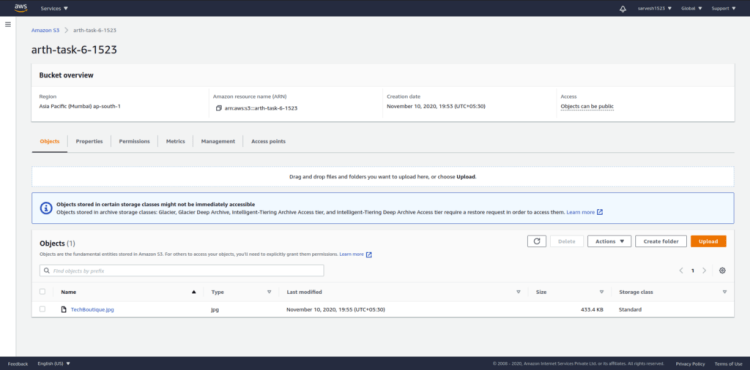
  • Create S3 Bucket and place the static object in the bucket and make it publicly accessible.
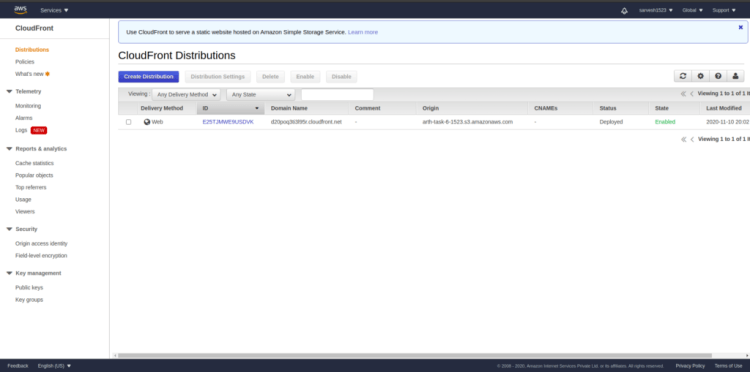
  • Create and setup Content Delivery Network using CloudFront using the origin domain of S3 bucket .
  • Use the Cloud Front Domain in the webapp instead of S3 domain name for security and low latency during access.

Before starting our work we require you to set up your system to have a smooth sail throughout this article. Its gonna be a little long so stay with us and you will see it all working at the end.

Pre-requisites:

1. Install and Configure AWS CLI version 2.

Installing, updating, and uninstalling the AWS CLI version 2 on Linux

2. Create AWS IAM User.

Steps to Create AWS IAM User –

  • Login to the AWS Management Console as a root user.

Amazon Web Services (AWS) – Cloud Computing Services

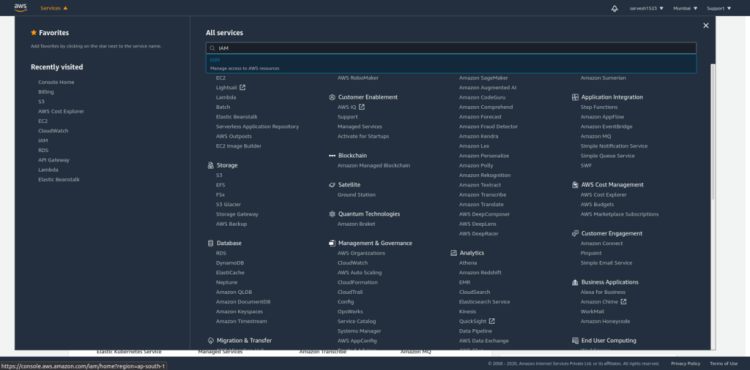
  • Search for a IAM in AWS Services.
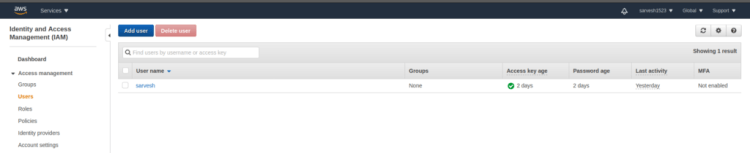
  • Click on the users and then click on Add User.
  • Enter unique Username, select Access Type based on the requirements, choose auto-generated password, uncheck Require password reset.

Access Type :-

Programmatic access — Enables an access key ID and secret access key for the AWS API, CLI, SDK, and other development tools.

AWS Management Console access — Enables a password that allows users to sign-in to the AWS Management Console.

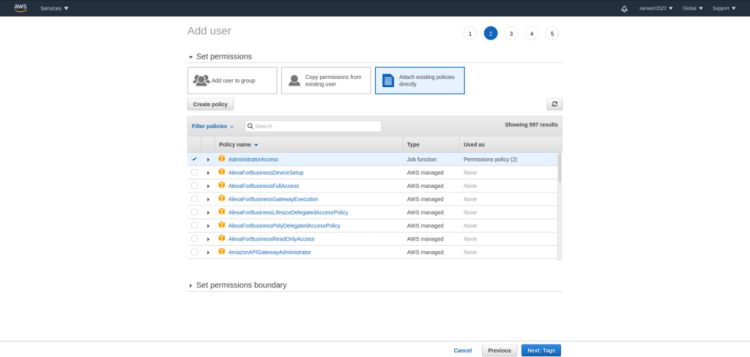
  • Click on Next Permission, then click Attach existing policies directly and select AdministratorAccess.

AdministratorAccess— Provide all the powers to users except billing.

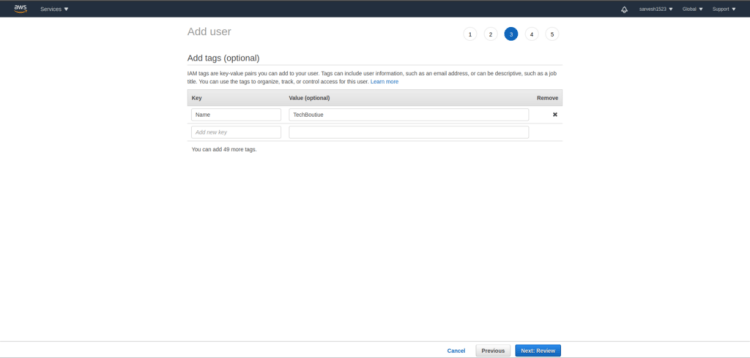
  • Click Next Tags and add appropriate tags. Ex – Name: TechBoutique

Note: There is no limit for tags, we can add n no. of tags.

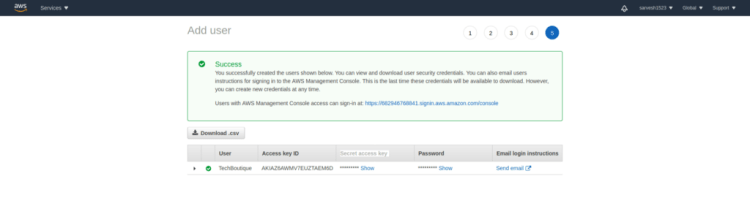
  • Review the User Permissions and click the Create User once user is created download the CSV contains Access Key ID and Secret Access Key.

Note: Keep the CSV safe, don’t share the Access Key ID and Secret Access Key with anybody.

Amazing! ? you are done with the pre-requisite setup.

Step 1

Configure the AWS Command Line Interface (AWS CLI) and specify the settings for interacting with AWS.

Here we will configure the AWS CLI for rest of the work.

  • We will setup the AWS Access Key Id, present in the CSV downloaded during pre-requisite.
  • We will setup the AWS Secret Access Key.
  • We will setup the Default Region Name.
  • We will setup the Default Output Format.

Note: This step we need to do only once.

# run only once and enter the details
aws configure

Step 2

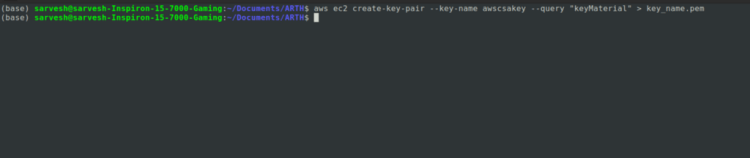
Here we will create a new Key Pair using a AWS CLI, and save the private key(.pem) in a file which will be needed at the later point of time.

Key Pair — A key pair, consisting of a private key and a public key, is a set of security credentials that you use to prove your identity when connecting to an instance.

aws ec2 create-key-pair --key-name awscsakey --query "keyMaterial" > awscsakey.pem

Output

  • Local File System
  • AWS Management Console

Step 3

This step we will be creating a Security Group which we named as SecurityGroupForCLI.

Security Group — A security group acts as a virtual firewall for your instance to control inbound and outbound traffic. When you launch an instance in a VPC, you can assign up to five security groups to the instance.

aws ec2 create-security-group --description Security_group_using_AWS_CLI --group-name SecurityGroupForCLI

Output

Note: The Security Group is created but there is no inbound and outbound rules are attached by default .

Step 4

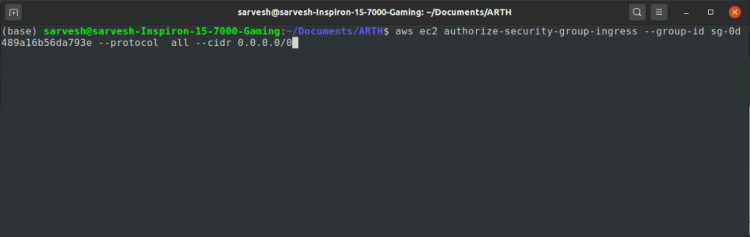
Once the security group is created, we need to add the rules for Inbound and Outbound, in our case we added the rules for inbound where we allowed all traffic from anywhere (entire world) using the AWS CLI.

aws ec2 authorize-security-group-ingress --group-id sg-0d489a16b56da793e --protocol  all --cidr 0.0.0.0/0

Output

Step 5

Now once the Key pair and Security Group is created and also the inbound and outbound rules are added, its a right time to create a AWS EC2 instance.

EC2 — Amazon Elastic Compute Cloud (Amazon EC2) is a web service that provides secure, resizable compute capacity in the cloud. It is designed to make web-scale cloud computing easier for developers.

To create the EC2 instance using the AWS CLI. We need the following information.

  • Image Id
  • Instance type
  • Security Group Id
  • Subnet Id
  • Key Name
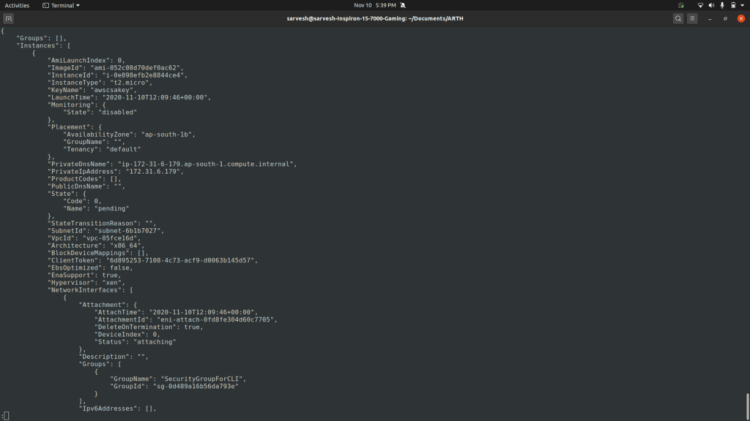
aws ec2 run-instances --image-id ami-052c08d70def0ac62 --security-group-ids sg-0d489a16b56da793e --instance-type t2.micro --subnet-id subnet-6b1b7027 --key-name awscsakey

Output

  • Console/Terminal
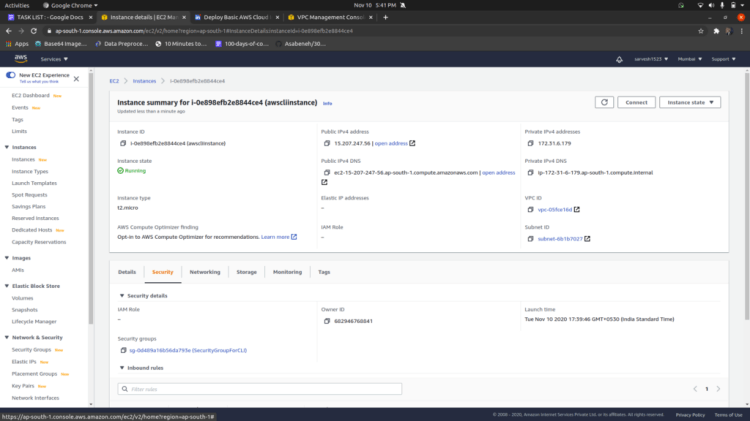
  • AWS Management Console

Cross check the instance details that we have used the above created resources.

Step 6

Now we will create the EBS volume of 1 GB to make our code persistent or safe the code from any loss. Create the EBS volume in the region where EC2 instance is created.

EBS(Elastic Block Storage) Amazon Elastic Block Store (EBS) is an easy to use, high performance block storage service designed for use with Amazon Elastic Compute Cloud (EC2) for both throughput and transaction intensive workloads at any scale.

aws ec2 create-volume --availability-zone ap-south-1b --size 1 --volume-type gp2

Output

  • Console/Terminal
  • AWS Management Console

Step 6

Once we are ready with EC2 instance and EBS Volume, now we need to connect them with each other. For that we need the following information.

  • Instance Id
  • Volume Id
aws ec2 attach-volume  --instance-id i-0e898efb2e8844ce4  --volume-id vol-0cb41c3d139b8a9a8  --device /dev/xvdh

Great! ? you have created EC2 instance, EBS Volume and successfully attach them together.

Now we are going to setup Cloud Front for Content Delivery Network.

Step 7

Login to the EC2 instance using SSH Protocol in case of Linux. In case of Windows use Putty to do SSH to the EC2 instance.

# Change the permission of private key file.
chmod 400 awscsakey.pem
# SSH to EC2 instance using Private Key.
ssh -i "awscsakey.pem" ec2-user@ec2-13-232-153-64.ap-south-1.compute.amazonaws.com

Step 8

Now we need to format, partition and mount the connected EBS disk to the folder in a instance.

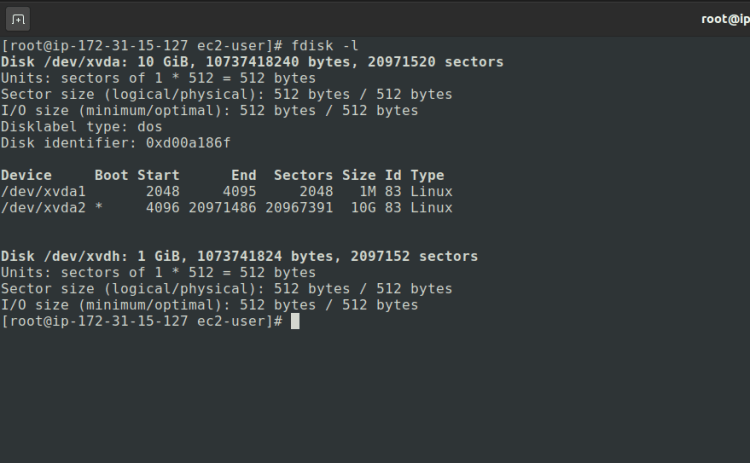
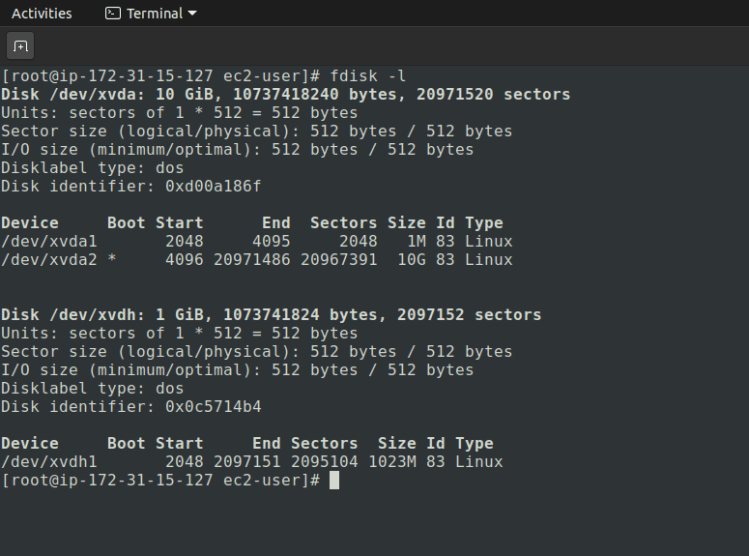
Check the partitions available in the instance.

# command to check the partitions available in the instances
fdisk -l

First we need to format the disk attached to the instance.

mkfs.ext4 /dev/xvdh

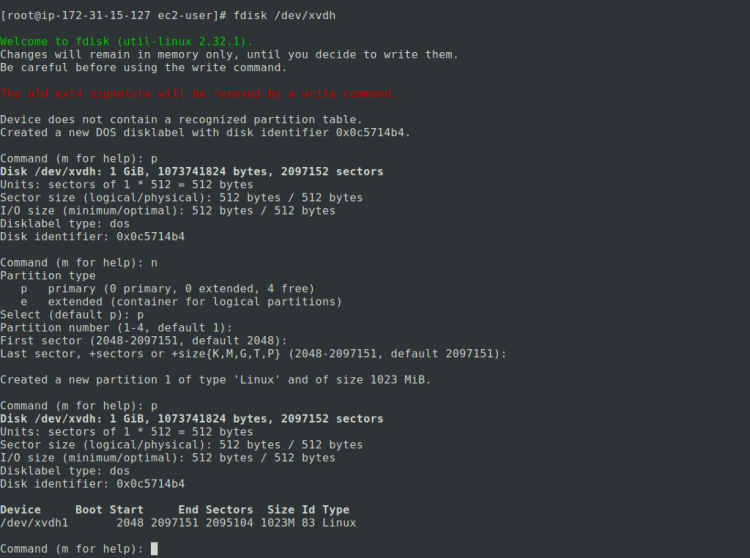
Second we need to create and configure the partitions.

# command to start partition process
fdisk /dev/xvdh
# write the following options
# select p to the the details of the partitions available

p
# select n to create a new partition
n
# select p for the primary or e for extended partition
p
# Select the number of partitions 1-4
1
# Starting of the first sector, starting from 2048 as a default.
Press Enter without any changes
# Ending of the sector, ending at 2097151 as default(entire size)
Press Enter without any changes
# Press p to see the details of the partition
p

Check the partitions available in the instance.

# command to check the partitions available in the instances
fdisk -l

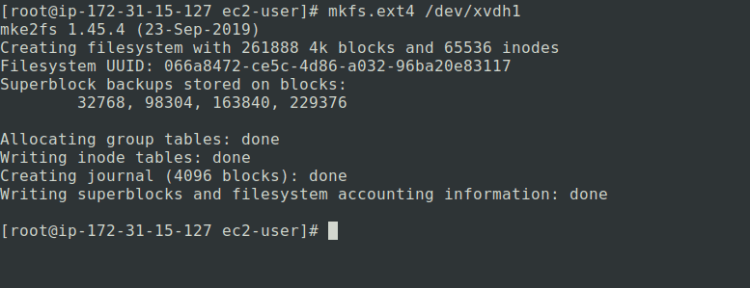
Third format the recently created partition.

mkfs.ext4 /dev/xvdh1

Step 9

Now it’s a time to setup the httpd server, for that first we need to install the httpd server using the following command.

dnf install httpd

Output

To check whether the httpd server is running run the following command.

systemctl status httpd 

Step 10

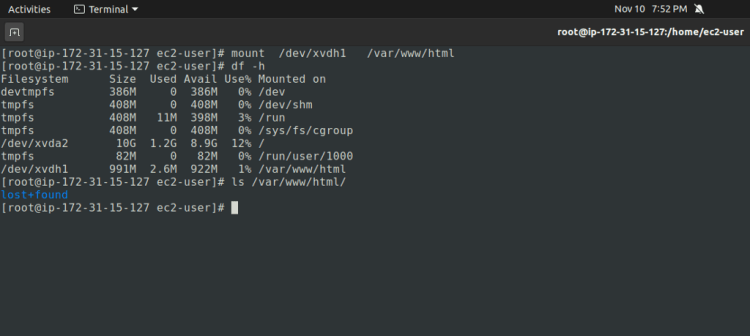
Once the httpd server is setup, we need to mount the formatted partitions created in the step 8 to the /var/www/html to make the location persistent.

mount /dev/xvdh1 /var/www/html

So, whatever we will store in /var/www/html location will be stored in 1GB EBS volume. So, in any failure we can easily retrieve the data.

Step 11

For store any object like images, videos, files etc we need to use S3 bucket. S3 is a global service we need not to worry about the region where to create. To create the same we need to run the following command.

aws s3api  create-bucket  --bucket arth-task-6-1523  --region ap-south-1   --create-bucket-configuration LocationConstraint=ap-south-1

Output

Once the bucket is ready, store some images or any data which you want to show or use in your website or web-application and provide the public access to it.

Step 12

For showing our website we need to create a code base for our website and then copy the files to /var/www/html, as httpd server reads the file from the same folder.

  • change the dir to /var/www/html, create index.html and copy the below code.
# change to root user
sudo su
cd /var/www/html
vi index.html
# copy the code
# press esc

:wq
# press enter
  • restart the httpd server.
# restart the server
systemctl restart httpd
# html code
<!DOCTYPE html>
<html>
<head>
<meta name="viewport" content="width=device-width, initial-scale=1">
<link rel="stylesheet" href="https://cdnjs.cloudflare.com/ajax/libs/font-awesome/4.7.0/css/font-awesome.min.css">
<style>
.fa {
padding: 20px;
font-size: 30px;
width: 30px;
text-align: center;
text-decoration: none;
margin: 5px 2px;
border-radius: 50%;
}
.fa:hover {
opacity: 0.4;
}
.fa-github {
background: #24292E;
color: white;
}
.fa-linkedin {
background: #007bb5;
color: white;
}
.fa-instagram {
background: #125688;
color: white;
}
.fa-medium {
background: #117A65;
color: white;
}
.fa-rss {
background: #808080;
color: black;
}
img {
border-radius: 50%;
}
.a {
opacity: 0.9
background: #808080;
}
</style>
</head>
&nbsp
<p>
<body bgcolor="white" class=a>
<center><img src="http://d20poq3ti3l95r.cloudfront.net/TechBoutique.jpg" alt="Sami" style="width:200px">
<h2><font face = "Verdana" size = "6">TechBoutique Automation Hub</font></h2>
<h4><font face = "Verdana" size = "4">Blogger || Arth Learner || Developer </font></h4>
<a href="https://github.com/TechBoutique" class="fa fa-github"></a>
<a href="https://medium.com/@techboutique.official" class="fa fa-medium"></a>
</center>

</body>
</body>
</html>

Step 13

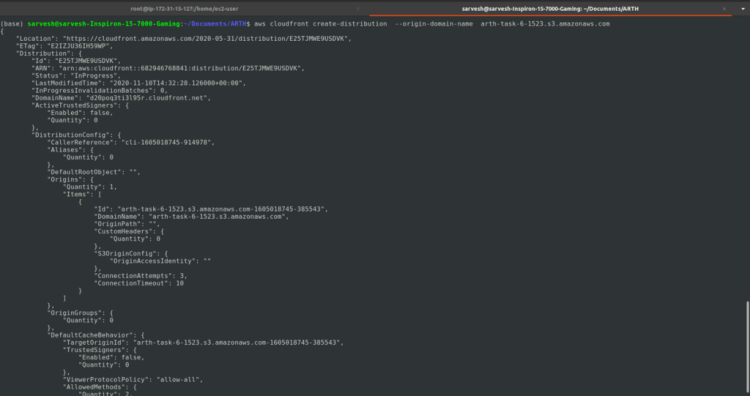
Finally after the completion of the previous steps its a time to move to the last step to create CloudFront and use the Cloud Front Domain to our code. For creating the cloudfront we need s3 domain.

aws cloudfront create-distribution  --origin-domain-name  arth-task-6-1523.s3.amazonaws.com

Output

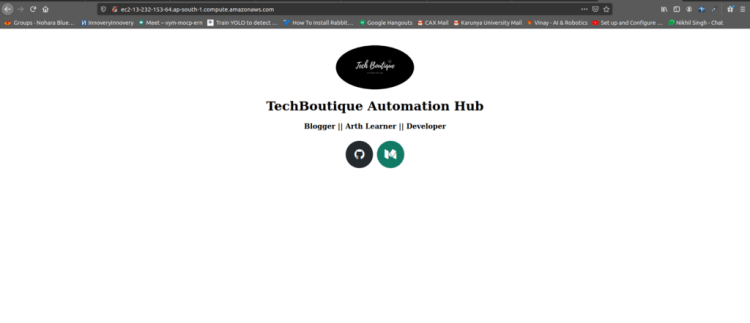
Now use the CloudFront domain in place of s3 domain in image tag of html code.

Now access the website using the public domain or public ip of the EC2 instance.

Hurray!! you have successfully completed the entire process.

WE HOPE YOU HAVE LEARNED SOMETHING NEW! ?

Leave a comment, or contact us for any doubts at

? TechBoutique.official@gmail.com

Don’t forget to give us your ? !


Using AWS CLI to host and deliver web content in a snap was originally published in Becoming Human: Artificial Intelligence Magazine on Medium, where people are continuing the conversation by highlighting and responding to this story.
Via https://becominghuman.ai/using-aws-cli-to-host-and-deliver-web-content-in-a-snap-60e49bf09538?source=rss—-5e5bef33608a—4

source https://365datascience.weebly.com/the-best-data-science-blog-2020/using-aws-cli-to-host-and-deliver-web-content-in-a-snap

How To Describe a Dataset For A Computer Vision Classification Problem

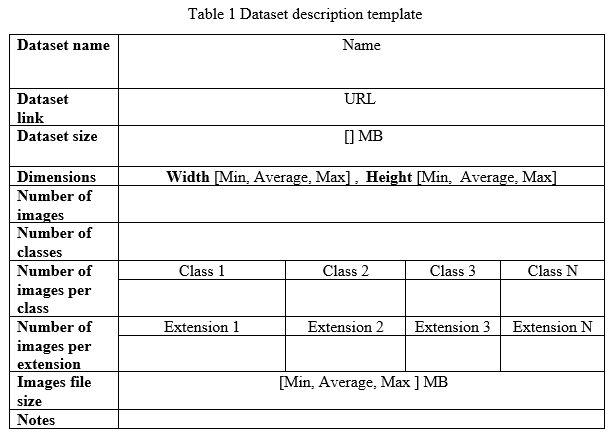
As a data scientist I worked on several machine learning and deep learning projects related to the computer vision field. In each project, I was asking myself how to choose the best dataset, and I realized that an accurate and well-organized description would give me the right answer. In this article, I would like to share with you the following table (table 1) which I developed to describe a dataset of images for classification projects in machine learning.

  • General information: Dataset name, link, and size.
  • Images dimensions: Dimension range for both width and height gives you a better idea about the images and about the transformation that you may apply, also an average value gives you an intuition about the dimension value for most images.
  • Number of images: · Depending on the problem you want to solve, there will be an acceptable number that you can deal with. But if the problem is very complex, then this number may need to be sufficient to cover all the possible cases.
  • Number of classes: The number of classes will help you choose and set up a ML/DL algorithm.
  • Number of images per class: It is very important to know whether the dataset is balanced or imbalanced as it will affect the whole process of training and validating of the ML/DL model.
  • Number of images per extension: Sometimes we are interested in a specific image extension. This info will help you to know the portion of images per extension
  • Images File size: Will give you an intuition about the images file size distribution.
  • Notes: This is useful if you want to add some additional information or notes about the dataset. (such as permissions, ethics…etc)
Artificial Intelligence Jobs

Trending AI Articles:

1. How to automatically deskew (straighten) a text image using OpenCV

2. Explanation of YOLO V4 a one stage detector

3. 5 Best Artificial Intelligence Online Courses for Beginners in 2020

4. A Non Mathematical guide to the mathematics behind Machine Learning

In order to understand the idea better let me show you a quick demo. The following table (Table 2) shows a description of a Covid19 dataset from Kaggle website.

This is all for this article, I hope you find it useful, and would you please share with me your ideas about the discussed topic.

Don’t forget to give us your ? !


How To Describe a Dataset For A Computer Vision Classification Problem was originally published in Becoming Human: Artificial Intelligence Magazine on Medium, where people are continuing the conversation by highlighting and responding to this story.
Via https://becominghuman.ai/how-to-describe-a-dataset-for-a-computer-vision-classification-problem-7a93b43903d5?source=rss—-5e5bef33608a—4

source https://365datascience.weebly.com/the-best-data-science-blog-2020/how-to-describe-a-dataset-for-a-computer-vision-classification-problem

AI Is More Than a Model: Four Steps to Complete Workflow Success

The key element for success in practical AI implementation is uncovering any issues early on and knowing what aspects of the workflow to focus time and resources on for the best results—and it’s not always the most obvious steps.
Originally from KDnuggets https://ift.tt/3kBgsUR

source https://365datascience.weebly.com/the-best-data-science-blog-2020/ai-is-more-than-a-model-four-steps-to-complete-workflow-success

Facebook Open Sourced New Frameworks to Advance Deep Learning Research

Polygames, PyTorch3D and HiPlot are the new additions to Facebook’s open source deep learning stack.

Originally from KDnuggets https://ift.tt/2UxAdSw

source https://365datascience.weebly.com/the-best-data-science-blog-2020/facebook-open-sourced-new-frameworks-to-advance-deep-learning-research

Is Data Science for Me? 14 Self-examination Questions to Consider

You are intrigued by this exciting new field of Data Science, and you think you want in on the action. The demand remains very high and the salaries are strong. Before taking the leap onto this path, these questions will help you evaluate if you are ready for the challenges and opportunities.

Originally from KDnuggets https://ift.tt/3lGzCK2

source https://365datascience.weebly.com/the-best-data-science-blog-2020/is-data-science-for-me-14-self-examination-questions-to-consider

Algorithms for Advanced Hyper-Parameter Optimization/Tuning

In informed search, each iteration learns from the last, whereas in Grid and Random, modelling is all done at once and then the best is picked. In case for small datasets, GridSearch or RandomSearch would be fast and sufficient. AutoML approaches provide a neat solution to properly select the required hyperparameters that improve the model’s performance.

Originally from KDnuggets https://ift.tt/38LjuUa

source https://365datascience.weebly.com/the-best-data-science-blog-2020/algorithms-for-advanced-hyper-parameter-optimizationtuning

Design a site like this with WordPress.com
Get started