Also: Ain’t No Such a Thing as a Citizen Data Scientist; Building Neural Networks with PyTorch in Google Colab.
Originally from KDnuggets https://ift.tt/3jO7d3a

365 Data Science is an online educational career website that offers the incredible opportunity to find your way into the data science world no matter your previous knowledge and experience.
Originally from KDnuggets https://ift.tt/3jO7d3a
Originally from KDnuggets https://ift.tt/2I4LlmL
Swarm is a large number of agents interacting locally with themselves. In Swarm there’s no supervisor or central control to give orders of…
Continue reading on Becoming Human: Artificial Intelligence Magazine »
This is my 3rd and final blog post on NumPy in which I will be discussing operations, joining, splitting, and filtering of arrays and also about different math functions available in NumPy.

If you haven’t checked out my first 2 blog posts on Numpy discussing initializing a NumPy array, indexing, and basic functions available. Then check out the link below:
http://www.letsdiscussstuff.in/complete-guide-to-numpy-for-beginners-part-1/
http://www.letsdiscussstuff.in/complete-guide-to-numpy-for-beginners-part-2/

You can perform all basic arithmetic operations like addition, subtraction, multiplication, and division with NumPy arrays.
+, -, * and \ are used to do this.
import numpy as np
arr1 = np.array([1,2,3])
arr2 = np.array([4,5,6])
arr3 = np.array([7,8,9,10])
arr1 + arr2
array([5, 7, 9])
arr1 - arr2
array([-3, -3, -3])
arr1 * arr2
array([ 4, 10, 18])
arr1 / arr2
array([0.25, 0.4 , 0.5 ])
For using these operators, the arrays should be of the same shape, as the operations are done elementwise. As you can see the first element of arr1 + arr2 is 5, which is 1+4.
1. Fundamentals of AI, ML and Deep Learning for Product Managers
3. Graph Neural Network for 3D Object Detection in a Point Cloud
4. Know the biggest Notable difference between AI vs. Machine Learning
If you use, arrays of different sizes then it will result in an ValueError.
arr1 + arr3
---------------------------------------------------------------------------
ValueError Traceback (most recent call last)
<ipython-input-9-9cd496795bf2> in <module>()
----> 1 arr1 + arr3
ValueError: operands could not be broadcast together with shapes (3,) (4,)
Instead of using the operators, you can also use add(), subtract() , multiply() and divide() functions to do the same operation as before. You need to pass the arrays as arguments to the function.
print(np.add(arr1,arr2))
print(np.subtract(arr1,arr2))
print(np.multiply(arr1,arr2))
print(np.divide(arr1,arr2))
[5 7 9]
[-3 -3 -3]
[ 4 10 18]
[0.25 0.4  0.5 ]
You can also perform these operations for only a selected group of elements in an array. Like if you want to add only the first 3 elements of the arrays, then you can use arr1[:3] + arr2[:3]
arr1 = np.array([1,2,3,4,5])
arr2 = np.array([2,3,4,5,6,7,8])
print(arr1[:3] + arr2[:3])
[3 5 7]
See that in this case, the arrays need not be of the same size, but the portions of the array you are adding must be of the same size.
You can add, subtract, multiply, or divide an array with a scalar value. It will perform the operation will all the elements that are present in the array.
arr1 = np.array([1,2,3,4,5])
print(arr1 + 10)
print(arr1 - 10)
print(arr1 * 10)
print(arr1 / 10)
[11 12 13 14 15]
[-9 -8 -7 -6 -5]
[10 20 30 40 50]
[0.1 0.2 0.3 0.4 0.5]
There are several functions available to find the sine of the values, exponent of the values in the NumPy array. If you use any of the functions, then the operations will be performed on the entire array.
np.sin() – gives the sine of the values in the array.,
import numpy as np
arr = np.array([1,2,3])
np.sin(arr)
array([0.84147098, 0.90929743, 0.14112001])
np.cos() – gives the cosine of the values in the array
np.tan() – gives the tangential value of the elements in the array
Similarly, functions are available for other trigonometric operations too — arcsinh(), arccosh() and arctanh() which will output the inverse hyperbolic values of the elements.
print(np.cos(arr))
print(np.tan(arr))
[ 0.54030231 -0.41614684 -0.9899925 ]
[ 1.55740772 -2.18503986 -0.14254654]
np.exp() – gives the exponential value of the elements in the array.
np.log() – gives the logarithmic value of the elements in the array.
print(np.exp(arr))
print(np.log(arr))
[ 2.71828183  7.3890561  20.08553692]
[0.         0.69314718 1.09861229]
np.sqrt() – gives the square root of the elements in the array
print(np.sqrt(arr))
[1. 1.41421356 1.73205081]
In some cases, NumPy will just show warnings and not produce an error, if you pass arguments that do not match with the function. Like in np.log() function, if you pass zero0 which should never be passed into a log function, then it will just show a warning and will not show any error, as it will stop the whole program from running.
print(np.log(0))
-inf
/usr/local/lib/python3.6/dist-packages/ipykernel_launcher.py:1: RuntimeWarning: divide by zero encountered in log
  """Entry point for launching an IPython kernel.
You know that dot products element wise multiplication of 2 arrays and then adding them to get the final output. You can do it by using np.dot() function in NumPy.
arr1 = [1,2,3]
arr2 = [4,5,6]
print(np.dot(arr1,arr2))
32
np.concatenate() the function is used to join 2 arrays. The second array will be joined at the end of the first array if you pass axis=0.
arr1 = np.array([1,2,3])
arr2 = np.array([4,5,6])
arr3 = np.concatenate((arr1,arr2),axis=0)
arr3
array([1, 2, 3, 4, 5, 6])
To join 2d arrays, along the rows, then you need to use axis=1.
arr1 = np.array([[1,2],[3,0]])
arr2 = np.array([[0,7],[2,1]])
arr3 = np.concatenate((arr1,arr2),axis=1)
arr3
array([[1, 2, 0, 7],
       [3, 0, 2, 1]])
For joining them along the column, use axis=0.
arr3 = np.concatenate((arr1,arr2),axis=0)
arr3
array([[1, 2],
       [3, 0],
       [0, 7],
       [2, 1]])
You can also use stacking to join arrays. hstack() is used to stack along rows and vstack() is used to stack along columns. Pass the arrays you need to stack as arguments to the function.
arr1 = np.array([[1,2],[3,0]])
arr2 = np.array([[0,7],[2,1]])
arr3 = np.vstack((arr1,arr2))
arr4 = np.hstack((arr1,arr2))
print(arr3)
print("    ")
print(arr4)
[[1 2]
 [3 0]
 [0 7]
 [2 1]]
[[1 2 0 7]
 [3 0 2 1]]
sort() the function is used to sort arrays in NumPy.
arr1 = np.array([1,2,5,6,7,3,4])
arr1.sort()
arr1
array([1, 2, 3, 4, 5, 6, 7])
There is no separate operation for sorting an array in descending order. But you can use arr1[::-1].sort() to sort in descending order.
arr1 = np.array([1,2,5,6,7,3,4])
arr1[::-1].sort()
arr1
array([7, 6, 5, 4, 3, 2, 1])
In the case of 2-D arrays, the array will be sorted row-wise.
arr1 = np.array([[1,2,6,5],[7,3,4,8]])
arr1.sort()
arr1
array([[1, 2, 5, 6],
       [3, 4, 7, 8]])
For alphabetical values, the array will be started alphabetically in a lexicographical manner.
arr1 = np.array(['sheep','apple','bat','dog','camel'])
arr1.sort()
arr1
array(['apple', 'bat', 'camel', 'dog', 'sheep'], dtype='<U5')
First, check whether the elements in the array are following a certain condition and store the boolean values in a separate array.
arr1 = np.array([1,2,3,5,4,8,7])
filter=[]
for i in arr1:
  if i>=4:
    filter.append(True)
  else:
    filter.append(False)
Pass this filter into the array, to get only the required values.
arr1[filter]
array([5, 4, 8, 7])
You can also pass the function directly into the array to get the final output.
print(arr1[arr1>=4])
[5 4 8 7]
See that both of them give the same output.
That’s it we have come to the end of the blog post. Thanks for reading through my blog post series. If you like my blog post, make sure you give it a like and subscribe to my website — Let’s Discuss Stuff if you want to get notified for more content like this.
Next Series: Complete Guide to Seaborn for Beginners




Complete Guide to Numpy for Beginners — Part 3 was originally published in Becoming Human: Artificial Intelligence Magazine on Medium, where people are continuing the conversation by highlighting and responding to this story.

Machine Learning Projects solved and explained for free
Continue reading on Becoming Human: Artificial Intelligence Magazine »
Originally from KDnuggets https://ift.tt/34Qu5uG
Originally from KDnuggets https://ift.tt/3jWB3lY
source https://365datascience.weebly.com/the-best-data-science-blog-2020/topic-modeling-with-bert
Originally from KDnuggets https://ift.tt/386k92i
Originally from KDnuggets https://ift.tt/2Gm7VqL

Content Structure
Part 1:
1. Problem definition and Goals
2. Brief introduction to Concepts & Terminologies
3. Building a CNN Model
Part 2:
4. Training and Validation
5. Image Augmentation
6. Predicting Test images
7. Visualizing intermediate CNN layers
Goal:
Build a Convolutional Neural Network that efficiently classifies images of Dogs and Cats.
Baseline Performance:
We have two classification categories — Dogs and Cats. So the probability for a random program to associate the correct category with the image is 50%. So, our baseline is 50%, which means that our model should perform well above this minimum threshold, else it is useless.
Dataset:
For this problem, we will use the Dogs vs Cats dataset from Kaggle, which has 25000 training images of dogs and cats combined.
You can download the dataset from here: Dogs vs. Cats
Convolutional Neural Networks are a type of Deep Neural Networks. This NN uses Convolutions to extract meaningful information or patterns from the input features, which is further used to build the subsequent layers of neural network computations.
The following image is a visual example of how convolutions work
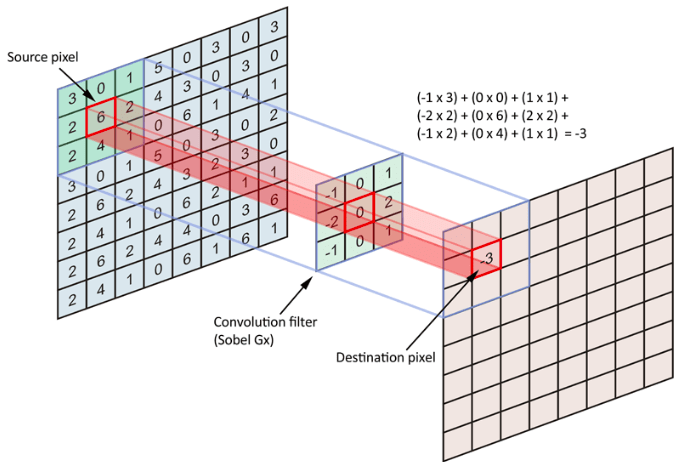
The left-most matrix is our input feature map.
The 3×3 matrix is our convolution filter.
The final matrix at the right is the output feature map.
The dimension of the convolution filter is usually called window size or kernel size of a convolution. This filter contains floating-point values, which can extract a certain pattern from the input feature map.
1. Fundamentals of AI, ML and Deep Learning for Product Managers
3. Graph Neural Network for 3D Object Detection in a Point Cloud
4. Know the biggest Notable difference between AI vs. Machine Learning
The convolution window slides over every possible position on the input feature map and tries to extract patterns. As we see in the image, the convolution filter is nothing but a matrix that holds certain floating-point values. To apply the filter over the input feature map, we extract a patch from the input map with the exact dimension of the filter and perform matrix multiplication. When the same operation is performed over all possible patches in the input feature map, we compile them together as the output feature map.
Convolutional Neural Networks perform amazingly well on Image data and computer vision. Following are a few reasons, why CNN’s perform well on image data:
Convnets: Shorthand representation of Convolutional Neural Networks
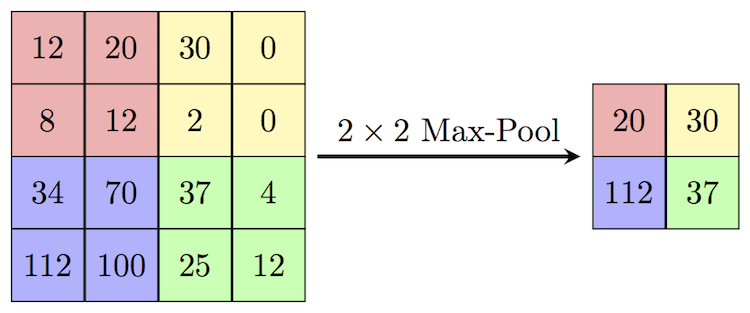
Max Pooling: Max pooling is a technique of aggressive downsampling of the feature map.
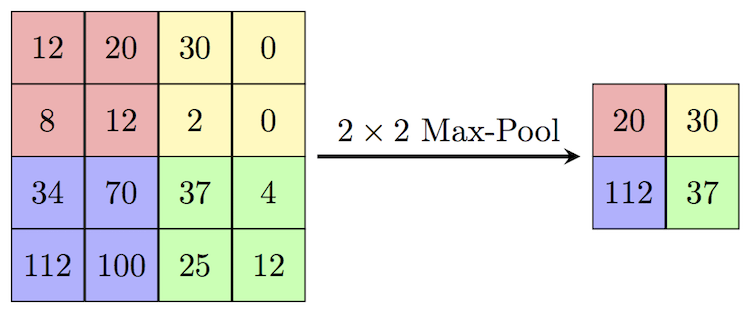
This is a 2×2 Max Pooling example. A 2×2 window slides over the feature map, and extracts only the maximum value from the window frame, and creates a new downsampled feature map. 2×2 MaxPooling with a stride of 2, downsamples the image by half. When 2×2 MaxPooling is applied over the 4×4 matrix, the result will be a 2×2 matrix.
Note: MaxPooling is preferred more over AveragePooling, because, it is more useful to have max value information of a pixel rather than to have the mean value of the values in the window.
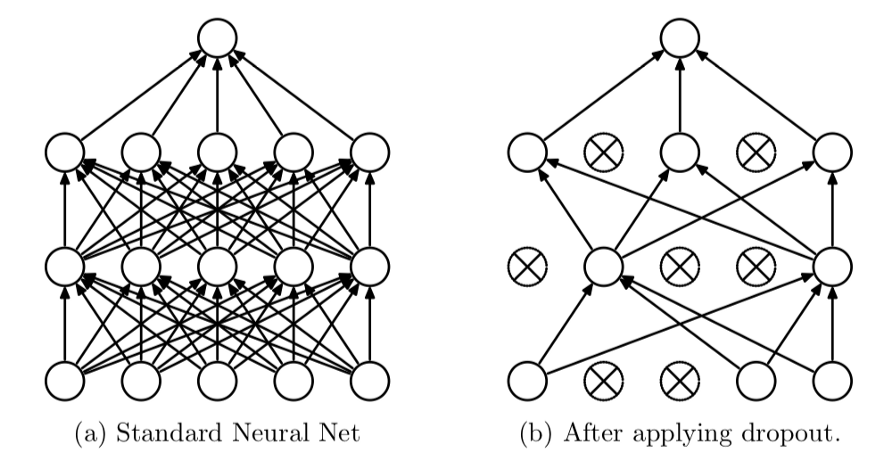
Dropout: Dropout is a popular technique in deep learning, where we ask the system to randomly ignore features in the neural network. This approach is used to prevent the neural network from overfitting and make sure it doesn’t learn some non-important patterns in the input data.

Batch Normalization: Batch Normalization speeds up the training process and helps the model learn from the training data. I highly suggest you look up this video Batch Normalization — EXPLAINED! by CodeEmporium YouTube channel.
For this particular model, we will make use of all these components explained above to build the Convolutional Neural Network to detect cats and dogs.
A Typical CNN:
The following image is a descriptive representation of how a convolutional neural network will look like.
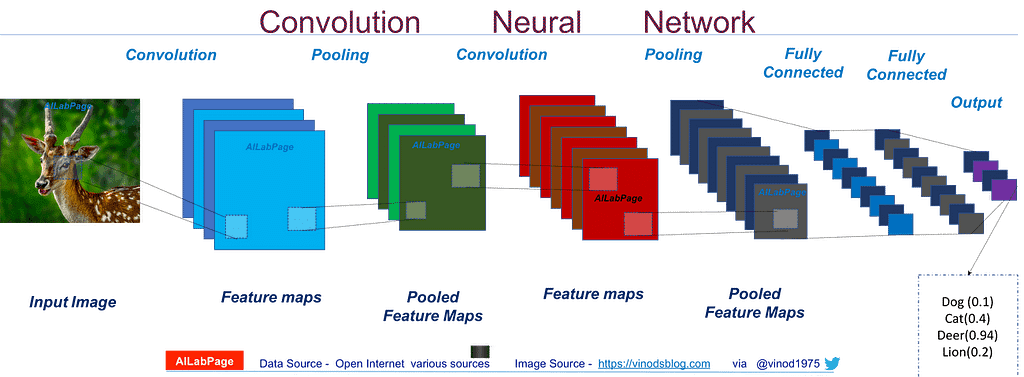
The input image is fed to the neural network. The Convnet then performs convolutions over the input image. Each convolution filter will result in its own output feature map. As we can look at the image, multiple convolutional filters are applied over the input image, as a result, we have transformed a single image into multiple output feature maps(Check the blue blocks).
Each feature map will hold specific information about the image. The number of these layers is called the depth of the channels.
Next, comes the pooling stage. In pooling, we downsize the input feature map, while retaining the most useful information. So, each value in the feature map after max-pooling will represent a larger patch of the input feature map. Max pooling helps convnets to detect more complex patterns with less computing power.
Multiple convolutional layers and max-pooling layers can be arranged successively to form the deep neural network. The number of layers and the depth of each convolutional layer are provided by us, there are no strict guidelines for these hyperparameters and we can experiment on our own to find the combination that works best for our model.
Finally, these convolutional layers are connected to a Dense layer(Fully connected), or a regular neural network. We are free to add multiple layers in this dense layer as well. The final output layer of this neural network will have two nodes, one for each class (Dogs vs Cats). There is another way to approach where we only go for a single output neuron (That outputs the binary value, Is it a cat? yes/no).
Enough of theory, let’s get practical:
Step 1: Creating a Sequential Model. Sequential models indicate that the layers of the neural network are stacked one after another. Convnets use Sequential architecture.
We will make use of the Keras library to build the Convolutional neural network. We will first create a sequential model first, and layers one by one to the network.
from keras import models, layers
# Create a Sequential model
model = models.Sequential()
Step 2: Add a Convolution Layer
IMAGE_SHAPE = (150, 150, 3)
# Create a Conv2D Layer
model.add(layers.Conv2D( filters = 32,
                         kernel_size = (3, 3),
                         activation='relu',
                         input_shape=IMAGE_SHAPE) )
The 2D Convolutional layer is available in the Keras library under the ‘layers’ module. A convolutional layer requires a number of filters, kernel size, and activation hyperparameters to create the object. Additionally, for the first layer of the model, we pass the dimension of the input image as well.
filters: Number of Convolution filters the conv2d layer should create
kernel_size: window size of the convolutional filter
activation: which activation function should the layer use
input_shape: the dimension of the input feature map
For further layers of this network, we need not explicitly provide the dimensions of the input feature map, Keras will calculate the dimensions on its own.
After this step, we have a neural network with a single convolutional layer that creates an output feature map with a depth of 32.
Step 3: Add a BatchNormalization Layer and Dropout layer
The next step is to add Batch Normalization to our neural network. BatchNormalization and Dropout layers are also defined under the Keras.layers module, so we can make use of the library to quickly add the layers to our model.
# Add Batch Normalization layer
model.add(layers.BatchNormalization())
# Add drop out layer with 25% dropout rate
model.add(layers.Dropout(0.25))
BatchNormalization does take input hyperparameters, but for our current problem, it’s not required. If you are interested, you can take a look at the official documentation: BatchNormalization
For the Dropout layer, we pass one parameter, a floating-point value that represents the dropout rate. In the above example, 0.25 represents 25%, so 25% of the output features will be randomly ignored in further computations.
Step 4: Downsizing using MaxPooling
The next step is to create a MaxPooling layer with a 2×2 kernel, which downsamples the input image by half. This helps convolution layers understand more complex patterns.
model.add(layers.MaxPooling2D(pool_size=(2, 2)))
Step 5: Build a deep network
Add more convolution layers(Step 2) to the model, in combination with other layers like MaxPooling2d(Step 4), Dropout, and BatchNormalization(Step 3) to build a deep neural network. You can experiment with the hyperparameters too.
Deeper the network, the deeper the understanding of the data. But a deeper network also means more time for training and requires more computing power. It’s enough to build a model that is borderline complex enough to perform well on the dataset, but not too complex. Extremely complex deep networks might be overkill for the problem at hand.
Here is an example of a deep convolutional network that you can refer
    model = models.Sequential()

    model.add(layers.Conv2D(32, (3, 3), activation='relu', input_shape=IMAGE_SHAPE))
    model.add(layers.BatchNormalization())
    model.add(layers.MaxPooling2D(pool_size=(2, 2)))
    model.add(layers.Dropout(0.20))

    model.add(layers.Conv2D(64, (3, 3), activation='relu'))
    model.add(layers.Conv2D(64, (3, 3), activation='relu'))
    model.add(layers.BatchNormalization())
    model.add(layers.MaxPooling2D(pool_size=(2, 2)))
    model.add(layers.Dropout(0.25))

    model.add(layers.Conv2D(128, (3, 3), activation='relu'))
    model.add(layers.Conv2D(128, (3, 3), activation='relu'))
    model.add(layers.Conv2D(128, (3, 3), activation='relu'))
    model.add(layers.BatchNormalization())
    model.add(layers.MaxPooling2D(pool_size=(2, 2)))
    model.add(layers.Dropout(0.30))

    model.add(layers.Conv2D(256, (3, 3), activation='relu'))
    model.add(layers.BatchNormalization())
    model.add(layers.MaxPooling2D(pool_size=(2, 2)))
Step 6: Add Dense Layers and Output layers
So far the network architecture that we have built is well suited for extracting the patterns from the feature map, but we don’t have a prediction system that helps us classify the input as either dog or a cat. In order to perform the task, we can feed the patterns detected by the convolutional neural network to another dense neural network, which can then classify the images as dogs or cats.
The dense neural networks take 1D tensors as input, while the final output from the convolutional network is a 3D tensor. So we perform the Flatten operation to convert the 3D tensor into a one-dimensional tensor that can be provided as input to the dense/fully connected neural network.
# Flatten the convolutional layer output
model.add(layers.Flatten())
# Create a dense layer with 512 hidden units
model.add(layers.Dense(512, activation='relu'))
# Output layer - 2 Units(Dogs, Cats)
model.add(layers.Dense(2, activation='softmax'))
Dense layer hyperparameters:
units: the first parameter, which takes the number of hidden units in this particular layer.
activation: activation function that the neurons of this layer should use.
The final output layer of this dense layer contains two neurons, one for dog and the other for the cat. Using SoftMax activation outputs a probabilistic value for each category.
For example, let’s assume the first neuron outputs the probability of the image being a dog, and the second neuron outputs the probability of the image is a cat. if we give an image to the model, and the model produces output values [0.89, 0.11], it means that the probability of the image being a dog is 89%.
Step 7: Compiling the model
We have now defined the architecture of our convolutional neural network model. Next step is to compile the model so that we can start training the model.
Compiling the model requires three inputs, the optimizing method, loss function, and the metrics.
Loss function (loss): This is the function that our model will try to reduce during the training process.
Optimizing method (optimizer): This indicates the method we are asking the model to use, to reduce the loss function.
Metrics(metrics): We will evaluate the performance of our model using the metrics provided here.
# Compiling the model
model.compile(loss='categorical_crossentropy', optimizer='rmsprop', metrics=['accuracy'])
categorical_crossentropy is a loss function that is used for multiclass classification problems. Here we have two classes(Dogs and Cats), so we use this as the loss function to train the model.
rmsprop — This is a popular optimizing method, we can experiment with different optimizers such as adam optimizer, adagrad optimizer. But to keep things simple, I have used rmsprop here, and also rmsprop works well for almost all the classification problems.
The remaining sections Training and Validation, Image Augmentation, Predicting the test dataset will be covered in the next blog post.
100MLProjects
This project is done as a part of #100MLProjects, a challenge that I set myself to master Machine Learning and Deep Learning concepts by doing 100 Projects. All the projects are available in my GitHub repository — #100MLProjects.
If you like this project, comment below, star the GitHub project repo.
If you are an expert, I would like to hear your comments and advise, I’m available at WriteTo@Laxmena.com. Also, I’ve attached the URL to my LinkedIn below.
Have a great day, Happy coding!
Beginners Guide -CNN Image Classifier | Part 1 was originally published in Becoming Human: Artificial Intelligence Magazine on Medium, where people are continuing the conversation by highlighting and responding to this story.

 365 Data Science